gemini-rs
Full Rust SDK for the Gemini Multimodal Live API — wire protocol, agent runtime, and fluent DX in three layered crates.
┌─────────────────────────────────────────────────────┐
│  gemini-adk-fluent-rs (L2 — Fluent DX)                    │
│  AgentBuilder · Live · S·C·T·P·M·A · .govern/.on_enter │
├─────────────────────────────────────────────────────┤
│  gemini-adk-rs (L1 — Agent Runtime)                       │
│  Agent · Tools · State · Phases · TextAgent · LLM  │
│  Governed Agents: Flow · Extract · Resolver        │
├─────────────────────────────────────────────────────┤
│  gemini-genai-rs (L0 — Wire Protocol)                     │
│  Transport · Session · Protocol · VAD · Buffers    │
└─────────────────────────────────────────────────────┘
Governed Agents —
Flow(control DAG),Extract(deterministic + async fact resolution), andResolver(orchestration) are L1 runtime primitives, not a layer above the fluent API. L2 surfaces them ergonomically (Live::govern,.extract_record,.on_enter). They compose over one sharedStatespine — see the Governed Flows, Extraction, and Agent Orchestration chapters.
Quick Start
use gemini_adk_fluent_rs::prelude::*;

// `connect_from_env()` resolves Google AI vs Vertex AI from the environment —
// no auth ceremony. See "Authentication & Connecting" for the variables it reads.
let handle = Live::builder()
    .model(GeminiModel::Gemini2_0FlashLive)   // native-audio Live model
    .voice(Voice::Kore)
    .instruction("You are a helpful voice assistant.")
    .on_audio(|pcm| { /* play audio */ })
    .on_text(|text| print!("{text}"))
    .connect_from_env()
    .await?;

handle.send_text("What's the weather like?").await?;
handle.disconnect().await?;
New here? Start with Setup and Running and Authentication & Connecting, then browse the cookbook (Crawl → Walk → Run).
Guide Structure
This book is organized into six sections:
- Getting Started — Local setup, architecture overview, migration guide, and best practices
- Voice & Live Sessions — Building real-time voice agents with phases, state, and watchers
- Tools & Extraction — Tool system, deterministic + LLM extraction, MCP
- Composition & Patterns — Governed Flows, Agent Orchestration, text-agent combinators, S·C·T·P·M·A operators, middleware
- Examples — 40 progressive cookbook examples (Crawl/Walk/Run/Governed) plus interactive
gemini-adk-web-rsdemos - ADK Web UI — Design system, dark/light mode, DevTools panels, and the cookbook browser
API Reference
For detailed type and method documentation, see the rustdoc API reference.
| Crate | Layer | API Docs |
|---|---|---|
gemini-genai-rs | L0 — Wire Protocol | gemini_genai_rs |
gemini-adk-rs | L1 — Agent Runtime | gemini_adk_rs |
gemini-adk-fluent-rs | L2 — Fluent DX | gemini_adk_fluent_rs |
Links
Setup and Running
This guide gets the workspace, cookbook examples, and ADK Web UI running from a fresh checkout.
1. Install Prerequisites
Ubuntu or Debian
sudo apt-get update
sudo apt-get install -y pkg-config libssl-dev libasound2-dev build-essential
macOS
xcode-select --install
brew install pkg-config openssl
You also need a stable Rust toolchain:
rustup update stable
rustup default stable
2. Choose Authentication
Create .env in the repository root.
Google AI
Use this for the fastest local setup.
GOOGLE_API_KEY=your-api-key
Vertex AI
Use this for project-scoped Google Cloud usage.
GOOGLE_CLOUD_PROJECT=your-project-id
GOOGLE_CLOUD_LOCATION=us-central1
GOOGLE_GENAI_USE_VERTEXAI=TRUE
Then authenticate application default credentials:
gcloud auth application-default login
3. Run ADK Web
cargo run -p gemini-adk-web-rs
Open:
http://localhost:25125
The landing page lists every bundled app. Open a voice app such as voice-chat, call-screening, or debt-collection, allow microphone access, and use the DevTools panel on the right to inspect state, phases, metrics, tools, traces, and cookbook guidance.
4. Run Cookbook Examples
The cookbook examples are plain Rust binaries:
cargo run -p example-cookbook --example 01_simple_agent
cargo run -p example-cookbook --example 17_evaluation_suite
cargo run -p example-cookbook --example 29_live_voice
The learning path is:
| Tier | Examples | Focus |
|---|---|---|
| Crawl | 01-10 | Single-agent foundations, tools, callbacks, state, guards |
| Walk | 11-20 | Routing, fallback, middleware, context, evaluation, artifacts |
| Run | 21-30 | Production compositions, testing, voice, dispatch, telemetry |
5. Verify the Workspace
Useful checks while developing:
cargo test -p gemini-adk-rs
cargo test -p gemini-adk-fluent-rs
cargo test -p gemini-adk-web-rs
For frontend-only changes:
node --check apps/gemini-adk-web-rs/static/js/app.js
node --check apps/gemini-adk-web-rs/static/js/devtools.js
Troubleshooting
| Symptom | Check |
|---|---|
| Web UI does not open | Confirm the server printed http://localhost:25125 and no firewall is blocking the port. |
| Microphone is silent | Browser microphone permission must be allowed; Linux also needs libasound2-dev. |
| Live API auth fails | Confirm .env is in the repository root and contains either GOOGLE_API_KEY or Vertex AI settings. |
| Vertex AI rejects setup fields | The SDK strips Google AI-only fields automatically; confirm GOOGLE_GENAI_USE_VERTEXAI=TRUE. |
Linker fails with ld terminated | Retry after closing other large builds; this is usually local linker memory pressure, not Rust code. |
What to Inspect in DevTools
| Panel | Use it for |
|---|---|
| Timeline | Event ordering, interruptions, tool calls, turn boundaries |
| Events | Raw JSON payloads for exact debugging |
| State | Canonical state, raw extractor output, state_meta:* provenance |
| Phases | Current phase, requirements, transitions, state promotion decisions |
| Metrics | Latency, tokens, interruptions, playback buffer health |
| Traces | Span timing across model, tools, and runtime work |
| Cookbook | Source path, run command, and app-specific inspection checklist |
Authentication and Connecting
Every Live::builder() chain ends with a connect call. This chapter explains
the four connection methods, how credentials are resolved from the environment,
and how to diagnose missing-credential errors.
The Recommended Path: connect_from_env()
The zero-ceremony entry point reads platform selection and credentials from standard environment variables. You do not need to write token-fetching logic for local development.
use gemini_adk_fluent_rs::prelude::*;

let handle = Live::builder()
    .model(GeminiModel::Gemini2_0FlashLive)
    .voice(Voice::Kore)
    .instruction("You are a helpful voice assistant.")
    .connect_from_env()
    .await?;
Compare that to a typical pre-connect_from_env() bootstrap for Vertex AI:
// Without connect_from_env() -- roughly 30 lines in real code
let project = std::env::var("GOOGLE_CLOUD_PROJECT")?;
let location = std::env::var("GOOGLE_CLOUD_LOCATION")
    .unwrap_or_else(|_| "us-central1".to_string());
let token = if let Ok(tok) = std::env::var("GOOGLE_ACCESS_TOKEN") {
    tok
} else {
    let out = std::process::Command::new("gcloud")
        .args(["auth", "print-access-token"])
        .output()?;
    String::from_utf8(out.stdout)?.trim().to_string()
};

let handle = Live::builder()
    .model(GeminiModel::Gemini2_0FlashLive)
    .connect_vertex(project, location, token)
    .await?;
The one-liner is equivalent and handles the gcloud fallback automatically.
Platform Detection
connect_from_env() reads GOOGLE_GENAI_USE_VERTEXAI first:
| Value | Effect |
|---|---|
true or 1 (case-insensitive) | Vertex AI mode |
| Unset, empty, or any other value | Google AI mode (default) |
Environment Variable Resolution
Google AI (default)
When GOOGLE_GENAI_USE_VERTEXAI is not true, the SDK checks for an API key
in this priority order:
GEMINI_API_KEYGOOGLE_GENAI_API_KEYGOOGLE_API_KEY
The first variable that is set and non-empty wins. All three names are accepted;
GEMINI_API_KEY is the canonical name for new projects.
Vertex AI
When GOOGLE_GENAI_USE_VERTEXAI=true, the SDK reads:
| Variable | Required | Default |
|---|---|---|
GOOGLE_CLOUD_PROJECT | Yes | — |
GOOGLE_CLOUD_LOCATION | No | us-central1 |
GOOGLE_ACCESS_TOKEN | No (see below) | gcloud fallback |
If GOOGLE_ACCESS_TOKEN is unset or empty, connect_from_env() automatically
falls back to running gcloud auth print-access-token. This means the only
Vertex setup for local development is:
export GOOGLE_GENAI_USE_VERTEXAI=true
export GOOGLE_CLOUD_PROJECT=my-gcp-project
# No GOOGLE_ACCESS_TOKEN needed if gcloud is already authenticated
gcloud auth login   # once
In production (Cloud Run, GKE Workload Identity, etc.) set
GOOGLE_ACCESS_TOKEN from a service-account token exchange. The gcloud
fallback is not available in containers without the CLI installed.
Explicit Connection Methods
Use these when you need to pass credentials from a source other than the environment, or when the platform is fixed at compile time.
connect_google_ai(api_key)
let handle = Live::builder()
    .model(GeminiModel::Gemini2_0FlashLive)
    .connect_google_ai(std::env::var("GEMINI_API_KEY")?)
    .await?;
The API key is appended to the WebSocket URL as ?key={api_key}.
connect_vertex(project, location, access_token)
let token = std::env::var("GOOGLE_ACCESS_TOKEN")?;

let handle = Live::builder()
    .model(GeminiModel::Gemini2_0FlashLive)
    .connect_vertex("my-gcp-project", "us-central1", token)
    .await?;
The access token is sent as an Authorization: Bearer {token} header during
the WebSocket upgrade handshake.
connect(SessionConfig)
For advanced scenarios — custom auth providers, private endpoints (VPC-SC),
or testing — build a SessionConfig directly and pass it to .connect().
The builder merges the config's endpoint and model into its own settings,
preserving everything else configured on the Live builder (system
instruction, tools, voice, transcription, callbacks, and so on).
use gemini_genai_rs::prelude::*;

let config = SessionConfig::from_endpoint(
    ApiEndpoint::vertex_with_host(
        "my-project",
        "us-central1",
        token,
        "custom-vpc-endpoint.example.com",
    )
)
.model(GeminiModel::Gemini2_0FlashLive);

let handle = Live::builder()
    .instruction("You are a helpful assistant.")
    .on_audio(|data| { /* play audio */ })
    .connect(config)
    .await?;
The L0 Building Block: ApiEndpoint::from_env()
connect_from_env() delegates credential resolution to
ApiEndpoint::from_env() from gemini_genai_rs. You can call this directly
when building SessionConfig at the L0 or L1 layer:
use gemini_genai_rs::protocol::types::ApiEndpoint;

let endpoint = ApiEndpoint::from_env()?;
let config = SessionConfig::from_endpoint(endpoint)
    .model(GeminiModel::Gemini2_0FlashLive);
from_env() returns Err(EndpointEnvError::Missing(var_name)) naming the
missing variable so the failure is immediately actionable. The connect_from_env()
Vertex AI path intercepts the Missing("GOOGLE_ACCESS_TOKEN") error specifically
and attempts the gcloud fallback before propagating. Any other EndpointEnvError
is converted to an AgentError::Config with a diagnostic message.
Troubleshooting Credential Errors
Google AI: missing API key
Error: connect_from_env: missing required environment variable:
       GEMINI_API_KEY (or GOOGLE_GENAI_API_KEY / GOOGLE_API_KEY).
       For Google AI set GEMINI_API_KEY; ...
Set any one of GEMINI_API_KEY, GOOGLE_GENAI_API_KEY, or GOOGLE_API_KEY.
Vertex AI: missing project
Error: GOOGLE_CLOUD_PROJECT is required for Vertex AI
Set GOOGLE_CLOUD_PROJECT to your GCP project ID and ensure
GOOGLE_GENAI_USE_VERTEXAI=true.
Vertex AI: gcloud not installed
Error: Vertex AI needs an access token: set GOOGLE_ACCESS_TOKEN, or install
       the gcloud CLI (failed to run `gcloud auth print-access-token`: ...)
Either install and authenticate the gcloud CLI (gcloud auth login), or set
GOOGLE_ACCESS_TOKEN directly from a service-account token.
Vertex AI: gcloud not authenticated
Error: `gcloud auth print-access-token` failed: ...
Run gcloud auth login (or gcloud auth application-default login for ADC)
before starting the application.
Platform Differences Relevant to Auth
| Feature | Google AI | Vertex AI |
|---|---|---|
| Credential type | API key (?key=...) | OAuth2 bearer token (header) |
| WebSocket host | generativelanguage.googleapis.com | {location}-aiplatform.googleapis.com |
| API version in path | v1beta | v1beta1 |
| Frame format | Text WebSocket frames | Binary WebSocket frames (handled automatically) |
| Async tool calling | Supported | Not supported (fields stripped automatically) |
| Thinking config | Supported | Not supported (stripped automatically) |
The SDK handles Binary-frame decoding and field stripping transparently. You can write the same agent code and switch platforms with a single env-var change.
Next Steps
- Live Sessions — full session configuration and the
runtime
LiveHandleAPI - Live Callbacks — wiring fast-lane and control-lane event handlers
Architecture Overview
This guide explains how the gemini-genai-rs workspace is structured, how data flows through the system, and how to decide which layer to build on.
The Three-Crate Stack
The workspace is organized into three crates, each adding a layer of abstraction on top of the one below:
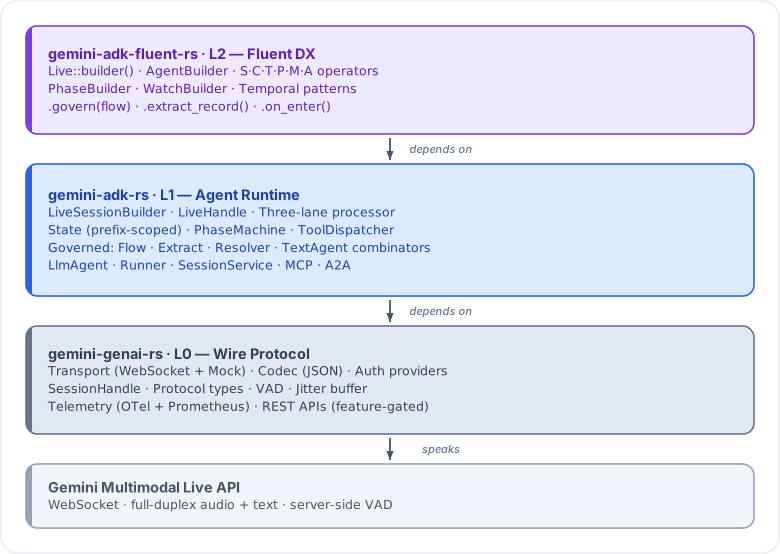
L0: gemini-genai-rs
The wire protocol crate. Maps 1:1 to the Gemini API surface. No application logic, no opinions about how you structure your app.
What it provides:
SessionConfigfor building the setup message (model, voice, tools, VAD)SessionHandlefor sending commands and subscribing to eventsConnectBuilderfor establishing the WebSocket connectionTransport/Codec/AuthProvidertraits for pluggable I/OSessionEventenum (17 variants) for everything the server can sendSessionCommandenum (9 variants) for everything you can sendSessionPhaseFSM with validated transitions- Audio buffers (lock-free SPSC ring buffer, adaptive jitter buffer)
- Client-side VAD (Voice Activity Detection)
L1: gemini-adk-rs
The agent runtime. Adds the event processing loop, typed callbacks, automatic tool dispatch, state management, and the phase machine.
What it provides:
LiveSessionBuilderto wire up config + callbacks + tools in one placeEventCallbackswith typed fast-lane (sync) and control-lane (async) hooksToolDispatcherwithToolFunction,StreamingTool,InputStreamingToolState(concurrent key-value store with prefix scoping and delta tracking)PhaseMachinefor multi-step conversation flowsWatcherRegistryfor state-reactive triggersTranscriptBufferfor accumulating conversation historyTurnExtractor/LlmExtractorfor structured data extractionLiveHandleas the runtime API surfaceSessionSignals+SessionTelemetryfor observabilityTextAgenttrait and combinators for text-based LLM pipelines
L2: gemini-adk-fluent-rs
The fluent developer experience layer. Wraps L1 in a chainable builder API and adds operator-algebra composition (S, C, T, P, M modules).
What it provides:
Live::builder()with method chaining for the entire configuration surface.phase()/.watch()/.computed()sub-builders that flow back naturally.connect_google_ai()/.connect_vertex()for one-line connectionT::simple(),T::google_search()for composable tool registrationS,C,T,P,Moperator modules with|compositionlet_clone!macro for reducingArc::cloneboilerplate in closures- Test utilities and mock helpers
Data Flow
Here is how data moves through the system during a live session:
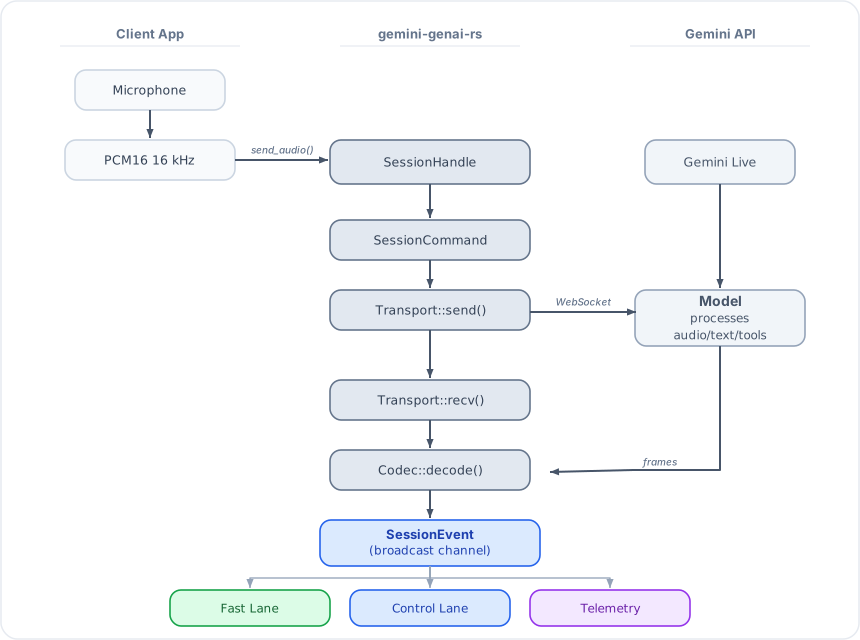
Outbound path: Your app calls send_audio() / send_text() on the
LiveHandle (L1/L2) or SessionHandle (L0). These become SessionCommand
variants sent through an mpsc channel to the transport loop, which encodes
them via the Codec and sends them over the WebSocket.
Inbound path: The transport loop receives WebSocket frames, decodes them
via the Codec into SessionEvent variants, and broadcasts them. The
three-lane processor (L1) routes each event to the appropriate lane.
Three-Lane Processor
Audio arrives at 40-100 events per second. Tool dispatch can take 1-30 seconds. Sharing one processing loop causes audio stutter during tool execution. The solution: split the event stream into three priority lanes.
Fast Lane (sync, <1ms)
Handles latency-sensitive events with sync callbacks that must never block:
| Event | Callback |
|---|---|
AudioData | on_audio(&Bytes) |
TextDelta | on_text(&str) |
TextComplete | on_text_complete(&str) |
InputTranscription | on_input_transcript(&str, bool) |
OutputTranscription | on_output_transcript(&str, bool) |
VoiceActivityStart | on_vad_start() |
VoiceActivityEnd | on_vad_end() |
Interrupted | Sets interrupted flag, stops forwarding audio |
Fast lane callbacks are Fn (not FnMut, not async). If your callback
takes longer than 1ms, audio playback will stutter.
Control Lane (async, can block)
Handles events that require I/O, state mutation, or multi-step processing:
| Event | Callback |
|---|---|
ToolCall | on_tool_call (auto-dispatch or manual) |
ToolCallCancelled | Cancels pending tool tasks |
Interrupted | on_interrupted() |
TurnComplete | Extractors, phase transitions, on_turn_complete() |
GoAway | on_go_away(Duration) |
Connected | on_connected() |
Disconnected | on_disconnected(Option<String>) |
Error | on_error(String) |
The control lane also owns the TranscriptBuffer (no Arc<Mutex<>>) and
runs extractors concurrently via join_all.
Telemetry Lane (async, debounced)
Runs on its own broadcast receiver. Collects SessionSignals (activity
timestamps, timing, token usage) and SessionTelemetry (atomic counters for
audio chunks, tool calls, interruptions, latency tracking, token counts).
Flushes periodically (100ms debounce) with zero overhead on the hot path.
The telemetry lane also handles UsageMetadata events from the Gemini API,
recording prompt/response/cached/thoughts token counts in both SessionSignals
(as session: state keys) and SessionTelemetry (as atomic counters). The
.on_usage() callback fires here for real-time token observation.
The Router
The router is the zero-work dispatcher that sits between the broadcast
channel and the two processing lanes. It pattern-matches each SessionEvent
and sends it to the correct lane(s) via mpsc channels. No session signals,
no telemetry, no allocations on the hot path.
Key Traits
| Trait | Crate | Purpose |
|---|---|---|
Transport | L0 (gemini_genai_rs::transport::ws) | Bidirectional byte transport (WebSocket or mock) |
Codec | L0 (gemini_genai_rs::transport::codec) | Encode commands / decode server messages (JSON default) |
AuthProvider | L0 (gemini_genai_rs::transport::auth) | URL construction + auth headers (Google AI / Vertex AI) |
SessionWriter | L0 (gemini_genai_rs::session) | Send audio/text/video/tools/instructions (trait object safe) |
SessionReader | L0 (gemini_genai_rs::session) | Subscribe to events, observe phase |
ToolFunction | L1 (gemini_adk_rs::tool) | One-shot tool: call(args) -> Result<Value> |
StreamingTool | L1 (gemini_adk_rs::tool) | Background tool yielding multiple results |
InputStreamingTool | L1 (gemini_adk_rs::tool) | Tool receiving live input while running |
TurnExtractor | L1 (gemini_adk_rs::live::extractor) | Extract structured data from transcript window |
TextAgent | L1 (gemini_adk_rs::text) | Text-based LLM agent (generate(), not Live) |
BaseLlm | L1 (gemini_adk_rs::llm) | LLM abstraction for generate() calls |
Choosing Your Layer
Use L0 (gemini-genai-rs) if you need:
- Raw WebSocket access with no abstraction overhead
- Custom event loop logic that does not fit the callback model
- A custom transport (e.g., Unix domain socket, QUIC)
- To build your own agent runtime
- Maximum control over every message sent and received
use gemini_genai_rs::prelude::*;

let config = SessionConfig::from_endpoint(ApiEndpoint::google_ai("YOUR_KEY"))
    .model(GeminiModel::Gemini2_0FlashLive);

let handle = ConnectBuilder::new(config).build().await?;
let mut events = handle.subscribe();

handle.send_text("Hello").await?;
while let Some(event) = recv_event(&mut events).await {
    match event {
        SessionEvent::TextDelta(text) => print!("{text}"),
        SessionEvent::TurnComplete => break,
        _ => {}
    }
}
Use L1 (gemini-adk-rs) if you need:
- Automatic tool dispatch without manual message matching
- State management with prefix scoping (
session:,turn:,app:) - Phase machine for multi-step conversation flows
- Turn extraction (LLM-based or custom) between turns
- Telemetry and session signals
- Full control over callback registration without the fluent syntax
Use L2 (gemini-adk-fluent-rs) if you want:
- The fastest path from zero to working voice agent
- Chainable builder API with sub-builders for phases and watchers
- Operator algebra for composing tools (
T::simple() | T::google_search()) - One-line connection (
connect_vertex(project, location, token)) - Sensible defaults (auto-enables transcription when extractors are used)
use gemini_adk_fluent_rs::prelude::*;

let handle = Live::builder()
    .model(GeminiModel::Gemini2_0FlashLive)
    .voice(Voice::Kore)
    .instruction("You are a helpful assistant")
    .on_audio(|data| { /* play audio */ })
    .on_text(|t| print!("{t}"))
    .connect_google_ai("YOUR_KEY")
    .await?;

handle.send_text("Hello!").await?;
handle.done().await?;
Most developers should start at L2 and drop to L1/L0 only when they hit a
specific limitation. The layers are designed to compose: you can use L0
types (like SessionConfig) with L2 builders via Live::connect(config).
See also
- Migration Guide — side-by-side comparison of the same agent at L0, L1, and L2
- Best Practices — when to stay at each layer and common pitfalls
- Live Sessions — building a full voice session with the L2 builder
Migration Guide: L0 -> L1 -> L2
This guide shows the same voice agent implemented at all three layers, so you can see what each layer adds and decide where to build.
Why Migrate?
Each layer removes a category of boilerplate:
| What you write | L0 (gemini-genai-rs) | L1 (gemini-adk-rs) | L2 (gemini-adk-fluent-rs) |
|---|---|---|---|
| WebSocket connection | Manual | Manual | One line |
Event loop (select!) | Manual | Automatic | Automatic |
| Tool dispatch + response | Manual | Automatic | Automatic |
| State management | None | Built-in | Built-in |
| Phase transitions | Manual | PhaseMachine | .phase() builder |
| Turn extraction | None | TurnExtractor | .extract_turns::<T>() |
| Telemetry | None | SessionTelemetry | Auto-collected |
| Instruction updates | Manual | instruction_template | .instruction_template() |
The tradeoff is control. L0 gives you total control over every message. L2 handles the common patterns automatically but gives you less room to customize the event processing loop itself.
The L2 prelude: kernel + submodule map
gemini_adk_fluent_rs::prelude is a kernel, not an everything-glob. It
re-exports the ~40 types a typical application touches; everything else lives in
a focused, discoverable submodule. Start with the prelude and reach for a
submodule when the compiler says a name isn't found.
In the kernel prelude:
- Builders & composition:
AgentBuilder/Agent, theS·C·T·P·M·A·E·G·Ctxalgebra, operators (>> | * /) and patterns (until,review_loop,fan_out_merge,supervised),Live. - State:
State,StateKey. - Flow (core):
Flow,Guard,FlowMonitor,FlowMode,Verdict,ToolPolicy. - Tools (core):
SimpleTool,TypedTool,ToolFunction,ToolDispatcher,#[tool],Extract,Frame. - LLM (core):
BaseLlm,GeminiLlm. - Errors:
AgentError,AgentResult,ToolError. - Callback contexts:
CallbackContext,ToolContext. - Common Live types:
LiveHandle,EventCallbacks,SteeringMode,ContextDelivery,RepairConfig,SessionPersistence,FsPersistence,MemoryPersistence,TurnExtractor,ExtractionTrigger,LlmExtractor,SoftTurnDetector,TranscriptBuffer,TranscriptTurn. - Text-agent combinators (
LlmTextAgent,SequentialTextAgent, …). - Build-time validation:
check_contracts,ContractViolation,diagnose,infer_data_flow,AgentHarness,DataFlowEdge. - The L0 wire prelude (
GeminiModel,Voice,Content,Part,Role, …).
Moved to submodules (import the named module):
| Symbol(s) | Home |
|---|---|
Full Live control plane: LiveEvent, RuntimeContract, FieldPromotion, DeferredWriter, PendingContext, NeedsFulfillment, RepairAction, SessionSnapshot, LiveSessionBuilder, CallbackMode, ToolExecutionMode, the *Contract types, … | gemini_adk_fluent_rs::live |
| Text-agent runtime internals | gemini_adk_fluent_rs::text |
Toolset, StaticToolset, ConfirmationProvider, Recognizer, RecordExtractor, FrameSpec, SlotSpec, … | gemini_adk_fluent_rs::tools |
SlotEvidence, prefix-scope helpers | gemini_adk_fluent_rs::state |
CompiledFlow, StepAction, Violation, FlowExplanation, run (on-enter), … | gemini_adk_fluent_rs::flow |
AgentTrait (L1 Agent trait), call_agent, AgentMode, provenance, Resolver, agent_session::* | gemini_adk_fluent_rs::agents |
LlmRequest, LlmResponse, GeminiLlmParams, LlmRegistry | gemini_adk_fluent_rs::llm |
Conversation, ConversationSpec, CompiledConversation, FlowStack, … | gemini_adk_fluent_rs::conversation |
A2AServer, RemoteAgent, SkillDeclaration | gemini_adk_fluent_rs::a2a |
Scenario, Sim, SimStep | gemini_adk_fluent_rs::simulation |
Motif, CommitPolicy, Policy | gemini_adk_fluent_rs::{motifs, policy} |
| Raw L0 wire types | gemini_adk_fluent_rs::wire |
The L1
Agenttrait is exposed asAgentTrait(in bothpreludeandagents) to avoid colliding with the L2Agentbuilder alias.
0.8 feature changes (slim defaults)
gemini-genai-rs default features contracted to ["live", "tls-native"]:
- ML VAD is opt-in. The
wavekatVAD model is no longer compiled by default. Enablevad-wavekat(available as a passthrough feature ongemini-adk-rsandgemini-adk-fluent-rstoo). The lightweight energy VAD (vad) is still enabled bygemini-adk-rs. - TLS backend is selectable.
tls-native(default) ortls-rustls; both the WebSocket transport and the optional REST client follow the choice. To go rustls:default-features = false, features = ["live", "tls-rustls"]. - Tracing facade vs subscriber. The
tracingfacade is always compiled (spans/events are no-ops without a subscriber).TelemetryConfig::init's console-logging machinery now sits behind thetracing-subscriberfeature. The oldtracing-supportfeature is a deprecated no-op for one release. - No more
tokio/full. The published crates declare only the tokio features they use; applications control their own tokio feature set.
L0: Wire Protocol
At L0, you work directly with SessionHandle, SessionEvent, and
SessionCommand. You write your own event loop, dispatch tools manually,
and manage all state yourself.
Here is a weather assistant with one tool:
use gemini_genai_rs::prelude::*;
use serde_json::json;

#[tokio::main]
async fn main() -> Result<(), Box<dyn std::error::Error>> {
    // 1. Build session config with tool declaration
    let config = SessionConfig::from_endpoint(
        ApiEndpoint::google_ai(std::env::var("GEMINI_API_KEY")?)
    )
        .model(GeminiModel::Gemini2_0FlashLive)
        .system_instruction("You are a weather assistant. Use get_weather for queries.")
        .add_tool(Tool {
            function_declarations: Some(vec![FunctionDeclaration {
                name: "get_weather".into(),
                description: "Get current weather for a city".into(),
                parameters: Some(json!({
                    "type": "object",
                    "properties": {
                        "city": { "type": "string", "description": "City name" }
                    },
                    "required": ["city"]
                })),
            }]),
            ..Default::default()
        });

    // 2. Connect
    let handle = ConnectBuilder::new(config).build().await?;
    handle.wait_for_phase(SessionPhase::Active).await;

    // 3. Subscribe to events
    let mut events = handle.subscribe();

    // 4. Send a question
    handle.send_text("What's the weather in Tokyo?").await?;

    // 5. Manual event loop
    while let Some(event) = recv_event(&mut events).await {
        match event {
            SessionEvent::TextDelta(text) => {
                print!("{text}");
            }
            SessionEvent::TurnComplete => {
                println!();
            }
            SessionEvent::ToolCall(calls) => {
                // Manual tool dispatch
                let mut responses = Vec::new();
                for call in calls {
                    let result = match call.name.as_str() {
                        "get_weather" => {
                            let city = call.args.get("city")
                                .and_then(|v| v.as_str())
                                .unwrap_or("unknown");
                            json!({ "city": city, "temp_c": 22, "condition": "sunny" })
                        }
                        _ => json!({ "error": "unknown tool" }),
                    };
                    responses.push(FunctionResponse {
                        name: call.name.clone(),
                        id: call.id.clone(),
                        response: result,
                    });
                }
                // Manual response send
                handle.send_tool_response(responses).await?;
            }
            SessionEvent::Disconnected(_) => break,
            _ => {}
        }
    }

    Ok(())
}
Lines of code: ~70 What you manage: Event loop, tool dispatch, tool response serialization, phase waiting, all state.
L1: Agent Runtime
At L1, LiveSessionBuilder handles the event loop, tool dispatch, and
state. You register callbacks and a ToolDispatcher instead of writing
a match over every event variant.
Same weather assistant:
use gemini_adk_rs::{SimpleTool, ToolDispatcher, LiveSessionBuilder};
use gemini_genai_rs::prelude::*;
use serde_json::json;

#[tokio::main]
async fn main() -> Result<(), Box<dyn std::error::Error>> {
    // 1. Create tool dispatcher
    let mut dispatcher = ToolDispatcher::new();
    dispatcher.register(SimpleTool::new(
        "get_weather",
        "Get current weather for a city",
        None, // JSON Schema for parameters (None = no declared schema)
        |args| async move {
            let city = args["city"].as_str().unwrap_or("unknown");
            Ok(json!({ "city": city, "temp_c": 22, "condition": "sunny" }))
        },
    ));

    // 2. Build session config
    let config = SessionConfig::from_endpoint(
        ApiEndpoint::google_ai(std::env::var("GEMINI_API_KEY")?)
    )
        .model(GeminiModel::Gemini2_0FlashLive)
        .system_instruction("You are a weather assistant. Use get_weather for queries.");

    // 3. Build callbacks
    let mut callbacks = gemini_adk_rs::EventCallbacks::default();
    callbacks.on_text = Some(Box::new(|t| print!("{t}")));
    callbacks.on_turn_complete = Some(std::sync::Arc::new(|| {
        Box::pin(async { println!() })
    }));

    // 4. Build and connect
    let handle = LiveSessionBuilder::new(config)
        .dispatcher(dispatcher)
        .callbacks(callbacks)
        .connect()
        .await?;

    // 5. Send a question (tools are auto-dispatched)
    handle.send_text("What's the weather in Tokyo?").await?;
    handle.done().await?;

    Ok(())
}
Lines of code: ~40
What changed: No event loop. No manual tool dispatch. No manual
send_tool_response. The ToolDispatcher handles tool calls automatically:
it matches the function name, deserializes args, calls your function, and
sends the response back to the model.
You also get State (via handle.state()), SessionTelemetry
(via handle.telemetry()), and the full three-lane processor for free.
L2: Fluent DX
At L2, Live::builder() wraps everything in a chainable API. The same
weather assistant:
use gemini_adk_fluent_rs::prelude::*;
use serde_json::json;

#[tokio::main]
async fn main() -> Result<(), Box<dyn std::error::Error>> {
    let handle = Live::builder()
        .model(GeminiModel::Gemini2_0FlashLive)
        .instruction("You are a weather assistant. Use get_weather for queries.")
        .with_tools(
            T::simple("get_weather", "Get current weather for a city", |args| async move {
                let city = args["city"].as_str().unwrap_or("unknown");
                Ok(json!({ "city": city, "temp_c": 22, "condition": "sunny" }))
            })
        )
        .on_text(|t| print!("{t}"))
        .on_turn_complete(|| async { println!() })
        .connect_google_ai(std::env::var("GEMINI_API_KEY")?)
        .await?;

    handle.send_text("What's the weather in Tokyo?").await?;
    handle.done().await?;
    Ok(())
}
Lines of code: ~20
What changed: No SessionConfig construction. No ToolDispatcher
setup. No EventCallbacks struct. The builder infers everything:
.with_tools()creates and configures theToolDispatcher.instruction()sets the system instruction on the underlyingSessionConfig.connect_google_ai()builds the endpoint and connects in one call
L2 with Multiple Tools
Tools compose with the | operator:
let handle = Live::builder()
    .model(GeminiModel::Gemini2_0FlashLive)
    .instruction("You are a helpful assistant with access to tools.")
    .with_tools(
        T::simple("get_weather", "Get weather", |args| async move {
            Ok(json!({ "temp_c": 22 }))
        })
        | T::simple("get_time", "Get current time", |_| async move {
            Ok(json!({ "time": "14:30" }))
        })
        | T::google_search()
    )
    .on_text(|t| print!("{t}"))
    .connect_google_ai(api_key)
    .await?;
Feature Comparison Table
| Feature | L0 | L1 | L2 |
|---|---|---|---|
| WebSocket connection | ConnectBuilder::new(config).build() | LiveSessionBuilder::new(config).connect() | Live::builder().connect_*() |
| Event loop | Manual while let + match | Automatic (three-lane processor) | Automatic |
| Audio callback | Manual match SessionEvent::AudioData | callbacks.on_audio = Some(...) | .on_audio(|data| ...) |
| Tool dispatch | Manual match + response send | ToolDispatcher auto-dispatch | .tools() or .with_tools() |
| Tool declaration | Manual Tool + FunctionDeclaration | Auto from ToolFunction::parameters() | Auto from T::simple() |
| State management | None (DIY) | State with prefixes | State with prefixes |
| Phase machine | None (DIY) | PhaseMachine::new() | .phase("name").instruction().done() |
| Watchers | None (DIY) | WatcherRegistry | .watch("key").became_true().then() |
| Turn extraction | None (DIY) | TurnExtractor trait | .extract_turns::<T>(llm, prompt) |
| Instruction template | handle.update_instruction() | callbacks.instruction_template | .instruction_template(|state| ...) |
| Greeting | handle.send_text() after connect | builder.greeting("...") | .greeting("...") |
| Telemetry | None | SessionTelemetry auto-collected | Auto-collected |
| Session signals | None | SessionSignals auto-collected | Auto-collected |
| Transcription toggle | config.enable_input_transcription() | Same | .transcription(true, true) |
| Computed state | None | ComputedRegistry | .computed("key", &["deps"], |s| ...) |
| Temporal patterns | None | TemporalRegistry | .when_sustained() / .when_rate() |
| Text agent tools | None | TextAgentTool | .agent_tool("name", "desc", agent) |
When to Stay at L0
L0 is the right choice when you need:
Custom transport: You want to route WebSocket frames through a proxy, use a Unix socket, or implement a custom reconnection strategy.
let handle = ConnectBuilder::new(config)
    .transport(MyCustomTransport::new())
    .codec(MyCustomCodec::new())
    .build()
    .await?;
Non-standard event processing: Your application needs to process events in an order or pattern that does not fit the callback model (e.g., batching audio chunks before processing, custom priority queuing).
Embedding in a larger runtime: You are building your own agent framework and want wire-level access without the L1 runtime's task spawning.
Minimal binary size: L0 has fewer dependencies than L1/L2.
When to Stay at L1
L1 is the right choice when you need:
Programmatic callback registration: You build callbacks dynamically based on configuration or plugin systems, and the fluent builder syntax gets in the way.
let mut callbacks = EventCallbacks::default();
if config.enable_logging {
    callbacks.on_text = Some(Box::new(|t| println!("{t}")));
}
if config.enable_audio {
    callbacks.on_audio = Some(Box::new(move |data| {
        audio_tx.send(data.clone()).ok();
    }));
}
Custom PhaseMachine setup: You need to build the phase machine programmatically (e.g., phases loaded from a database at runtime).
Direct registry access: You want to add/configure ComputedRegistry,
WatcherRegistry, or TemporalRegistry objects directly rather than
through sub-builders.
Mixing Layers
The layers are designed to compose. Common patterns:
L0 config + L2 builder: Build a SessionConfig at L0 and pass it to
the L2 builder. Useful when build_session_config() handles credential
detection for you:
let config = build_session_config(Some("gemini-2.0-flash-live"))?
    .voice(Voice::Kore)
    .response_modalities(vec![Modality::Audio])
    .system_instruction("You are a helpful assistant.");

let handle = Live::builder()
    .on_audio(|data| { /* play */ })
    .on_text(|t| print!("{t}"))
    .connect(config)
    .await?;
L1 types in L2 callbacks: The on_tool_call callback receives State
(an L1 type) that you can query and mutate:
let handle = Live::builder()
    .on_tool_call(|calls, state| async move {
        // Promote tool context to state
        state.set("last_tool", calls[0].name.clone());
        None // auto-dispatch
    })
    .connect_google_ai(api_key)
    .await?;
L0 handle from L2: Access the underlying SessionHandle for operations
not exposed on LiveHandle:
let live_handle = Live::builder()
    .connect_google_ai(api_key)
    .await?;

// Access raw L0 handle
let session = live_handle.session();
let events = session.subscribe();
let phase = session.phase();
Migration Checklist
When migrating from L0 to L2:
- Replace
SessionConfig::from_endpoint(...)withLive::builder().model().instruction() - Replace manual
Tooldeclarations with.tools(dispatcher)or.with_tools(T::simple(...)) - Replace the
while let Some(event) = recv_event(...)loop with callbacks - Replace
match SessionEvent::AudioDatawith.on_audio() - Replace
match SessionEvent::TextDeltawith.on_text() - Replace manual
send_tool_response()withToolDispatcherauto-dispatch - Replace
ConnectBuilder::new(config).build()with.connect_google_ai()or.connect_vertex() - Replace manual phase tracking with
.phase("name").instruction().transition().done() - Replace manual state HashMaps with
.extract_turns::<T>()andhandle.state() - Remove the
tokio::select!loop -- the three-lane processor handles it
See also
- Architecture Overview — the three-crate stack explained, with a guide on choosing your layer
- S.C.T.P.M.A Operator Algebra — fluent composition operators available at L2
Best Practices & Common Mistakes
Practical guidance for building with the gemini-rs stack. Organized by category: architecture decisions, performance constraints, common pitfalls, and testing patterns.
Architecture Best Practices
Use the highest-level crate that fits your needs
The three-crate stack is layered for a reason. Reach for the highest level that covers your use case:
L2 (gemini-adk-fluent-rs)  -- Fluent DX, operator algebra, AgentBuilder, Live builder
L1 (gemini-adk-rs)         -- Agent runtime, tools, state, phases, TextAgent
L0 (gemini-genai-rs)       -- Wire protocol, transport, auth, raw WebSocket
For applications, start with L2. Drop to L1 if you need custom processor logic. Drop to L0 only for raw WebSocket access or custom transport implementations.
// Recommended for applications
use gemini_adk_fluent_rs::prelude::*;

// Only if building custom processors
use gemini_adk_rs::*;

// Only for raw wire access
use gemini_genai_rs::prelude::*;
Use ContextInjection steering for multi-phase voice apps
Most multi-phase voice apps share a stable base persona across phases. Use SteeringMode::ContextInjection to set the persona once at connect and deliver phase-specific behavior as lightweight model-role context turns. This avoids the latency spike of system instruction replacement on every phase transition.
// Recommended for most apps
Live::builder()
    .instruction("You are a helpful restaurant reservation assistant.")
    .steering_mode(SteeringMode::ContextInjection)
    .phase("greeting")
        .instruction("Welcome the guest and ask how you can help.")
        .done()
    .phase("booking")
        .instruction("Help find an available time slot.")
        .done()
    .initial_phase("greeting")
Only use InstructionUpdate when phases represent genuinely different agent personas (e.g., switching from a receptionist to a triage nurse). See the Steering Modes guide for the full decision matrix and anti-patterns.
Use deferred context delivery for voice apps
When using ContextInjection, context turns sent during silence (between user speech) can cause audio glitches or confuse the model. Use ContextDelivery::Deferred to queue context and flush it alongside the next user interaction:
// Voice app: context arrives with user audio, not during silence
Live::builder()
    .steering_mode(SteeringMode::ContextInjection)
    .context_delivery(ContextDelivery::Deferred)
    .phase("greeting")
        .instruction("Welcome the guest")
        .done()
    .initial_phase("greeting")
The DeferredWriter wraps the session writer at the LiveHandle level. When handle.send_audio() is called, it drains any pending context first — two back-to-back frames with no gap. For text-only apps, Immediate (the default) is fine since there's no audio pipeline to disrupt.
Keep tool callbacks fast — or use background execution
The model waits for standard tool responses before continuing. A slow tool blocks the entire conversation turn. For tools that need to do expensive work (database queries, external API calls, LLM pipelines), you have two options:
- Set timeouts and cache for tools that must complete before the model continues
- Use background execution for tools where the model can continue speaking while results arrive
// Option 1: fast tool with timeout
let tool = SimpleTool::new("lookup", "Quick lookup", None, |args| async move {
    let result = tokio::time::timeout(
        Duration::from_secs(5),
        db.query(&args["id"]),
    ).await
    .map_err(|_| ToolError::ExecutionFailed("Database timeout".into()))?;
    Ok(json!(result))
});

// Option 2: background execution — model gets an ack immediately
Live::builder()
    .tools(dispatcher)
    .tool_background("search_knowledge_base")  // zero dead-air
Use concurrent callbacks for fire-and-forget work
Control-lane callbacks default to Blocking — the event loop waits for completion. For fire-and-forget work (logging, analytics, broadcasting to a UI), use _concurrent variants to avoid blocking the pipeline:
// Blocking: appropriate when ordering matters
.on_turn_complete(|| async { tx.send(TurnComplete).ok(); })

// Concurrent: fire-and-forget — doesn't block the next event
.on_extracted_concurrent(|name, val| async move {
    broadcast_to_ui(name, val).await;
})
.on_error_concurrent(|e| async move {
    send_to_error_tracker(&e).await;
})
.on_disconnected_concurrent(|reason| async move {
    info!("Disconnected: {reason:?}");
})
Use State::modify() for atomic updates
state.get() followed by state.set() is a race condition under concurrent access. Use modify() for atomic read-modify-write:
// Bad: race condition
let count: u32 = state.get("count").unwrap_or(0);
state.set("count", count + 1);

// Good: atomic read-modify-write
let count = state.modify("count", 0u32, |n| n + 1);
Extraction is out-of-band
Turn extractors run asynchronously after each turn completes. They do not block the model's response. This means:
- Extracted values may not be available immediately after a turn
- Do not rely on extraction results being instant for the next tool call
- Use watchers if you need to react when extracted values change
// Extraction runs asynchronously -- the model may start its next turn
// before extraction completes
handle.extracted::<OrderState>("OrderState"); // may return stale data briefly
Phase transitions are reactive
Phase transitions fire on the next state check after the condition becomes true, not the instant state changes. This is by design -- it prevents mid-turn phase switching that would confuse the model.
// The transition predicate is checked after each turn, not continuously
.phase("greeting")
    .instruction("Welcome the user")
    .transition("main", S::is_true("greeted"))
    .done()
Declare tools at session start
Voice sessions (Live API) do not support adding or removing tool definitions mid-session. All tools must be declared in the SessionConfig before connecting. Only instructions can be updated during the session.
// Tools declared at build time -- cannot change after connect
let handle = Live::builder()
    .tools(dispatcher)  // fixed for the session's lifetime
    .connect_vertex(project, location, token)
    .await?;

// Instructions CAN be updated mid-session
handle.update_instruction("New instruction text").await?;
Use typed tools over simple tools
TypedTool auto-generates JSON Schema from your Rust struct via schemars::JsonSchema. This prevents schema drift and gives you compile-time type safety on arguments:
// Prefer TypedTool -- schema stays in sync with code
#[derive(Deserialize, JsonSchema)]
struct WeatherArgs {
    /// The city to get weather for
    city: String,
    /// Temperature unit (celsius or fahrenheit)
    unit: Option<String>,
}

let tool = TypedTool::new::<WeatherArgs>(
    "get_weather", "Get weather for a city",
    |args: WeatherArgs| async move {
        Ok(json!({"temp": 22, "city": args.city}))
    },
);
Use StateKey<T> for frequently accessed keys
Compile-time typed keys prevent typos and give you type inference:
const TURN_COUNT: StateKey<u32> = StateKey::new("session:turn_count");
const RISK_LEVEL: StateKey<f64> = StateKey::new("derived:risk");

// Type-safe access -- no risk of typos or wrong types
state.set_key(&TURN_COUNT, 5);
let count: Option<u32> = state.get_key(&TURN_COUNT);
Performance Best Practices
Fast lane callbacks must complete in under 1ms
The three-lane processor architecture separates hot-path audio processing (fast lane) from control logic (control lane). Fast lane callbacks are synchronous and must not:
- Allocate heap memory
- Acquire locks or mutexes
- Perform async operations
- Make system calls
// Good: fast lane callback -- just forward to a channel
let (tx, rx) = tokio::sync::mpsc::unbounded_channel();
.on_audio(move |data| { tx.send(data.clone()).ok(); })

// Bad: allocating and locking in the fast lane
.on_audio(move |data| {
    let processed = expensive_processing(data);  // too slow
    mutex.lock().push(processed);                 // blocks
})
Use Arc<dyn SessionWriter> -- do not clone session handles
When you need to share the session writer across tasks, wrap it in Arc:
// Good: share via Arc
let writer: Arc<dyn SessionWriter> = handle.writer();
let writer_clone = writer.clone();
tokio::spawn(async move { writer_clone.send_text("hello").await; });

// Bad: cloning the entire handle
let handle_clone = handle.clone();  // unnecessary overhead
Extractors run concurrently
Multiple turn extractors execute via futures::future::join_all, not sequentially. This means adding more extractors does not linearly increase latency -- they run in parallel.
// These three extractors run concurrently after each turn
Live::builder()
    .extract_turns::<Sentiment>(flash, "Extract emotional state")
    .extract_turns::<OrderInfo>(flash, "Extract order details")
    .extract_turns::<RiskScore>(flash, "Assess compliance risk")
SessionSignals uses AtomicU64
last_activity_ns is tracked with atomic operations (~1ns overhead), not Mutex<Instant>. Telemetry counters use atomic CAS operations. This means telemetry collection has near-zero impact on the hot path.
Common Mistakes
Vertex AI sends Binary WebSocket frames
Vertex AI sends Binary frames, not Text frames. The TungsteniteTransport handles this transparently, but if you are debugging at the WebSocket level, do not expect text frames.
Native audio model only supports AUDIO output
The Gemini2_0FlashLive model supports only Modality::Audio output, not Modality::Text. If you need text responses, use .text_only() on the builder, which sets Modality::Text explicitly:
// Voice output (default for live model)
Live::builder().model(GeminiModel::Gemini2_0FlashLive)
    // response_modalities defaults to [Audio]

// Text-only output
Live::builder().model(GeminiModel::Gemini2_0FlashLive).text_only()
    // response_modalities set to [Text]
Cannot update tool definitions mid-session
This is a Gemini Live API constraint. Tools are declared once at session start. Only instructions can be updated. If you need different tools in different phases, declare all tools up front and use phase-scoped tool filtering:
// Declare ALL tools at build time
Live::builder()
    .tools(all_tools_dispatcher)
    .phase("greeting")
        .tools(vec![])  // no tools in greeting phase
        .done()
    .phase("main")
        .tools(vec!["search".into(), "lookup".into()])  // filter to these
        .done()
The processor rejects tool calls not in the current phase's tools_enabled list.
Wrong Vertex AI endpoint
The global Vertex AI endpoint is wss://aiplatform.googleapis.com/..., NOT wss://global-aiplatform.googleapis.com/.... This is handled automatically by the Platform enum, but matters if you are constructing URLs manually.
API version mismatch
Google AI uses v1beta, Vertex AI uses v1beta1. Again, the Platform enum handles this, but be aware when reading API docs.
State prefix confusion
State keys can have prefixes: session:, derived:, turn:, app:, bg:, user:, temp:. When using state.get("risk"), the derived fallback automatically checks derived:risk if risk is not found. You do not need to manually check both:
// The derived fallback handles this automatically
state.set("derived:risk", 0.85);
assert_eq!(state.get::<f64>("risk"), Some(0.85));

// Use scoped accessors for clarity
state.derived().set("risk", 0.85);  // writes "derived:risk"
state.app().set("mode", "production");  // writes "app:mode"
state.turn().set("transcript", text);   // writes "turn:transcript" (cleared each turn)
Forgetting to declare tools in SessionConfig
Tools must be declared at session start. If you register tools in the ToolDispatcher but do not include their declarations in the session config, the model will not know they exist.
Blocking in on_audio callback
The on_audio callback runs on the fast lane. Blocking it stalls the entire audio pipeline:
// Bad: blocking the audio pipeline
.on_audio(|data| {
    std::thread::sleep(Duration::from_millis(10));  // stalls everything
})

// Good: non-blocking forward
let (tx, _rx) = tokio::sync::mpsc::unbounded_channel();
.on_audio(move |data| { tx.send(data.clone()).ok(); })
Forgetting .done() on phase builders
Phase builder chains must end with .done() to return to the Live builder. Without it, you are still configuring the phase when you think you are configuring the session:
// Wrong: missing .done() -- next call configures the phase, not the session
Live::builder()
    .phase("greeting")
        .instruction("Welcome the user")
        // .done() is missing!
    .phase("main")  // this might not do what you expect
        .instruction("Handle the request")

// Correct
Live::builder()
    .phase("greeting")
        .instruction("Welcome the user")
        .done()  // returns to Live builder
    .phase("main")
        .instruction("Handle the request")
        .done()
Forgetting .initial_phase()
The phase machine requires an explicit initial phase. Without it, no phase is active and phase-scoped instructions will not apply:
Live::builder()
    .phase("greeting").instruction("...").done()
    .phase("main").instruction("...").done()
    .initial_phase("greeting")  // required
Using instruction_template with phases
instruction_template replaces the entire instruction, overwriting phase-specific instructions. For additive composition, use instruction_amendment or phase modifiers:
// Bad: template replaces everything, including phase instruction
.instruction_template(|state| format!("Context: {}", state.get::<String>("ctx").unwrap_or_default()))

// Good: amendment adds to the phase instruction
.instruction_amendment(|state| format!("\nContext: {}", state.get::<String>("ctx").unwrap_or_default()))

// Better: use P:: modifiers on phases
.phase("main")
    .instruction("Handle customer requests")
    .modifiers(vec![
        P::with_state(&["emotional_state"]),
        P::context_fn(|s| format!("Customer: {}", s.get::<String>("name").unwrap_or_default())),
    ])
    .done()
Testing Patterns
Use MockTransport for unit testing
MockTransport lets you test without real WebSocket connections. Inject scripted server responses:
use gemini_genai_rs::transport::MockTransport;

let mock = MockTransport::new(vec![
    // Scripted server messages
    ServerMessage::SetupComplete { ... },
    ServerMessage::ServerContent { ... },
]);

let (handle, _) = ConnectBuilder::new(config)
    .transport(mock)
    .build()
    .await?;
State is cheap to construct
State::new() creates an empty concurrent map. Use it freely in tests:
#[tokio::test]
async fn test_my_agent() {
    let state = State::new();
    state.set("input", "test query");
    state.set("user:name", "Test User");

    let result = my_agent.run(&state).await.unwrap();
    assert!(result.contains("expected output"));

    // Verify state mutations
    assert_eq!(state.get::<bool>("processed"), Some(true));
}
Test text agent pipelines with mock LLMs
Implement BaseLlm to create deterministic test fixtures:
struct MockLlm(String);

#[async_trait]
impl BaseLlm for MockLlm {
    fn model_id(&self) -> &str { "mock" }

    async fn generate(&self, _req: LlmRequest) -> Result<LlmResponse, LlmError> {
        Ok(LlmResponse {
            content: Content {
                role: Some(Role::Model),
                parts: vec![Part::Text { text: self.0.clone() }],
            },
            finish_reason: Some("STOP".into()),
            usage: None,
        })
    }
}

#[tokio::test]
async fn test_pipeline() {
    let llm: Arc<dyn BaseLlm> = Arc::new(MockLlm("mock output".into()));
    let agent = AgentBuilder::new("test")
        .instruction("Analyze this")
        .build(llm);

    let state = State::new();
    state.set("input", "test data");
    let result = agent.run(&state).await.unwrap();
    assert_eq!(result, "mock output");
}
Test composable operators structurally
Verify the operator tree structure without running agents:
#[test]
fn pipeline_structure() {
    let pipeline = AgentBuilder::new("a") >> AgentBuilder::new("b") >> AgentBuilder::new("c");
    match pipeline {
        Composable::Pipeline(p) => assert_eq!(p.steps.len(), 3),
        _ => panic!("expected Pipeline"),
    }
}

#[test]
fn fan_out_structure() {
    let fan = AgentBuilder::new("x") | AgentBuilder::new("y");
    match fan {
        Composable::FanOut(f) => assert_eq!(f.branches.len(), 2),
        _ => panic!("expected FanOut"),
    }
}
Test state transforms in isolation
S:: transforms operate on serde_json::Value and can be tested without any agent infrastructure:
#[test]
fn state_transform_chain() {
    let chain = S::pick(&["name", "age"]) >> S::rename(&[("name", "customer")]);
    let mut state = json!({"name": "Alice", "age": 30, "internal": "x"});
    chain.apply(&mut state);
    assert_eq!(state, json!({"customer": "Alice", "age": 30}));
}
Test context policies in isolation
C:: policies operate on Vec<Content> slices:
#[test]
fn context_window() {
    let history = vec![
        Content::user("a"),
        Content::model("b"),
        Content::user("c"),
    ];
    let result = C::window(2).apply(&history);
    assert_eq!(result.len(), 2);
}
See also
- Architecture Overview — the three-crate stack and which layer to choose
- Live Callbacks — fast-lane vs control-lane callback constraints
- Tools —
TypedTool,SimpleTool, and the#[tool]macro
Voice & Live Sessions
This guide covers everything you need to build voice-enabled agents with the Gemini Multimodal Live API using gemini-genai-rs.
What is a Live Session?
A Live Session is a full-duplex WebSocket connection to the Gemini API that
supports simultaneous audio/video input and audio/text output. Unlike the
standard generateContent REST API, a Live Session:
- Streams audio bidirectionally (you talk while the model talks)
- Uses server-side VAD (Voice Activity Detection) for turn management
- Supports barge-in (interrupt the model mid-sentence)
- Handles function calling inline with speech
- Maintains conversation context server-side
- Runs for up to ~10 minutes per session (with resumption support)
Audio formats:
- Input: PCM16, 16 kHz, mono
- Output: PCM16, 24 kHz, mono
Quick Start
Zero-ceremony with connect_from_env()
The recommended starting point reads platform selection and credentials from standard environment variables — no token-fetching boilerplate required:
use gemini_adk_fluent_rs::prelude::*;

#[tokio::main]
async fn main() -> Result<(), Box<dyn std::error::Error>> {
    let handle = Live::builder()
        .model(GeminiModel::Gemini2_0FlashLive)
        .instruction("You are a helpful voice assistant.")
        .on_text(|t| print!("{t}"))
        .on_turn_complete(|| async { println!() })
        .connect_from_env()
        .await?;

    handle.send_text("What is the capital of France?").await?;
    handle.done().await?;
    Ok(())
}
connect_from_env() checks GOOGLE_GENAI_USE_VERTEXAI to select the platform,
then resolves credentials from standard variables (GEMINI_API_KEY for Google
AI; GOOGLE_CLOUD_PROJECT + GOOGLE_ACCESS_TOKEN for Vertex AI, with an
automatic gcloud auth print-access-token fallback). See
Authentication and Connecting for the full
resolution rules and troubleshooting guide.
Explicit API key
let handle = Live::builder()
    .model(GeminiModel::Gemini2_0FlashLive)
    .instruction("You are a helpful voice assistant.")
    .on_text(|t| print!("{t}"))
    .on_turn_complete(|| async { println!() })
    .connect_google_ai(std::env::var("GEMINI_API_KEY")?)
    .await?;

handle.send_text("What is the capital of France?").await?;
handle.done().await?;
This connects to Gemini, sends a text message, prints the streamed response,
and waits for the session to end. For audio, replace send_text() with
send_audio() and add an on_audio callback.
The Live Builder
Live::builder() returns a chainable builder that configures the entire
session. Here is the full chain with all major options:
let handle = Live::builder()
    // Model and voice
    .model(GeminiModel::Gemini2_5FlashNativeAudio)
    .voice(Voice::Kore)
    .temperature(0.7)
    .instruction("You are a restaurant order assistant.")

    // Tools (auto-dispatched when model calls them)
    .tools(dispatcher)

    // Audio/transcription config
    .transcription(true, true)   // input, output
    .affective_dialog(true)      // emotionally expressive responses

    // Server-side VAD
    .vad(AutomaticActivityDetection::default())

    // Session lifecycle
    .session_resume(true)
    .context_compression(4000, 2000)  // trigger_tokens, target_tokens

    // Greeting (model speaks first)
    .greeting("Greet the customer and ask what they'd like to order.")

    // Fast-lane callbacks (sync, <1ms)
    .on_audio(|data| { /* forward to speaker */ })
    .on_text(|t| print!("{t}"))
    .on_input_transcript(|text, _is_final| { /* display what user said */ })
    .on_output_transcript(|text, _is_final| { /* display what model said */ })
    .on_vad_start(|| { /* user started speaking */ })
    .on_vad_end(|| { /* user stopped speaking */ })

    // Telemetry callback (sync, telemetry lane)
    .on_usage(|usage| {
        if let Some(total) = usage.total_token_count {
            println!("Tokens: {total}");
        }
    })

    // Control-lane callbacks (async)
    .on_tool_call(|calls, state| async move { None })  // None = auto-dispatch
    .on_interrupted(|| async { /* flush playback buffer */ })
    .on_turn_complete(|| async { /* turn finished */ })
    .on_connected(|writer| async move { /* session ready */ })
    .on_disconnected(|reason| async move { /* session ended */ })
    .on_error(|msg| async move { eprintln!("Error: {msg}") })

    // Connect
    .connect_vertex("my-project", "us-central1", access_token)
    .await?;
The builder validates configuration at connect time, not at each method call. All methods are optional except the connect method.
Callbacks
Callbacks are split into two categories based on latency requirements. For the
full callback catalog, argument shapes, is_final transcript semantics,
on_generation_complete vs on_turn_complete, _concurrent variants, and
outbound interceptors, see Live Callbacks.
Fast Lane (Sync, <1 ms)
These fire on the fast lane and must complete in under 1 ms. They receive
references (not owned values) and cannot be async. No allocations, no mutex
locks, no blocking I/O.
// Audio: receives zero-copy Bytes
.on_audio(|data: &Bytes| {
    playback_tx.try_send(data.clone()).ok();
})

// Text: incremental deltas as the model generates
.on_text(|text: &str| { print!("{text}"); })

// Transcription: text version of audio (input or output)
// Second parameter is `is_final` — only the final delivery is suitable for storage
.on_input_transcript(|text: &str, is_final: bool| {
    if is_final { println!("User said: {text}"); }
})

// VAD: voice activity detection events from the server
.on_vad_start(|| { /* user started talking */ })
.on_vad_end(|| { /* user stopped talking */ })
Control Lane (Async)
These fire on the control lane and can perform I/O, state access, or any
async work. They block the control lane while running (other control events
queue behind them). Append _concurrent to any setter to spawn the body as a
detached task instead.
// Interrupted: flush playback on barge-in (forced blocking)
.on_interrupted(|| async {
    playback_buffer.flush().await;
})

// Turn complete: model finished its (possibly truncated) response
.on_turn_complete(|| async {
    println!("--- turn complete ---");
})

// Generation complete: full intended response, before truncation
// Use with .extract_on_generation::<T>() for pre-interruption extraction
.on_generation_complete(|| async {
    println!("--- generation complete (pre-truncation) ---");
})

// Tool calls: return None for auto-dispatch, Some to override
.on_tool_call(|calls: Vec<FunctionCall>, state: State| async move { None })

// Error: non-fatal error (session continues)
.on_error(|msg: String| async move { eprintln!("Error: {msg}") })

// Disconnected (concurrent — fire-and-forget)
.on_disconnected_concurrent(|reason| async move {
    tracing::info!(?reason, "session disconnected");
})
See Live Callbacks for the complete reference including
on_tool_cancelled, on_resumed, on_go_away, before_tool_response,
on_turn_boundary, on_extracted, on_extraction_error, and the full list of
_concurrent variants.
Tool Dispatch
When the model calls a tool, the dispatch logic follows this priority:
- If
on_tool_callis registered and returnsSome(responses)-- use those responses. - If
on_tool_callreturnsNone(or is not registered) and aToolDispatcheris set -- auto-dispatch to the registered tool, send the result back to the model automatically. - If neither -- log a warning and skip.
Register tools with the dispatcher:
use gemini_adk_rs::{SimpleTool, ToolDispatcher};

let mut dispatcher = ToolDispatcher::new();
dispatcher.register(SimpleTool::new(
    "get_weather",
    "Get current weather for a city",
    None, // JSON Schema for parameters (None = no declared schema)
    |args| async move {
        let city = args["city"].as_str().unwrap_or("unknown");
        Ok(serde_json::json!({ "city": city, "temp_c": 22, "condition": "sunny" }))
    },
));

let handle = Live::builder()
    .model(GeminiModel::Gemini2_0FlashLive)
    .instruction("You are a weather assistant. Use get_weather to answer questions.")
    .tools(dispatcher)
    .on_text(|t| print!("{t}"))
    .connect_google_ai(api_key)
    .await?;
Audio Pipeline
The audio pipeline for a typical voice agent:
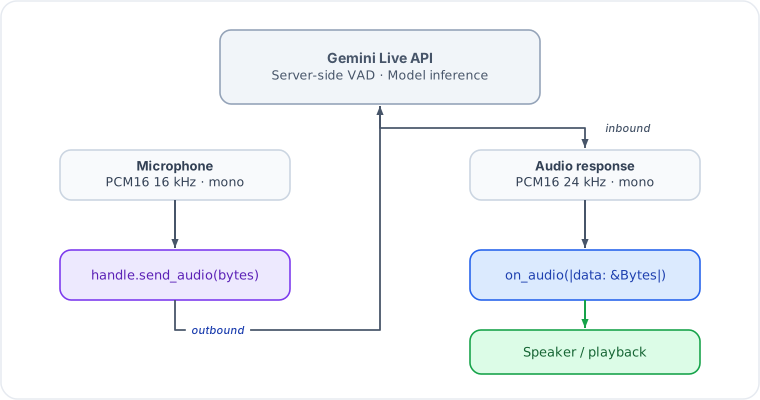
Key points:
- Input format: PCM16, 16 kHz, mono. Send raw bytes, not base64. The SDK handles base64 encoding on the wire.
- Output format: PCM16, 24 kHz, mono. The
on_audiocallback receives decoded bytes ready for playback. - Buffer sizes: Audio arrives in variable-size chunks. Use an
AudioJitterBuffer(from L0) if you need smooth playback. - Barge-in: When the user speaks while the model is responding, the
server sends an
Interruptedevent. The fast lane sets the interrupted flag and stops forwarding audio; the control lane fireson_interrupted.
Greeting
Use .greeting() to make the model speak first without waiting for user
input. The greeting prompt is sent immediately after the WebSocket setup
completes.
let handle = Live::builder()
    .model(GeminiModel::Gemini2_5FlashNativeAudio)
    .voice(Voice::Kore)
    .instruction("You are a receptionist at a dental clinic.")
    .greeting("Greet the caller and ask how you can help them today.")
    .on_audio(|data| { playback_tx.send(data.clone()).ok(); })
    .connect_vertex(project, location, token)
    .await?;
// Model will immediately start speaking a greeting
The greeting text is sent as a user-role client_content message with
turn_complete: true, which triggers the model to generate a response.
Transcription
Enable text transcription of audio streams to get text versions of what the user said and what the model said:
let handle = Live::builder()
    .model(GeminiModel::Gemini2_0FlashLive)
    .transcription(true, true)  // input, output
    .on_input_transcript(|text, is_final| {
        if is_final {
            println!("User: {text}");  // final, suitable for storage
        }
    })
    .on_output_transcript(|text, is_final| {
        if is_final {
            println!("Model: {text}");
        }
    })
    .connect_from_env()
    .await?;
Both transcript callbacks deliver intermediate partial results (is_final = false) while speech is in progress, followed by a single finalized result
(is_final = true) at the turn boundary. Only the is_final = true delivery
should be persisted or processed downstream. See
Live Callbacks — partial/final semantics
for details.
Transcription is required for turn extraction (.extract_turns()) to work.
When you add an extractor, transcription is enabled automatically.
If the user interrupts the model mid-response, on_output_transcript will
not receive is_final = true for the truncated portion. Use
on_generation_complete with .extract_on_generation::<T>(...) to capture
the model's full intended output before truncation.
Session Lifecycle
A session progresses through these phases:
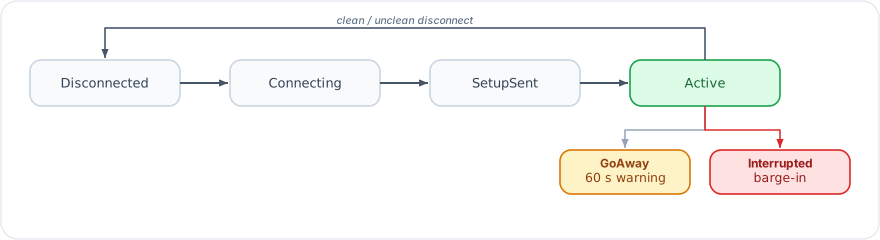
| Phase | Description |
|---|---|
Disconnected | Initial state, or after clean/unclean disconnect |
Connecting | WebSocket handshake in progress |
SetupSent | Setup message sent, waiting for setupComplete |
Active | Session is live, audio/text flowing |
The GoAway event signals the server will disconnect in ~60 seconds.
Save state and prepare to reconnect. With .session_resume(true), you
receive a SessionResumeHandle that can be used to continue the
conversation in a new session.
Interacting with a Running Session
The LiveHandle returned by .connect_*() provides the runtime API:
// Send audio (raw PCM16 16kHz bytes)
handle.send_audio(pcm_bytes).await?;

// Send text
handle.send_text("What's the weather?").await?;

// Send video frame (raw JPEG bytes)
handle.send_video(jpeg_bytes).await?;

// Update system instruction mid-session
handle.update_instruction("Now focus on dessert orders.").await?;

// Read state (populated by extractors)
let order: Option<OrderState> = handle.extracted("OrderState");

// Access telemetry
let snapshot = handle.telemetry().snapshot();

// Get current session phase
let phase = handle.phase();

// Subscribe to raw events (for custom processing)
let mut events = handle.subscribe();

// Latest server-issued resumption handle (see Session Persistence guide)
let resume = handle.resume_handle();

// Graceful disconnect
handle.disconnect().await?;

// Wait for session to end naturally
handle.done().await?;
Consuming Events as a Stream
handle.stream() exposes the semantic LiveEvent flow as a
futures::Stream, so it composes with the full futures/tokio-stream
combinator toolbox (callbacks become sugar):
use futures::StreamExt;
use gemini_adk_fluent_rs::live::LiveEvent;

let mut stream = handle.stream();
while let Some(ev) = stream.next().await {
    match ev {
        LiveEvent::TextDelta(t) => print!("{t}"),
        LiveEvent::TurnComplete => println!(),
        LiveEvent::Disconnected { .. } => break,
        _ => {}
    }
}
Each call to stream() creates an independent subscriber starting from the
current point in the event flow. A subscriber that falls behind the broadcast
buffer skips the missed events and keeps going; the stream ends when the
session's event channel closes.
Vertex AI vs Google AI
The SDK supports both Google AI (API key) and Vertex AI (OAuth2 token) backends. The wire protocol is the same; only the endpoint URL and authentication differ. For the full credential-resolution rules and troubleshooting guide, see Authentication and Connecting.
The easiest way to switch platforms is connect_from_env() with
GOOGLE_GENAI_USE_VERTEXAI=true|false.
Google AI
let handle = Live::builder()
    .model(GeminiModel::Gemini2_0FlashLive)
    .connect_google_ai("YOUR_API_KEY")
.await?;- Endpoint:
wss://generativelanguage.googleapis.com(API versionv1beta) - Auth: API key appended as
?key={api_key}in the WebSocket URL
Vertex AI
// Get token via gcloud: gcloud auth print-access-token
let token = std::env::var("GOOGLE_ACCESS_TOKEN")?;

let handle = Live::builder()
    .model(GeminiModel::Gemini2_0FlashLive)
    .connect_vertex("my-gcp-project", "us-central1", token)
.await?;- Endpoint:
wss://{location}-aiplatform.googleapis.com(API versionv1beta1) - Auth: Bearer token in WebSocket upgrade headers
- Binary WebSocket frames (decoded automatically by the SDK)
Pre-configured SessionConfig
For advanced scenarios (custom auth, VPC-SC private endpoints, etc.), build
the config yourself and pass it to .connect():
use gemini_genai_rs::prelude::*;

let config = SessionConfig::from_endpoint(
    ApiEndpoint::vertex("my-project", "us-central1", token)
)
    .model(GeminiModel::Gemini2_5FlashNativeAudio)
    .voice(Voice::Kore)
    .response_modalities(vec![Modality::Audio])
    .system_instruction("You are a helpful assistant.")
    .enable_input_transcription()
    .enable_output_transcription();

let handle = Live::builder()
    .on_audio(|data| { /* play audio */ })
    .connect(config)
    .await?;
When using .connect(config), the config's endpoint and model are merged
into the builder's settings. Everything else — system instruction, tools,
voice, transcription, callbacks — is taken from the Live builder.
Key Differences
| Feature | Google AI | Vertex AI |
|---|---|---|
| Auth | API key (?key=...) | OAuth2 Bearer token (header) |
| API version | v1beta | v1beta1 |
| Frame format | Text WebSocket frames | Binary WebSocket frames (auto-decoded) |
| Async tool calling | Supported | Not supported (fields auto-stripped) |
| Thinking config | Supported | Not supported (auto-stripped) |
| Billing | Per-token pricing | GCP billing account |
| Region | Global | Regional (e.g., us-central1) |
Live Session Callbacks
Callbacks are how your application reacts to events from the Gemini Live API. The SDK routes events through two lanes with distinct performance contracts, and a third telemetry lane for usage metadata. Understanding the lanes prevents the most common audio-quality and deadlock bugs.
The Two-Lane Model
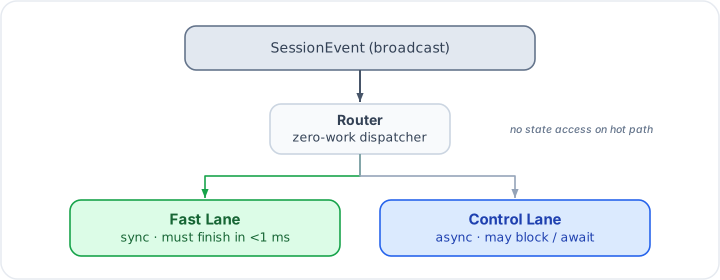
The router receives every incoming WebSocket event and dispatches it to the appropriate lane. It does zero work itself — no state reads, no allocations.
Fast lane callbacks are invoked synchronously on the dispatch thread. They
must complete in under 1 ms. No allocations, no mutex locks, no async work. A
channel try_send is acceptable; a channel send that can block is not.
Control lane callbacks run in a dedicated async task. They may perform I/O,
read shared state, call async functions, or do any other async work. Most
control-lane callbacks have a _concurrent variant that spawns the body as a
detached tokio task instead of blocking the control loop.
Fast-Lane Callbacks (sync, <1 ms)
Register these with the synchronous closure variants on Live::builder().
| Setter | Signature | Description |
|---|---|---|
.on_audio(f) | f: Fn(&Bytes) | Raw PCM audio chunk from the model (PCM16, 24 kHz, mono). Forward to a speaker buffer or channel. |
.on_text(f) | f: Fn(&str) | Incremental text delta as the model generates. Suitable for streaming display. |
.on_text_complete(f) | f: Fn(&str) | Full accumulated text for the current generation, delivered once per turn boundary. |
.on_input_transcript(f) | f: Fn(&str, bool) | ASR transcript of the user's speech. Second argument is is_final. |
.on_output_transcript(f) | f: Fn(&str, bool) | Transcript of the model's audio output. Second argument is is_final. |
.on_thought(f) | f: Fn(&str) | Thought summary chunk. Requires .include_thoughts(). Google AI only. |
.on_vad_start(f) | f: Fn() | Server-side VAD detected voice activity start. |
.on_vad_end(f) | f: Fn() | Server-side VAD detected voice activity end. |
.on_phase(f) | f: Fn(SessionPhase) | Session lifecycle phase changed (connecting, active, disconnecting, etc.). Use for lightweight UI state updates. |
.on_usage(f) | f: Fn(&UsageMetadata) | Token usage delivered after each generation. Fires on the telemetry lane (not the audio hot path), but shares the sync-only constraint. |
Partial and Final Transcript Semantics
Both on_input_transcript and on_output_transcript implement a streaming
ASR pattern:
- While speech is in progress, callbacks fire repeatedly with
is_final = false. Each delivery is the server's current best guess; earlier partial results may be revised. - At the turn boundary, a single callback fires with
is_final = truecarrying the complete, finalized transcript for the turn.
Only the is_final = true delivery is suitable for storage, downstream
processing, or display in a permanent transcript. Use is_final = false
deliveries for a live "typing" indicator or real-time captions.
.on_input_transcript(|text, is_final| {
    if is_final {
        println!("User said: {text}");  // commit to transcript
    } else {
        // update live caption display
    }
})
.on_output_transcript(|text, is_final| {
    if is_final {
        println!("Model said: {text}");
    }
})
The <1 ms Rule in Practice
// OK: try_send never blocks
.on_audio(|data| {
    playback_tx.try_send(data.clone()).ok();
})

// OK: atomic store
.on_vad_start(|| {
    is_speaking.store(true, Ordering::Relaxed);
})

// BAD: blocking send can stall the audio pipeline
.on_audio(|data| {
    blocking_channel.send(data.clone()).unwrap(); // DO NOT DO THIS
})

// BAD: async work requires spawning, not direct await
.on_text(|text| {
    // Cannot .await here — the closure is sync
    database.insert(text).await;  // compile error anyway
})
Fast-lane delivery policy (backpressure)
Internally the router forwards fast-lane events over a bounded channel. By default delivery is lossless — if a downstream consumer falls behind, the router awaits, which is the safe default but can stall routing under sustained back-pressure. For voice apps where a dropped frame is better than a stalled pipeline, opt into a lossy policy per event class:
use gemini_adk_rs::live::{Delivery, DeliveryConfig};

Live::builder()
    // Convenience setters for the common cases:
    .lossy_audio()          // drop newest audio frame instead of stalling
    .lossy_transcript()
    // …or configure every class explicitly:
    .delivery(
        DeliveryConfig::default()
            .audio(Delivery::LossyDropNewest)
            .transcript(Delivery::LossyDropNewest),
    )
Delivery::Lossless (the default for every class) is byte-for-byte the historical
behavior. Delivery::LossyDropNewest uses a non-blocking try_send and drops the
newest frame when the channel is full, bumping an internal dropped-frame counter
rather than blocking the router. Control-lane events (tool calls, turn/generation
completion, etc.) are always lossless. Per-class classes are audio, text,
transcript, thought, vad, and phase.
Control-Lane Callbacks (async, may block)
These are registered with async-closure variants. The control lane awaits each blocking callback in sequence; concurrent variants are spawned as detached tasks.
Lifecycle Callbacks
| Setter | Signature | Description |
|---|---|---|
.on_connected(f) | f: Fn(Arc<dyn SessionWriter>) -> impl Future | Fires when the WebSocket setup completes. The SessionWriter can be cloned and stored for sending messages from outside callbacks. |
.on_disconnected(f) | f: Fn(Option<String>) -> impl Future | Fires on disconnect. Some(msg) indicates an error close; None is a clean close. |
.on_go_away(f) | f: Fn(Duration) -> impl Future | Server sent a GoAway signal with a time-to-disconnect hint. Save state and prepare for reconnect. |
.on_resumed(f) | f: Fn() -> impl Future | Fires after a session resumes from a persisted snapshot. Use to re-subscribe to external streams or reset UI state. Requires .persistence(...) on the builder. |
.on_error(f) | f: Fn(String) -> impl Future | Non-fatal error from the server or processor. The session continues. |
.on_interrupted(f) | f: Fn() -> impl Future | Model output was interrupted by barge-in. Flush your playback buffer here. Forced blocking — no _concurrent variant. |
Tool Callbacks
| Setter | Signature | Description |
|---|---|---|
.on_tool_call(f) | f: Fn(Vec<FunctionCall>, State) -> impl Future<Output = Option<Vec<FunctionResponse>>> | Model requested tool execution. Return None to use auto-dispatch (ToolDispatcher); return Some(responses) to override. Receives the shared session State. Forced blocking — no _concurrent variant (return value is the tool response). |
.on_tool_cancelled(f) | f: Fn(Vec<String>) -> impl Future | Server cancelled pending tool calls. Argument is the list of cancelled call IDs. Use to clean up in-flight async work. |
Turn and Generation Callbacks
| Setter | Signature | Description |
|---|---|---|
.on_turn_complete(f) | f: Fn() -> impl Future | Turn boundary reached — the model has finished its (possibly truncated) response for this turn. |
.on_generation_complete(f) | f: Fn() -> impl Future | Model finished its full intended response before any interruption truncation. |
on_generation_complete vs on_turn_complete
These two callbacks mark different points in the generation lifecycle:
-
on_generation_completefires on the wireGenerationCompleteevent, which arrives before interruption truncation is applied. If the user interrupts mid-response,on_generation_completestill delivers a notification about the complete intended output. Pair this with.extract_on_generation::<T>(llm, "...")to run a structured extractor against the model's full text before truncation. -
on_turn_completefires at the turn boundary after any truncation. Use this for turn-level bookkeeping: transcript commits, phase evaluation, extractor runs triggered by.extract_turns(), and downstream signals.
Live::builder()
    // Capture full intent even when user interrupts
    .extract_on_generation::<FullIntent>(llm, "Extract model's intended action")
    .on_generation_complete(|| async {
        println!("Generation complete (pre-truncation)");
    })
    // Normal turn-level work
    .on_turn_complete(|| async {
        println!("Turn complete (post-truncation)");
    })
Extraction Callbacks
| Setter | Signature | Description |
|---|---|---|
.on_extracted(f) | f: Fn(String, serde_json::Value) -> impl Future | An out-of-band extractor produced a result. First argument is the schema type name; second is the extracted JSON value. |
.on_extraction_error(f) | f: Fn(String, String) -> impl Future | An extractor failed. First argument is the schema type name; second is the error message. By default, extraction failures are logged via tracing::warn!; register this callback for custom handling. |
Outbound Interceptors
These are not event callbacks but pipeline hooks that transform data on its way
out to Gemini. They are always blocking (no _concurrent variant).
before_tool_response
Intercept tool responses before they are sent back to the model. Use this to augment responses with conversation context, filter sensitive fields, or normalize formats.
.before_tool_response(|responses, state| async move {
    let customer: Option<String> = state.get("customer_name");
    responses.into_iter().map(|mut r| {
        if let Some(name) = &customer {
            r.response["customer"] = serde_json::json!(name);
        }
        r
    }).collect()
})
on_turn_boundary
Called at turn boundaries after extractors run but before on_turn_complete.
Receives the shared State and a SessionWriter for injecting content into
the conversation. Use for context stuffing, K/V injection, or condensed state
summaries.
.on_turn_boundary(|state, writer| async move {
    let summary = state.get::<String>("session_summary").unwrap_or_default();
    if !summary.is_empty() {
        writer.send_client_content(
            Content::user().text(format!("[Background context: {summary}]")),
            false,
        ).await.ok();
    }
})
Instruction Interceptors
These sync callbacks allow state-reactive instruction updates without requiring an async round-trip:
instruction_template(onLive::builder()via the phases module): called after extractors on eachTurnComplete; returnsSome(instruction)to fully replace the current system instruction, orNoneto leave it unchanged.instruction_amendment: additive alternative — returnsSome(text)to append to the phase instruction. Unlikeinstruction_template, you never need to repeat the base instruction text.
Both are sync closures (Fn(&State) -> Option<String>).
Callback Execution Modes
Control-lane callbacks default to Blocking — the event loop awaits each
callback before processing the next event. Use _concurrent variants for
fire-and-forget work.
// Blocking (default) — ordering guarantee: turn_complete fires after
// all in-turn processing completes
.on_turn_complete(|| async {
    metrics_tx.send(TurnComplete).await.ok();
})

// Concurrent — detached task, event loop continues immediately
.on_extracted_concurrent(|name, value| async move {
    db.upsert_extraction(&name, value).await.ok();
})

.on_error_concurrent(|msg| async move {
    alerting::send_slack(&msg).await;
})

.on_disconnected_concurrent(|reason| async move {
    tracing::info!(?reason, "session disconnected");
})
Forced-Blocking Callbacks
Some callbacks cannot be made concurrent because the event loop depends on their return value or side effects:
| Callback | Reason |
|---|---|
on_interrupted | Must clear the interrupted state before audio resumes |
on_tool_call | Returns the tool responses to the model |
before_tool_response | Transforms the response pipeline |
on_turn_boundary | Content injection must complete before on_turn_complete |
Middleware Tool Hooks
For tool-level audit logging or retry logic, register middleware via
Live::middleware(layer). The Middleware trait provides
before_tool / after_tool / on_tool_error hooks in addition to
agent-level before_agent / after_agent. See the
Middleware chapter for details.
Worked Example
A representative session wiring a cross-section of callbacks:
use gemini_adk_fluent_rs::prelude::*;
use std::sync::atomic::{AtomicBool, Ordering};
use std::sync::Arc;

let is_speaking = Arc::new(AtomicBool::new(false));
let is_speaking2 = is_speaking.clone();

let handle = Live::builder()
    .model(GeminiModel::Gemini2_0FlashLive)
    .voice(Voice::Kore)
    .instruction("You are a customer service agent.")
    .transcription(true, true)
    .greeting("Welcome! How can I help you today?")

    // Fast lane: audio forwarded via lock-free channel
    .on_audio(move |data| {
        playback_tx.try_send(data.clone()).ok();
    })

    // Fast lane: partial/final transcripts
    .on_input_transcript(|text, is_final| {
        if is_final {
            println!("User: {text}");
        }
    })
    .on_output_transcript(|text, is_final| {
        if is_final {
            println!("Agent: {text}");
        }
    })

    // Fast lane: VAD signals for UI
    .on_vad_start(move || { is_speaking2.store(true, Ordering::Relaxed); })
    .on_vad_end(move || { is_speaking.store(false, Ordering::Relaxed); })

    // Fast lane: token usage
    .on_usage(|usage| {
        if let Some(total) = usage.total_token_count {
            println!("Total tokens used: {total}");
        }
    })

    // Control lane: flush playback on barge-in (forced blocking)
    .on_interrupted(|| async move {
        playback.flush().await;
    })

    // Control lane: tool dispatch — None means auto-dispatch via ToolDispatcher
    .on_tool_call(|calls, _state| async move { None })

    // Control lane: clean up cancelled async tool work
    .on_tool_cancelled(|ids| async move {
        for id in ids {
            tracing::warn!("Tool call {id} was cancelled");
        }
    })

    // Control lane: turn-level bookkeeping (blocking)
    .on_turn_complete(|| async {
        tracing::debug!("turn complete");
    })

    // Control lane: capture full intent before truncation
    .on_generation_complete(|| async {
        tracing::debug!("generation complete (pre-truncation)");
    })

    // Control lane: log extractions concurrently (fire-and-forget)
    .on_extracted_concurrent(|name, value| async move {
        tracing::info!(%name, %value, "extraction result");
    })

    // Control lane: log disconnects concurrently
    .on_disconnected_concurrent(|reason| async move {
        tracing::info!(?reason, "session disconnected");
    })

    .connect_from_env()
    .await?;
Related Chapters
- Authentication and Connecting — credential resolution and connection methods
- Live Sessions — full session configuration and the
runtime
LiveHandleAPI - Extraction Pipeline — structured turn-by-turn extraction
with
on_extracted - Middleware — tool-level hooks via
Live::middleware()
Phase System
The phase system models conversations as a state machine. Each phase carries its own instruction, tool filter, and transition rules. The SDK evaluates transition guards after every state mutation and automatically switches phases when conditions are met -- updating the model's instruction, running lifecycle callbacks, and filtering tools, all without manual wiring.
What Are Phases?
A phase is a named conversation stage. A debt collection call might have:
disclosure -> verify_identity -> inform_debt -> negotiate -> close.
A support call might have: greet -> identify -> investigate -> resolve -> close.
Each phase defines:
- Instruction -- what the model should do in this stage
- Transitions -- guard conditions that trigger moves to other phases
- Tools -- which tools the model can call (optional filter)
- Lifecycle callbacks --
on_enter/on_exithooks
Defining Phases
Use the fluent Live::builder() API. Each .phase() call starts a
PhaseBuilder that returns to the main builder via .done():
use gemini_adk_fluent_rs::prelude::*;

let handle = Live::builder()
    .model(GeminiModel::Gemini2_0FlashLive)
    .phase("greeting")
        .instruction("Welcome the user warmly and ask how you can help.")
        .transition("main", |s| s.get::<bool>("greeted").unwrap_or(false))
        .done()
    .phase("main")
        .instruction("Handle the user's request.")
        .terminal()
        .done()
    .initial_phase("greeting")
    .connect_vertex(project, location, token)
    .await?;
Key points:
.initial_phase("greeting")declares which phase the machine starts in..terminal()marks a phase with no outbound transitions.- The machine is validated at connect time -- missing initial phase or dangling transition targets produce clear errors.
Phase Transitions
Transitions are guard-based: a closure that receives &State and returns bool.
When the guard returns true, the machine transitions to the target phase.
.phase("disclosure")
    .instruction(DISCLOSURE_INSTRUCTION)
    // When disclosure_given becomes true, move to verify_identity
    .transition("verify_identity", |s| {
        s.get::<bool>("disclosure_given").unwrap_or(false)
    })
    // Emergency exit: cease-and-desist goes straight to close
    .transition("close", |s| {
        s.get::<bool>("cease_desist_requested").unwrap_or(false)
    })
    .done()
Transitions are evaluated in order -- the first guard that returns true wins.
This means you should order transitions from most specific to most general.
Transition Descriptions
Use transition_with() to add a human-readable description to each transition.
These descriptions are used by the phase navigation context (see below) to give
the model awareness of where it can go and why:
.phase("identify_caller")
    .instruction("Get the caller's full name and organization.")
    .transition_with("determine_purpose", |s| {
        s.get::<String>("caller_name").is_some()
    }, "when caller provides their name")
    .transition_with("take_message", |s| {
        let tc: u32 = s.session().get("turn_count").unwrap_or(0);
        tc >= 12
    }, "after 12 turns if caller refuses to identify")
    .done()
The plain .transition() method still works and sets description: None.
S:: Predicates
The S module provides ergonomic predicate factories that eliminate boilerplate:
use gemini_adk_fluent_rs::prelude::S;

.transition("verify_identity", S::is_true("disclosure_given"))
.transition("negotiate", S::is_true("debt_acknowledged"))
.transition("arrange_payment", S::one_of("negotiation_intent", &["full_pay", "partial_pay"]))
.transition("tech_support", S::eq("issue_type", "technical"))
Available predicates:
S::is_true(key)-- key holdstrueS::eq(key, value)-- key equals the given stringS::one_of(key, &[values])-- key matches any of the given strings
Guards
A phase-level guard prevents the phase from being entered unless a condition is met. This is different from transition guards -- a transition guard decides when to leave a phase, while a phase guard decides whether the phase can be entered.
.phase("verify_identity")
    .instruction(VERIFY_IDENTITY_INSTRUCTION)
    // This phase can only be entered after disclosure is acknowledged
    .guard(S::is_true("disclosure_given"))
    .transition("inform_debt", S::is_true("identity_verified"))
    .done()
If a transition guard fires but the target phase's guard returns false, the
machine skips that transition and evaluates the next one in order.
Dynamic Instructions
For instructions that depend on runtime state, use dynamic_instruction:
.phase("discuss")
    .dynamic_instruction(|s| {
        let topic: String = s.get("topic").unwrap_or_default();
        let mood: String = s.get("derived:sentiment").unwrap_or_default();
        format!("Discuss {topic}. The user's mood is {mood}. Adjust tone accordingly.")
    })
    .done()
The closure is evaluated at transition time, so the instruction always reflects current state.
Instruction Modifiers
Modifiers append context to a phase's instruction without replacing it. Three types are available:
StateAppend -- Inject Key/Value Context
.phase("negotiate")
    .instruction("Help the customer resolve their debt.")
    // Appends: [Context: emotional_state=frustrated, willingness_to_pay=0.3]
    .with_state(&["emotional_state", "willingness_to_pay", "derived:call_risk_level"])
    .done()
Conditional -- Append Text When True
fn risk_is_elevated(s: &State) -> bool {
    let risk: String = s.get("derived:call_risk_level").unwrap_or_default();
    risk == "high" || risk == "critical"
}

.phase("negotiate")
    .instruction("Help the customer resolve their debt.")
    .when(risk_is_elevated, "IMPORTANT: Use extra empathy. Never threaten.")
    .done()
CustomAppend -- Arbitrary Formatting
.phase("investigate")
    .instruction("Investigate the issue.")
    .with_context(|state| {
        let items: Vec<String> = state.get("order_items").unwrap_or_default();
        if items.is_empty() {
            String::new()
        } else {
            format!("Current order: {}", items.join(", "))
        }
    })
    .done()
Tool Filtering
Each phase can restrict which tools the model is allowed to call. Tool calls for tools not in the filter are rejected by the processor:
.phase("verify_identity")
    .instruction("Verify the caller's identity.")
    .tools(vec!["verify_identity".into(), "log_compliance_event".into()])
    .done()
.phase("negotiate")
    .instruction("Negotiate a payment plan.")
    .tools(vec!["calculate_payment_plan".into(), "log_compliance_event".into()])
    .done()
Omitting .tools() means all registered tools are available in that phase.
Phase Needs
Declare what state keys a phase requires. The SDK uses these to generate the navigation context (see below), showing the model what information is still missing. This helps guide the conversation without over-constraining the LLM:
.phase("identify_caller")
    .instruction("Get the caller's full name and organization.")
    .needs(&["caller_name", "caller_org"])
    .transition_with("determine_purpose", |s| {
        s.get::<String>("caller_name").is_some()
    }, "when caller provides their name")
    .done()
At runtime, needs are filtered against the current state -- only keys not
yet present are shown as "still needed" in the navigation context.
Phase Navigation Context
The .navigation() modifier (available on both PhaseBuilder and
phase_defaults) injects a structured description of the phase graph into the
model's instruction. This gives the model geolocation awareness:
[Navigation]
Current phase: identify_caller -- Get the caller's full name and organization.
Previous: greeting (turn 2)
Still needed: caller_org
Possible next:
  -> determine_purpose: when caller provides their name
  -> take_message: after 12 turns if caller refuses to identify
This is auto-generated from .needs() keys filtered by state, .transition_with()
descriptions, and phase history. Apply it via phase_defaults so all phases
benefit:
Live::builder()
    .phase_defaults(|d| d
        .with_state(&["caller_name", "caller_org"])
        .navigation()  // inject navigation context into every phase
    )
The navigation context is stored in session:navigation_context and regenerated
on every turn and phase transition.
Phase Lifecycle Callbacks
on_enter and on_exit are async callbacks that run during transitions:
.phase("verify_identity")
    .instruction(VERIFY_IDENTITY_INSTRUCTION)
    .on_enter(|state, writer| async move {
        // Log the transition, initialize phase-specific state
        state.set("verification_attempts", 0u32);
        tracing::info!("Entered verify_identity phase");
    })
    .on_exit(|state, writer| async move {
        // Clean up, log compliance event
        tracing::info!("Exiting verify_identity phase");
    })
    .done()
The callbacks receive State and Arc<dyn SessionWriter>, so you can both
mutate state and send messages to the model.
enter_prompt -- Model Speaks on Entry
Use enter_prompt to inject a model-role bridge message and prompt the model to
respond immediately when entering a phase. This prevents the "cold start" problem
where the model says "how can I help?" after a phase transition:
.phase("verify_identity")
    .instruction(VERIFY_IDENTITY_INSTRUCTION)
    // Model will say this, then continue with the phase instruction
    .enter_prompt("The caller confirmed the disclosure. I'll now verify their identity.")
    .done()
For state-dependent prompts, use enter_prompt_fn:
.phase("close")
    .instruction(CLOSE_INSTRUCTION)
    .enter_prompt_fn(|state, _tw| {
        if state.get::<bool>("cease_desist_requested").unwrap_or(false) {
            "Cease-and-desist requested. Closing call respectfully.".into()
        } else {
            "Wrapping up the call.".into()
        }
    })
    .done()
Phase Defaults
Settings shared across all phases are declared with phase_defaults. These are
merged into each phase -- phase-specific modifiers extend (not replace) the
defaults:
const DEBT_STATE_KEYS: &[&str] = &[
    "emotional_state",
    "willingness_to_pay",
    "derived:call_risk_level",
    "identity_verified",
    "disclosure_given",
];

Live::builder()
    .phase_defaults(|d| d
        .with_state(DEBT_STATE_KEYS)
        .when(risk_is_elevated, "IMPORTANT: Use extra empathy.")
        .prompt_on_enter(true)
    )
    .phase("disclosure")
        .instruction(DISCLOSURE_INSTRUCTION)
        // Inherits with_state, when(), and prompt_on_enter from defaults
        .done()
    .phase("negotiate")
        .instruction(NEGOTIATE_INSTRUCTION)
        // Phase-specific modifier is appended after defaults
        .with_state(&["negotiation_intent"])
        .done()
Multi-Phase Example
A 3-phase conversation (greeting -> service -> close) combining the features covered above:
Live::builder()
    .model(GeminiModel::Gemini2_0FlashLive)
    .greeting("Greet the user warmly.")
    .phase_defaults(|d| d
        .with_state(&["customer_name", "derived:sentiment"])
        .prompt_on_enter(true)
    )
    .phase("greeting")
        .instruction("Welcome the customer. Ask for their name.")
        .transition("service", |s| s.contains("customer_name"))
        .done()
    .phase("service")
        .instruction("Help the customer with their request.")
        .guard(|s| s.contains("customer_name"))
        .tools(vec!["lookup_account".into(), "process_refund".into()])
        .transition("close", S::is_true("resolved"))
        .when(|s| s.get::<String>("derived:sentiment").unwrap_or_default() == "negative",
              "The customer seems upset. Use extra empathy.")
        .enter_prompt("I have the customer's name. I'll help them now.")
        .done()
    .phase("close")
        .instruction("Thank the customer and wrap up.")
        .terminal()
        .done()
    .initial_phase("greeting")
    .connect_vertex(project, location, token)
    .await?;
For a full 7-phase example with compliance gates, computed state, watchers, and
temporal patterns, see apps/gemini-adk-web-rs/src/apps/debt_collection.rs.
How Transitions Are Evaluated
The processor evaluates transitions after every state mutation cycle (extractors run, computed variables update, watchers fire). The evaluation is pure -- it checks guards without side effects:
- Get the current phase's transition list.
- For each transition (in order), check the guard.
- If the guard returns
true, check the target phase's guard (if any). - If both pass, execute the transition:
on_exit-> update current ->on_enter. - The new phase's instruction (with modifiers applied) is sent to the model.
Terminal phases skip transition evaluation entirely.
For the full turn-complete pipeline, timing diagrams, background agent dispatch, and common pitfalls, see Phase Transitions Deep Dive.
See also
- Phase Transitions Deep Dive — timing diagrams, background agents, and debugging
- Steering Modes — how phase instructions reach the model (
ContextInjectionvsInstructionUpdate) - State Watchers — reactive triggers that complement phase transition guards
- cookbook 24 — customer support
Phase Transitions Deep Dive
How phases, state, extraction, and background agents interact in a live voice session. This guide covers timing, data flow, and common pitfalls with visual diagrams.
The Turn-Complete Pipeline
Every model response ends with a TurnComplete event from the Gemini Live
API. This triggers a pipeline on the control lane:
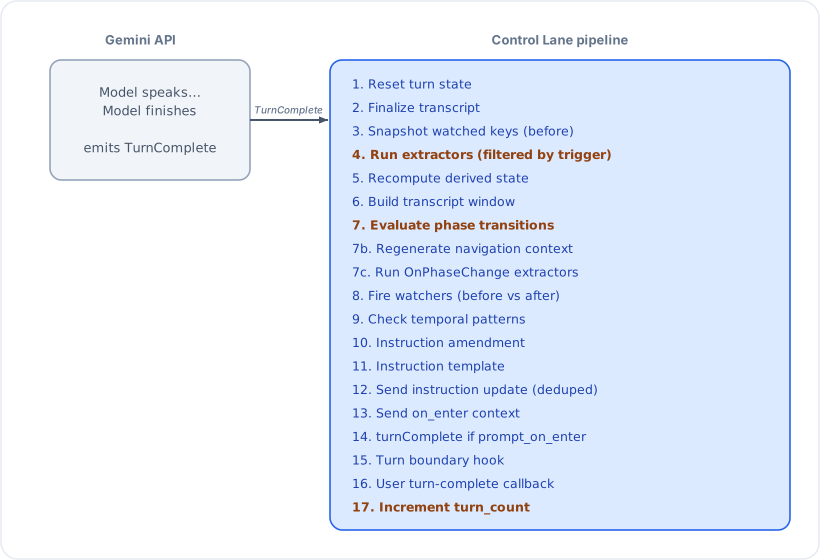
Key insight: extractors (step 4) run BEFORE transitions (step 7). This means freshly extracted state is available for transition guards. Turn count is incremented LAST (step 17), so guards see the current turn number, not the next one.
Extraction triggers: Step 4 filters extractors by their trigger mode.
EveryTurn extractors always run. Interval(n) extractors only run every
N turns. AfterToolCall and OnPhaseChange extractors are skipped here
and fire at their respective points (after tool dispatch and step 7c).
Navigation context: Step 7b always regenerates the navigation context
(stored in session:navigation_context), even if no transition fired. This
keeps the model's awareness of its position in the phase graph up to date.
Phases using .navigation() will include this context in the instruction.
State Flow: Conversation to Transition
Data flows through the system in one direction per turn cycle:
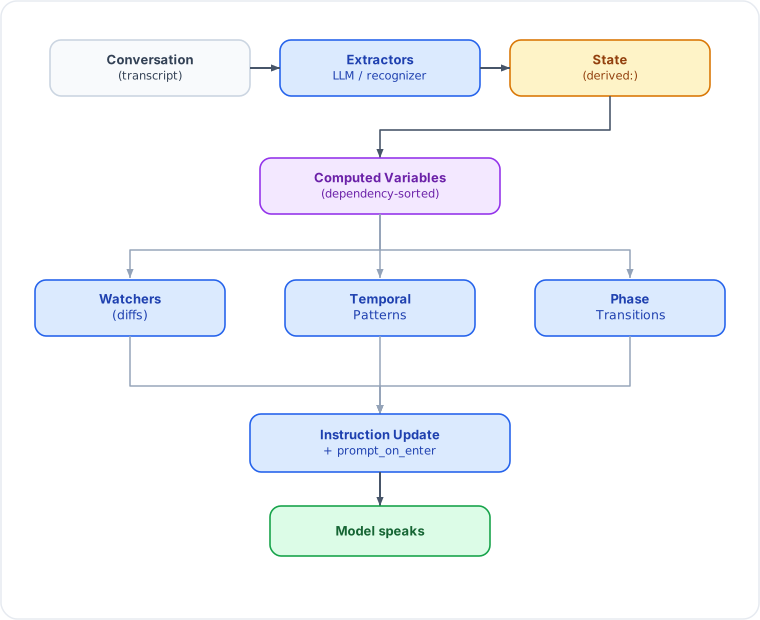
When Do Transitions Fire?
Transitions fire at step 7 of the turn-complete pipeline. By this point, all extractors have run and computed variables have been recalculated.
Timeline of a Typical Turn
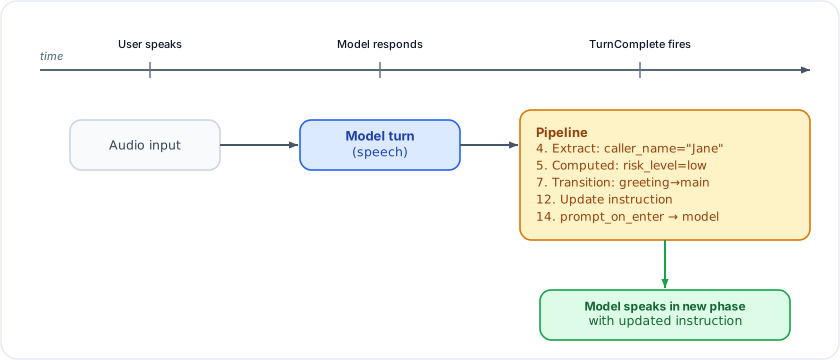
Transition Guards: What Works, What Doesn't
Good: State-dependent guards
These wait for real data from the conversation:
// Wait for extraction to populate caller_name
.transition("identify", |s| s.get::<String>("caller_name").is_some())

// Wait for a boolean flag from tool execution
.transition("negotiate", S::is_true("debt_acknowledged"))

// Wait for one of several values
.transition("payment", S::one_of("intent", &["full_pay", "partial_pay"]))
Bad: Unconditional guards
// BUG: fires on the FIRST turn_complete — before user speaks!
.transition("next_phase", |_s| true)
Why this breaks:
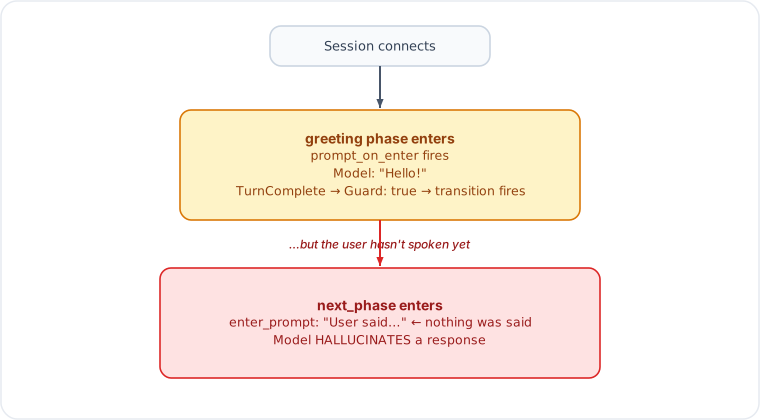
Fix: Turn-count guards for greeting phases
.phase("greeting")
    .instruction("Welcome the caller.")
    .transition("identify", |s| {
        // Turn 0 = prompt_on_enter (no user input yet)
        // Turn 1 = greeting model response
        // Turn 2+ = user has spoken at least once
        let tc: u32 = s.session().get("turn_count").unwrap_or(0);
        tc >= 2
    })
    .done()
Better: Combine turn count with state check
.transition("identify", |s| {
    let tc: u32 = s.session().get("turn_count").unwrap_or(0);
    let has_name = s.get::<String>("caller_name").is_some();
    tc >= 2 || has_name  // user spoke, or extraction already got the name
})
enter_prompt: How It Works
enter_prompt injects a Content::model() message when entering a phase.
This appears in the conversation as the model's own previous speech, giving
it continuity across the phase boundary.
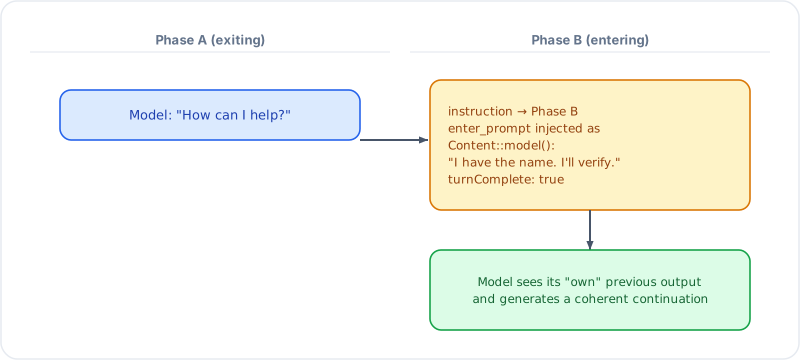
Pitfall: False context in enter_prompt
// BAD: claims something that hasn't happened
.enter_prompt("The caller has responded with their name and reason.")

// GOOD: states the agent's intent (doesn't assert facts about the user)
.enter_prompt("I'll now verify the caller's identity.")

// BEST: state-aware prompt that reflects actual state
.enter_prompt_fn(|state, _tw| {
    let name: String = state.get("caller_name").unwrap_or_default();
    format!("The caller identified as {name}. I'll check our records.")
})
Phase Transition + Extraction Interplay
The most common pattern: extractors populate state, transitions check it.
  Turn 1: User says "Hi, I'm Jane Smith from Acme Corp"
  ─────────────────────────────────────────────────────

  Model responds: "Hello Jane! How can I help?"

  TurnComplete fires:
    Step 4 ─ LlmExtractor runs ──> caller_name="Jane Smith"
                                    caller_org="Acme Corp"
                                    intent="unknown"

    Step 5 ─ Computed vars ──────> is_known_contact=true (lookup)

    Step 7 ─ Transitions:
             greeting guard: caller_name.is_some() ── true!
             ──> transition to identify_purpose

    Step 12 ─ Instruction update: "Ask Jane why she's calling"
    Step 14 ─ prompt_on_enter ──> model speaks in new phase
What happens when extraction fails
  Turn 1: User says "Hi, I'm Jane Smith"
  ─────────────────────────────────────────

  TurnComplete fires:
    Step 4 ─ LlmExtractor FAILS (401 auth error)
             ──> on_extraction_error callback fires
             ──> NO state written

    Step 7 ─ Transitions:
             greeting guard: caller_name.is_some() ── false
             ──> NO transition, stays in greeting

    Model continues in greeting phase (correct behavior)
This is why state-dependent guards are self-healing: if extraction fails, the guard simply doesn't fire, and the conversation stays in the current phase until extraction succeeds.
Phase-Scoped Tool Filtering
Each phase can restrict which tools the model may call. The processor rejects calls to tools not in the phase's list.
  Phase: greeting              Phase: determine_purpose
  ┌──────────────────────┐     ┌──────────────────────────┐
  │ tools: [             │     │ tools: [                 │
  │   "check_contact"    │     │   "check_calendar"       │
  │ ]                    │     │   "check_availability"   │
  │                      │     │ ]                        │
  │ Model calls          │     │                          │
  │ "check_calendar" ──X │     │ Model calls              │
  │ REJECTED (not in     │     │ "check_calendar" ──✓     │
  │ phase tools)         │     │ ALLOWED                  │
  └──────────────────────┘     └──────────────────────────┘
If a phase omits .tools(), ALL registered tools are available.
Why tools become "unreachable"
  greeting ──(needs caller_name)──> determine_purpose
                                         │
                                    check_calendar
                                    is ONLY here

  If extraction fails:
    caller_name never set
    determine_purpose never reached
    check_calendar never available
    Model says "I can't check the calendar"
Fix: ensure extraction works (auth, schema), or make critical tools available in multiple phases.
Callback Modes: Blocking vs Concurrent
Control-lane callbacks support two execution modes:
  Blocking (default)              Concurrent
  ──────────────────              ──────────

  Event ──> callback ──> await    Event ──> tokio::spawn(callback)
            (blocks)     done               (fire-and-forget)
                          │                       │
                     next event              next event
                                          (immediately)
When to use each
| Use Case | Mode | Why |
|---|---|---|
| State mutation | Blocking | Next event needs the state |
| Tool response | Blocking (forced) | Return value IS the response |
| Logging | Concurrent | Don't block the pipeline |
| Analytics webhook | Concurrent | Fire and forget |
| Background agent | Concurrent | Long-running, don't block |
| Error notification | Concurrent | Non-critical side effect |
L2 API
Live::builder()
    // Blocking (default) — awaited inline
    .on_turn_complete(|| async { update_dashboard().await; })

    // Concurrent — spawned, doesn't block pipeline
    .on_turn_complete_concurrent(|| async { log_to_cloud().await; })

    // Concurrent error/lifecycle callbacks
    .on_error_concurrent(|msg| async move { webhook(&msg).await; })
    .on_disconnected_concurrent(|reason| async move { cleanup(reason).await; })
    .on_extracted_concurrent(|name, val| async move { broadcast(name, val).await; })
Forced-blocking callbacks (no concurrent variant)
| Callback | Why forced blocking |
|---|---|
on_tool_call | Return value IS the tool response |
on_interrupted | Must clear state before audio resumes |
before_tool_response | Transforms data in the pipeline |
on_turn_boundary | Content injection must complete first |
Background Agent Dispatch
Fire-and-forget agent execution from callbacks. The agent runs independently while the voice conversation continues.
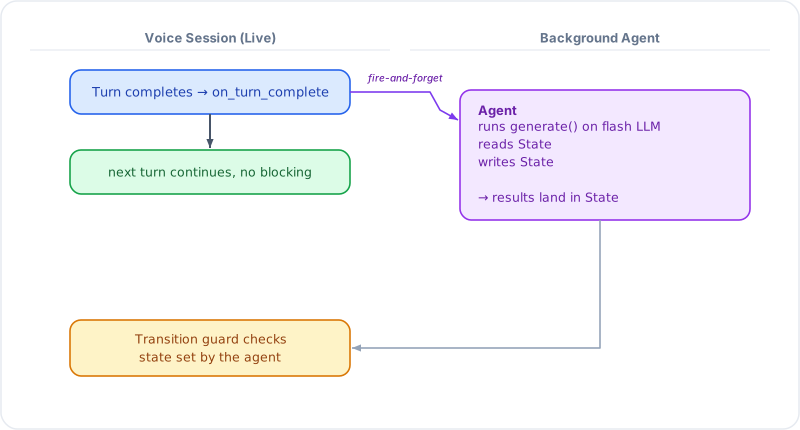
Using BackgroundAgentDispatcher
use gemini_adk_rs::live::BackgroundAgentDispatcher;

let bg_dispatcher = BackgroundAgentDispatcher::new();

let handle = Live::builder()
    .on_extracted_concurrent({
        let bg = bg_dispatcher.clone();
        let llm = flash_llm.clone();
        move |name, value| {
            let bg = bg.clone();
            let llm = llm.clone();
            async move {
                if name == "CallerState" {
                    // Dispatch a background agent to analyze the caller
                    let analyzer = AgentBuilder::new("caller_analyzer")
                        .instruction("Analyze caller risk profile")
                        .build(llm);
                    bg.dispatch("analyze_caller", analyzer, state.clone());
                }
            }
        }
    })
    .connect(config).await?;
Using agent_tool for synchronous agent dispatch
When the model needs to wait for the agent's result:
let verifier = AgentBuilder::new("verifier")
    .instruction("Verify caller identity against database")
    .build(llm.clone());

Live::builder()
    .agent_tool("verify_identity", "Verify caller", verifier)
    .phase("verify")
        .tools(vec!["verify_identity".into()])
        .transition("main", S::is_true("identity_verified"))
        .done()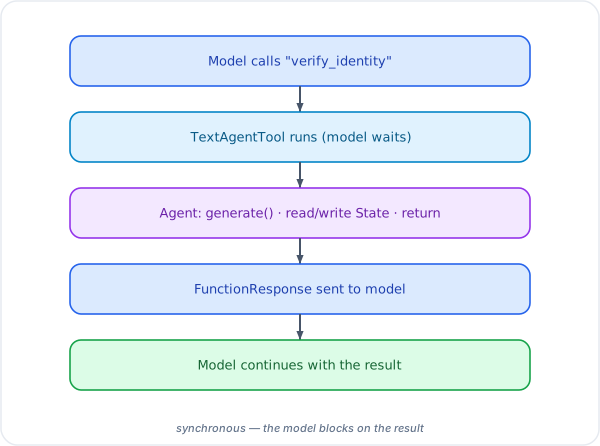
Background Tool Execution (Zero Dead Air)
For tools that take seconds (DB queries, API calls, agent pipelines), background execution eliminates silence in voice sessions:
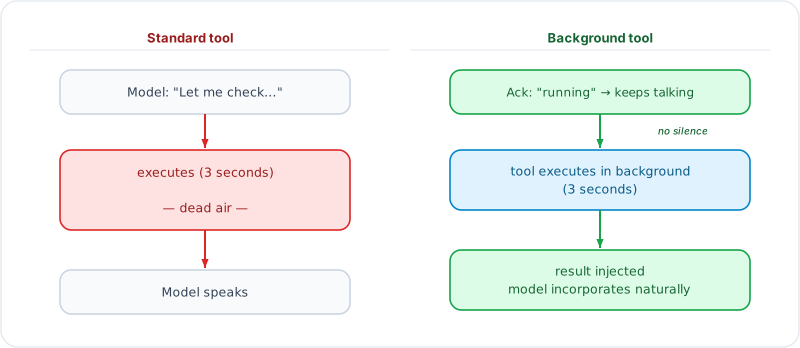
L2 API
Live::builder()
    .tools(dispatcher)
    .tool_background("search_knowledge_base")
    .tool_background_with_formatter("analyze_doc", Arc::new(VerboseFormatter))
    .connect_vertex(project, location, token)
    .await?;
Complete Example: Call Screening Pipeline
A 7-phase call screening system showing how all the pieces fit together:
  ┌─────────────────────────────────────────────────────────┐
  │                    SESSION START                         │
  │  Extraction LLM: gemini-2.5-flash (VertexAI)           │
  │  Live model: gemini-2.0-flash-live (VertexAI)          │
  │  Transcription: input + output enabled                  │
  └────────────────────────┬────────────────────────────────┘
                           │
                           ▼
  ┌─────────────────────────────────────────────────────────┐
  │  PHASE: greeting                                        │
  │  Tools: [check_contact_list]                            │
  │  Guard: tc >= 2 (user must speak before transitioning)  │
  │                                                         │
  │  Model: "Hello, you've reached Alex Rivera's office."   │
  │  User: "Hi, I'm Jane Smith from Marketing."             │
  │                                                         │
  │  TurnComplete:                                          │
  │    Extract: caller_name="Jane Smith"                    │
  │    Extract: caller_org="Marketing"                      │
  │    Computed: is_known → check_contact_list              │
  │    Watcher: is_known_contact=true fires                 │
  │    Guard: tc=2 → transition!                            │
  └────────────────────────┬────────────────────────────────┘
                           │
                           ▼
  ┌─────────────────────────────────────────────────────────┐
  │  PHASE: identify_caller                                 │
  │  Tools: [check_contact_list]                            │
  │  enter_prompt: "Ask for full name and organization."    │
  │                                                         │
  │  Guard: caller_name.is_some() → determine_purpose       │
  │  Guard: tc >= 3 && name.is_none() → take_message        │
  └────────────────────────┬────────────────────────────────┘
                           │ (caller_name already set)
                           ▼
  ┌─────────────────────────────────────────────────────────┐
  │  PHASE: determine_purpose                               │
  │  Tools: [check_calendar]     ← NOW AVAILABLE            │
  │                                                         │
  │  Model: "How can I help you today?"                     │
  │  User: "I need to discuss the Q3 budget."               │
  │                                                         │
  │  TurnComplete:                                          │
  │    Extract: call_purpose="Q3 budget discussion"         │
  │    Extract: urgency=0.5                                 │
  │    Guard: call_purpose.is_some() → screen_decision      │
  └────────────────────────┬────────────────────────────────┘
                           │
                           ▼
  ┌─────────────────────────────────────────────────────────┐
  │  PHASE: screen_decision                                 │
  │  Tools: [transfer_call, take_message, block_caller]     │
  │  Computed: screen_recommendation = "transfer"           │
  │            (known contact → auto-transfer)              │
  │                                                         │
  │  Guard: is_known || urgency > 0.8 → transfer            │
  │  Guard: caller_blocked → farewell                       │
  │  Guard: !known && urgency <= 0.8 → take_message         │
  └────────────────────────┬────────────────────────────────┘
                           │ (known contact)
                           ▼
  ┌─────────────────────────────────────────────────────────┐
  │  PHASE: transfer                                        │
  │  Tools: [transfer_call]                                 │
  │  Model calls transfer_call → state: call_transferred    │
  │  Guard: call_transferred → farewell                     │
  └────────────────────────┬────────────────────────────────┘
                           │
                           ▼
  ┌─────────────────────────────────────────────────────────┐
  │  PHASE: farewell (terminal)                             │
  │  Model: "I'm connecting you now. Have a great call!"    │
  └─────────────────────────────────────────────────────────┘
Reactive overlays running in parallel
  Watchers (fire on state diffs):
  ─────────────────────────────────────────────────
  urgency_level crossed_above(0.8)  → alert UI
  is_known_contact became_true      → prioritize call
  caller_sentiment changed_to("hostile") → show warning

  Temporal patterns (fire on sustained conditions):
  ─────────────────────────────────────────────────
  caller impatient for 20s  → inject de-escalation prompt
  screening stalled 4 turns → suggest taking a message

  Computed variables (recalculate on dependency change):
  ─────────────────────────────────────────────────
  screen_recommendation = f(is_known, urgency, sentiment)
Design Rules for Phase Transitions
1. Greeting phases need turn-count guards
The greeting is model-initiated. The first TurnComplete is the greeting
itself, not a user response. Always gate on tc >= 2:
.phase("greeting")
    .instruction("Welcome the caller.")
    .transition("next", |s| {
        s.session().get::<u32>("turn_count").unwrap_or(0) >= 2
    })
    .done()
2. Use state-dependent guards, not unconditional ones
// BAD: fires immediately, before any meaningful state exists
.transition("next", |_| true)

// GOOD: waits for real data
.transition("next", S::is_true("disclosure_given"))
.transition("next", |s| s.get::<String>("caller_name").is_some())
3. Order transitions from specific to general
Guards are evaluated in order. First match wins:
.phase("screening")
    // Most specific: hostile caller → decline immediately
    .transition("farewell", |s| {
        s.get::<String>("sentiment").as_deref() == Some("hostile")
    })
    // Specific: known contact or urgent → transfer
    .transition("transfer", |s| {
        s.get::<bool>("is_known").unwrap_or(false)
        || s.get::<f64>("urgency").unwrap_or(0.0) > 0.8
    })
    // General: unknown, not urgent → take message
    .transition("take_message", |s| {
        s.get::<String>("call_purpose").is_some()
    })
    .done()
4. Use phase guards for prerequisite enforcement
.phase("negotiate")
    // Cannot enter until identity is verified
    .guard(S::is_true("identity_verified"))
    .instruction("Negotiate a payment plan.")
    .done()
If a transition guard fires but the target's phase guard fails, the machine skips it and evaluates the next transition.
5. enter_prompt should state intent, not assert facts
// BAD: asserts something about the user that may be false
.enter_prompt("The caller provided their details and reason for calling.")

// GOOD: states the agent's intent (always true)
.enter_prompt("I'll now verify the caller's identity.")

// BEST: state-aware, reflects actual extracted data
.enter_prompt_fn(|state, _tw| {
    let name: String = state.get("caller_name").unwrap_or("the caller".into());
    format!("I'll verify {name}'s identity now.")
})
6. Make transitions resilient to extraction failure
If extraction fails (network error, 401, malformed response), no state is written. Your transition guards should handle this gracefully:
// Self-healing: if extraction fails, guard stays false, no transition
.transition("next_phase", |s| s.get::<String>("caller_name").is_some())

// Fallback: if stuck too long, offer an alternative
.transition("take_message", |s| {
    let tc: u32 = s.session().get("turn_count").unwrap_or(0);
    let name: Option<String> = s.get("caller_name");
    tc >= 5 && name.is_none()  // 5 turns without a name → give up
})
7. Use concurrent callbacks for fire-and-forget work
// BAD: blocks the pipeline for a webhook call
.on_extracted(|name, val| async move {
    slow_webhook(&name, &val).await;  // 500ms blocks next event!
})

// GOOD: fire-and-forget, pipeline continues immediately
.on_extracted_concurrent(|name, val| async move {
    slow_webhook(&name, &val).await;  // runs in background
})
Debugging Phase Transitions
Enable tracing
// In your main.rs or app setup
tracing_subscriber::fmt()
    .with_env_filter("gemini_adk_rs::live::processor=debug")
    .init();
Key log lines to watch
DEBUG processor: Phase transition: greeting -> identify_caller
DEBUG processor: Instruction updated (123 chars)
DEBUG processor: Extractor "CallerState" produced 5 fields
WARN  processor: Extraction failed: LLM request failed: API error 401
DEBUG processor: Turn 3 complete, turn_count=3
Common symptoms and causes
| Symptom | Likely Cause |
|---|---|
| Model hallucinates user input | Unconditional transition + misleading enter_prompt |
| Phase never transitions | Extraction failing (check on_extraction_error) |
| "Tool not available" | Tool scoped to unreachable phase |
| Model repeats itself | No transition guard matches (stuck in phase) |
| Callback blocks pipeline | Blocking callback doing slow I/O (use _concurrent) |
See also
- Phase System — phase definitions, guards, lifecycle callbacks, and tool filtering
- Steering Modes — how phase instructions are delivered (
ContextInjectionvsInstructionUpdate) - State Watchers — watcher patterns that complement phase transitions
- cookbook 24 — customer support
Steering Modes
How the SDK delivers phase instructions and per-turn context to the model during a Live session. This is the single most impactful configuration choice for multi-phase voice applications.
The Three Modes
ContextInjection (recommended)
The system instruction is set once at connect time and never updated. Phase instructions and per-turn modifiers are delivered as model-role context turns via send_client_content.
Live::builder()
    .model(GeminiModel::Gemini2_0FlashLive)
    .instruction("You are a restaurant reservation assistant at Sapore d'Italia.")
    .steering_mode(SteeringMode::ContextInjection)
    .phase("greeting")
        .instruction("Welcome the guest warmly and ask how you can help.")
        .done()
    .phase("booking")
        .instruction("Help the guest find an available time slot.")
        .done()
    .initial_phase("greeting")
What happens on phase transition:
- The phase instruction ("Welcome the guest...") is sent as a model-role content turn
- Per-turn modifiers (
with_context,with_state,when) are also sent as model-role turns - The system instruction ("You are a restaurant...") is never touched
When to use: Most multi-phase voice apps. The base persona stays stable across phases, and phase-specific behavior is guided through conversational context. Lower latency, no instruction re-processing spikes.
InstructionUpdate (default)
The system instruction is replaced on every phase transition. Per-turn modifiers are baked into the instruction text.
Live::builder()
    .model(GeminiModel::Gemini2_0FlashLive)
    .instruction("You are a helpful assistant.")
    .steering_mode(SteeringMode::InstructionUpdate)  // this is the default
    .phase("receptionist")
        .instruction("You are a medical receptionist. Schedule appointments.")
        .done()
    .phase("triage_nurse")
        .instruction("You are a triage nurse. Assess symptom severity.")
        .done()
    .initial_phase("receptionist")
What happens on phase transition:
- The entire system instruction is replaced with the new phase's instruction
- Per-turn modifiers are appended to the instruction text
- The model re-processes its full context with the new instruction
When to use: When phases represent genuinely different personas or roles. The model needs a complete context reset to shift behavior convincingly.
Hybrid
System instruction is replaced on phase transition (like InstructionUpdate), but per-turn modifiers are delivered as model-role context turns (like ContextInjection).
Live::builder()
    .steering_mode(SteeringMode::Hybrid)
    .phase("sales")
        .instruction("You are a sales representative.")
        .with_context(|s| format!("Customer budget: {}", s.get::<String>("budget").unwrap_or_default()))
        .done()
    .phase("support")
        .instruction("You are a technical support engineer.")
        .with_context(|s| format!("Ticket: {}", s.get::<String>("ticket_id").unwrap_or_default()))
        .done()
When to use: When you need persona shifts on transition but also want lightweight per-turn context updates within each phase. Uncommon in practice -- pick ContextInjection or InstructionUpdate unless you have a specific reason for both.
Decision Matrix
| Question | Yes | No |
|---|---|---|
| Does the model's core persona change between phases? | InstructionUpdate | ContextInjection |
| Is latency on phase transitions a concern? | ContextInjection | Either works |
| Do you need per-turn dynamic context (state summaries, conditional hints)? | ContextInjection or Hybrid | InstructionUpdate is fine |
| Are phases just different stages of the same conversation? | ContextInjection | -- |
| Are phases genuinely different agents (receptionist vs doctor)? | InstructionUpdate | -- |
Anti-Patterns
Using InstructionUpdate for minor context changes
Problem: Every phase has the same persona but slightly different focus areas. Using InstructionUpdate causes unnecessary instruction re-processing latency on each transition.
// Anti-pattern: same persona, different focus -- InstructionUpdate is overkill
Live::builder()
    .steering_mode(SteeringMode::InstructionUpdate)  // unnecessary latency
    .phase("gather_name")
        .instruction("You are a restaurant host. Ask for the guest's name.")
        .done()
    .phase("gather_party_size")
        .instruction("You are a restaurant host. Ask for the party size.")
        .done()
Fix: Use ContextInjection. The base persona is set once, and phase-specific focus is delivered as context turns.
// Better: stable persona, lightweight phase steering
Live::builder()
    .instruction("You are a friendly host at Sapore d'Italia.")
    .steering_mode(SteeringMode::ContextInjection)
    .phase("gather_name")
        .instruction("Ask for the guest's name for the reservation.")
        .done()
    .phase("gather_party_size")
        .instruction("Ask how many guests will be dining.")
        .done()
Using ContextInjection when personas differ radically
Problem: Phases represent genuinely different agent personas (e.g., switching from a receptionist to a clinical nurse). Context injection is too subtle -- the model may not fully shift behavior.
// Anti-pattern: radically different personas via context injection
Live::builder()
    .instruction("You work at a medical clinic.")
    .steering_mode(SteeringMode::ContextInjection)  // too subtle for persona shift
    .phase("receptionist")
        .instruction("You are the front desk receptionist. Be warm and administrative.")
        .done()
    .phase("triage")
        .instruction("You are a clinical triage nurse. Be precise and medical.")
        .done()
Fix: Use InstructionUpdate so the model gets a clean persona reset.
Over-engineering with Hybrid
Problem: Using Hybrid when ContextInjection alone would suffice. Adds complexity without benefit.
// Anti-pattern: Hybrid when the persona doesn't actually change
Live::builder()
    .steering_mode(SteeringMode::Hybrid)  // unnecessary complexity
    .phase("greeting").instruction("Welcome the user.").done()
    .phase("main").instruction("Help with their request.").done()
Fix: Use ContextInjection. If the persona is stable, there's no reason to replace the system instruction.
Putting volatile state in the base instruction
Problem: The base instruction (set at connect time) includes dynamic state that changes every turn. With ContextInjection, this instruction is never updated.
// Anti-pattern: dynamic content in the base instruction
Live::builder()
    .instruction(format!("You are helping {}. Their order has {} items.",
        customer_name, order_count))  // stale after the first turn
    .steering_mode(SteeringMode::ContextInjection)
Fix: Keep the base instruction static. Use with_context() modifiers for dynamic state.
// Better: static base, dynamic context via modifiers
Live::builder()
    .instruction("You are a helpful order assistant.")
    .steering_mode(SteeringMode::ContextInjection)
    .phase_defaults(|d| d.with_context(|s| {
        format!("Customer: {}. Items in order: {}.",
            s.get::<String>("customer_name").unwrap_or_default(),
            s.get::<u32>("order_count").unwrap_or(0))
    }))
How It Works Under the Hood
The three-lane processor evaluates steering at two points in the turn lifecycle:
  TurnComplete event
       |
  [Step 7]  Phase machine evaluates transitions
       |    --> if transition fires, resolved_instruction is set
       |
  [Steps 7d/7e/7f/12/13] Context accumulation
       |    --> tool advisory, repair nudge, steering modifiers,
       |        phase instruction, on_enter_context all push into
       |        a single context_buffer (Vec<Content>)
       |
  [Step 14] Batched context send
       |    --> ONE send_client_content(context_buffer, false)
       |    --> eliminates burst of separate WebSocket frames
       |
  [Step 14b] prompt_on_enter (triggers model response)
       |    --> send_client_content([], true) — separate frame
Batched delivery: All model-role context turns are accumulated into a single Vec<Content> and sent as one atomic WebSocket frame. This eliminates the burst of 3-5 separate send_client_content calls that could confuse the model or clash with concurrent user input.
The key insight: with ContextInjection, step 12 sends the phase instruction as Content::model(instruction_text). The model sees it as its own prior speech, which naturally steers its behavior without the overhead of system instruction replacement.
Context Delivery Timing
By default, the batched context frame is sent immediately during TurnComplete processing (ContextDelivery::Immediate). For voice apps where isolated WebSocket frames during silence can cause glitches, use ContextDelivery::Deferred:
Live::builder()
    .steering_mode(SteeringMode::ContextInjection)
    .context_delivery(ContextDelivery::Deferred)
    .phase("greeting")
        .instruction("Welcome the guest")
        .done()
    .initial_phase("greeting")
How deferred delivery works:
- During TurnComplete, context turns are pushed into a
PendingContextbuffer (instead of sent) - The
DeferredWriterwraps the session writer at theLiveHandlelevel - When user code calls
handle.send_audio(),send_text(), orsend_video(), the writer drains the buffer and sends the context immediately before the user content - The context arrives in the same burst as user input — no isolated frames during silence
When context is sent immediately regardless:
If a prompt is needed (prompt_on_enter: true or a repair nudge on the first attempt), the context is sent immediately — you can't defer a prompt because the model needs to respond now.
  Deferred delivery:                    Immediate delivery:

  TurnComplete                          TurnComplete
       |                                     |
  [context → PendingContext]            [context → wire now]
       |                                     |
  ... silence ...                       ... silence ...
       |                                     |
  User speaks                           User speaks
       |                                     |
  DeferredWriter.send_audio()           SessionHandle.send_audio()
  1. flush PendingContext               1. send audio
  2. send audio
Interaction with Other Features
| Feature | InstructionUpdate | ContextInjection | Hybrid |
|---|---|---|---|
with_context(fn) | Appended to instruction text | Sent as model-role turn | Sent as model-role turn |
with_state(&[keys]) | Baked into instruction | Sent as model-role turn | Sent as model-role turn |
when(pred, text) | Baked into instruction | Sent as model-role turn | Sent as model-role turn |
instruction_amendment | Appended to instruction | Appended to context turn | Appended to instruction |
instruction_template | Replaces instruction | Sent as context turn | Replaces instruction |
navigation() | Baked into instruction | Baked into instruction | Baked into instruction |
greeting() | Works normally | Works normally | Works normally |
prompt_on_enter | Works normally | Works normally | Works normally |
enter_prompt | Works normally | Works normally | Works normally |
See also
- Phase System — defining phases, modifiers, and lifecycle callbacks
- Phase Transitions Deep Dive — the full turn-complete pipeline where steering fires
State Management
The State type is a shared, concurrent key-value store that flows through every
component of a live session: callbacks, tool calls, extractors, watchers, phases,
and computed variables. Values are stored as serde_json::Value and deserialized
on read, giving you type safety without a rigid schema.
Reading and Writing
use gemini_adk_rs::State;

let state = State::new();

// Write any serializable value
state.set("customer_name", "Alice");
state.set("turn_count", 5u32);
state.set("scores", vec![0.8, 0.9, 0.7]);

// Read with type inference
let name: Option<String> = state.get("customer_name");
let count: Option<u32> = state.get("turn_count");

// Read with a default fallback
let count: u32 = state.get("turn_count").unwrap_or(0);

// Check existence
if state.contains("customer_name") {
    // ...
}

// Remove a key
let removed: Option<serde_json::Value> = state.remove("customer_name");
Zero-Copy Reads
For hot paths where you want to avoid cloning, use with() to borrow the
underlying Value directly through the DashMap ref-guard:
// Borrow without cloning
let len = state.with("customer_name", |v| v.as_str().unwrap().len());

// Avoids: state.get_raw("key").map(|v| ...) which clones the Value
Prefix Scoping
Every state key belongs to a namespace defined by its prefix. Prefixes establish ownership, lifecycle, and read/write rules:
| Prefix | Who writes | Lifecycle | Example keys |
|---|---|---|---|
session: | SDK (SessionSignals) | Entire session | session:is_user_speaking |
derived: | SDK (ComputedRegistry) | Recomputed each turn | derived:sentiment_score |
turn: | SDK / User code | Cleared each turn | turn:transcript |
app: | User code | Entire session | app:order_total |
user: | User code | Entire session | user:name |
bg: | Background tasks | Entire session | bg:search_failed |
temp: | User code | No automatic lifecycle | temp:scratch |
Keys without a prefix (e.g. "customer_name") are valid and commonly used for
extractor-populated fields. The prefix convention is for organizational clarity,
not enforcement -- the store does not reject unprefixed keys.
Scoped Accessors
Each prefix has a corresponding accessor that automatically prepends the prefix. This reduces typos and keeps code clean:
// These two are equivalent:
state.set("app:flag", true);
state.app().set("flag", true);

// Reading
let flag: Option<bool> = state.app().get("flag");

// Listing keys in a scope (prefix stripped from results)
let app_keys: Vec<String> = state.app().keys();
// Returns: ["flag"] not ["app:flag"]

// Other scoped accessors
state.session().set("turn_count", 5);
state.user().set("name", "Alice");
state.turn().set("transcript", "hello");
state.bg().set("task_id", "abc-123");
state.temp().set("scratch", 42);

// derived() is read-only -- no set() or remove()
let score: Option<f64> = state.derived().get("sentiment_score");
Atomic Modify
When multiple components read-modify-write the same key, use modify() to avoid
lost updates. It reads the current value (or a default), applies your function,
and writes the result back:
// Increment a counter (uses 0 if key doesn't exist yet)
let new_count = state.modify("turn_count", 0u32, |n| n + 1);

// Toggle a boolean
state.modify("muted", false, |b| !b);

// Append to a running total
state.modify("app:total_score", 0.0f64, |total| total + new_score);
Note: modify() uses the same DashMap as get/set. It is atomic in the sense
that no other modify on the same key can interleave, but it is not a database
transaction.
Derived Fallback
When you call state.get("risk") and the key "risk" does not exist, State
automatically checks "derived:risk" as a fallback. This means computed variables
are accessible without the prefix tax:
// ComputedRegistry writes to "derived:risk_level"
// You can read it either way:
let risk: Option<String> = state.get("derived:risk_level");
let risk: Option<String> = state.get("risk_level"); // same result

// Direct key wins if both exist:
state.set("score", 1.0);
state.set("derived:score", 0.5);
let score: f64 = state.get("score").unwrap(); // returns 1.0
The fallback only triggers for unprefixed keys. state.get("app:risk") will
never fall back to "derived:risk".
StateKey -- Type-Safe Keys
For keys used in multiple places, define a StateKey<T> constant to eliminate
string typos and enforce type consistency at compile time:
use gemini_adk_rs::state::StateKey;

const TURN_COUNT: StateKey<u32> = StateKey::new("session:turn_count");
const SENTIMENT: StateKey<f64> = StateKey::new("derived:sentiment_score");
const USER_NAME: StateKey<String> = StateKey::new("user:name");

// Usage
state.set_key(&TURN_COUNT, 5);
let count: Option<u32> = state.get_key(&TURN_COUNT);

// Zero-copy borrow with typed key
let val = state.with_key(&TURN_COUNT, |v| v.as_u64().unwrap());

// Interoperable with raw string access
assert_eq!(state.get::<u32>("session:turn_count"), Some(5));
Delta Tracking
Delta tracking creates a transactional view of state. Writes go to a separate delta map that can be committed or rolled back:
let state = State::new();
state.set("committed_key", "original");

// Create a delta-tracking view (shares the same backing store)
let tracked = state.with_delta_tracking();

// Writes go to delta, not to the committed store
tracked.set("new_key", "pending");
assert!(tracked.contains("new_key"));    // visible through tracked
assert!(!state.contains("new_key"));     // NOT visible in original

// Reads check delta first, then committed store
let val: String = tracked.get("committed_key").unwrap(); // reads from committed

// Commit: merges delta into the committed store
tracked.commit();
assert!(state.contains("new_key")); // now visible everywhere

// Or rollback: discards all pending changes
tracked.rollback();
Useful for extractor pipelines where you want to validate extracted data before committing it to the shared state.
State in Tool Calls
The on_tool_call callback receives State so you can promote tool results into
state keys that watchers and phase transitions react to:
Live::builder()
    .on_tool_call(|calls, state| async move {
        // Let the dispatcher handle execution, but promote results
        None // returning None means "auto-dispatch"
    })
    .before_tool_response(|responses, state| async move {
        // Inspect tool results and promote to state
        for r in &responses {
            if r.name == "verify_identity" {
                if r.response.get("verified") == Some(&json!(true)) {
                    state.set("identity_verified", true);
                }
            }
        }
        responses
    })
Auto-Tracked Session State
SessionSignals automatically writes session-level signals to the session:
prefix. You never need to set these manually:
| Key | Type | Updated on |
|---|---|---|
session:is_user_speaking | bool | VoiceActivityStart/End |
session:is_model_speaking | bool | PhaseChanged(ModelSpeaking) |
session:interrupt_count | u64 | Each interruption |
session:error_count | u64 | Each error event |
session:last_error | String | Each error event |
session:silence_ms | u64 | Periodic flush (~100ms) |
session:elapsed_ms | u64 | Periodic flush (~100ms) |
session:remaining_budget_ms | u64 | Periodic flush (~100ms) |
session:go_away_received | bool | GoAway from server |
session:go_away_time_left_ms | u64 | GoAway with time left |
session:resumable | bool | SessionResumeHandle |
session:total_token_count | u32 | Each UsageMetadata event |
session:prompt_token_count | u32 | Each UsageMetadata event |
session:response_token_count | u32 | Each UsageMetadata event |
session:cached_content_token_count | u32 | Each UsageMetadata event |
session:thoughts_token_count | u32 | Each UsageMetadata event |
session:last_input_transcription | String | Each input transcription |
session:last_output_transcription | String | Each output transcription |
session:phase | String | PhaseChanged |
session:session_type | String | Connected / mark_video_sent |
session:disconnected | bool | Disconnected |
Read them anywhere:
let speaking: bool = state.session().get("is_user_speaking").unwrap_or(false);
let elapsed: u64 = state.session().get("elapsed_ms").unwrap_or(0);
let budget: u64 = state.session().get("remaining_budget_ms").unwrap_or(0);
Utility Methods
// Snapshot specific keys (for diffing later)
let snap = state.snapshot_values(&["score", "mood"]);

// Diff against a previous snapshot
state.set("score", 99);
let diffs = state.diff_values(&snap, &["score", "mood"]);
// diffs: [("score", old_value, new_value)]

// Pick a subset of keys into a new State
let subset = state.pick(&["name", "score"]);

// Merge another state in (overwrites on conflict)
state.merge(&other_state);

// Rename a key
state.rename("old_key", "new_key");

// Clear all keys with a given prefix
state.clear_prefix("turn:");
See also
- State Watchers — reactive triggers and computed variables built on
State - Extraction Pipeline — how extracted values land in
derived:prefix - S.C.T.P.M.A Operator Algebra —
S::state transforms used in agent pipelines - cookbook 07 — state transforms
State Watchers & Temporal Patterns
Watchers and temporal patterns are reactive primitives that fire callbacks when state conditions are met. Watchers respond to value changes (numeric thresholds, boolean flips, value transitions). Temporal patterns respond to time-based conditions (sustained state, event rates, consecutive turns). Together they let you build escalation logic, compliance monitoring, and adaptive behavior without polling.
What Are Watchers?
A watcher observes a single state key and fires an async action when a predicate matches the state diff. The SDK evaluates all watchers after each mutation cycle (extractors + computed variables), comparing a snapshot of watched keys taken before mutations to the values after.
use gemini_adk_fluent_rs::prelude::*;

Live::builder()
    .watch("app:score")
        .crossed_above(0.9)
        .then(|old, new, state| async move {
            state.set("high_score_alert", true);
            tracing::info!("Score crossed 0.9: {old} -> {new}");
        })
The .watch(key) call starts a WatchBuilder. You chain a predicate, then
.then(action) to complete it and return to the Live builder.
Numeric Watchers
Fire when a numeric value crosses a threshold in a specific direction.
crossed_above
Fires when the old value was below the threshold and the new value is at or above it. Does not fire again if the value stays above the threshold.
// Fire when willingness_to_pay crosses above 0.7
.watch("willingness_to_pay")
    .crossed_above(0.7)
    .then(|_old, new, _state| async move {
        tracing::info!("Willingness crossed above 0.7: {new}");
    })
crossed_below
Fires when the old value was at or above the threshold and the new value drops below it.
// Fire when sentiment drops below 0.3
.watch("derived:sentiment_score")
    .crossed_below(0.3)
    .then(|_old, new, state| async move {
        state.set("low_sentiment_alert", true);
        tracing::warn!("Sentiment dropped below 0.3: {new}");
    })
Both predicates require numeric JSON values. Non-numeric values (strings, bools) will not trigger the watcher.
Boolean Watchers
Fire on boolean state transitions.
became_true
Fires when the value changes from any non-true value to true. This includes
the transition from not-set (null) to true.
// Fire when cease_desist_requested flips to true
.watch("cease_desist_requested")
    .became_true()
    .blocking()  // await this action before continuing
    .then(|_old, _new, state| async move {
        state.set("cease_desist_active", true);
        tracing::warn!("Cease-and-desist requested");
    })
became_false
Fires when the value changes from true to any non-true value.
// Fire when identity_verified reverts to false
.watch("identity_verified")
    .became_false()
    .then(|_old, _new, _state| async move {
        tracing::warn!("Identity verification revoked");
    })
Value Watchers
changed
Fires on any change to the watched key, regardless of old or new value. This is
the default predicate if you call .then() without setting one.
.watch("negotiation_intent")
    .changed()
    .then(|old, new, _state| async move {
        tracing::info!("Intent changed: {old} -> {new}");
    })
changed_to
Fires only when the new value equals a specific serde_json::Value.
use serde_json::json;

// Fire when negotiation_intent becomes "dispute"
.watch("negotiation_intent")
    .changed_to(json!("dispute"))
    .then(|_old, _new, _state| async move {
        tracing::warn!("Debtor is disputing the debt");
    })
Blocking vs Concurrent
By default, watcher actions are spawned concurrently. Use .blocking() to make
the processor await the action before continuing. Use blocking for actions that
set state other watchers or phases depend on. Use concurrent (the default) for
fire-and-forget side effects like logging and notifications.
Temporal Patterns
Temporal patterns detect conditions that unfold over time. Unlike watchers (which react to single state diffs), temporal patterns track duration, rates, and consecutive counts.
when_sustained -- State Held for Duration
Fires when a state-based condition remains true for at least the specified duration. Resets if the condition becomes false. Requires periodic timer checks, which the SDK handles automatically.
// Fire when sentiment stays below 0.4 for 30 seconds
.when_sustained(
    "sustained_frustration",
    |s| {
        let sentiment: f64 = s.get("derived:sentiment_score").unwrap_or(0.5);
        sentiment < 0.4
    },
    Duration::from_secs(30),
    |state, writer| async move {
        // Inject a de-escalation prompt
        writer.send_client_content(
            vec![Content::user("[System: User appears frustrated. Use empathetic tone.]")],
            false,
        ).await.ok();
        state.set("de_escalation_triggered", true);
    },
)
How it works internally:
- First check where condition is true: records the start time. Does not fire.
- Subsequent checks while condition holds: compares elapsed time to duration.
- When elapsed >= duration: fires the action.
- If condition becomes false at any point: resets the start time.
when_rate -- Event Rate Threshold
Fires when at least count matching events occur within a sliding time window.
The filter function selects which SessionEvent types count.
use gemini_genai_rs::session::SessionEvent;

// Fire when 3+ interruptions happen within 60 seconds
.when_rate(
    "rapid_interruptions",
    |evt| matches!(evt, SessionEvent::Interrupted),
    3,
    Duration::from_secs(60),
    |_state, writer| async move {
        writer.update_instruction(
            "The user is interrupting frequently. Speak more concisely.".into()
        ).await.ok();
    },
)
Old timestamps outside the window are automatically expired on each check.
when_turns -- Consecutive Turn Threshold
Fires when a condition is true for N consecutive turns. Resets the counter if the condition is false on any turn.
// Fire when no_progress is true for 5 consecutive turns
.when_turns(
    "stalled_conversation",
    |s| {
        let progress: bool = s.get("making_progress").unwrap_or(true);
        !progress
    },
    5,
    |state, writer| async move {
        state.set("escalation_needed", true);
        writer.send_text(
            "It seems we're having difficulty. Let me connect you with a specialist.".into()
        ).await.ok();
    },
)
Computed Variables
Computed variables are pure functions of other state keys. They auto-recalculate
when dependencies change and write results to the derived: prefix.
Live::builder()
    // Simple computed var: sentiment from emotion
    .computed("sentiment_score", &["emotional_state"], |state| {
        let emotion: String = state.get("emotional_state")?;
        let score = match emotion.as_str() {
            "cooperative" => 0.9,
            "calm" => 0.7,
            "frustrated" => 0.4,
            "angry" => 0.2,
            _ => 0.5,
        };
        Some(serde_json::json!(score))
    })
    // Computed var that depends on another computed var
    .computed("call_risk_level", &["derived:sentiment_score", "cease_desist_requested"], |state| {
        let sentiment: f64 = state.get("derived:sentiment_score").unwrap_or(0.5);
        let cease_desist: bool = state.get("cease_desist_requested").unwrap_or(false);
        let level = if cease_desist { "critical" }
            else if sentiment < 0.3 { "high" }
            else if sentiment < 0.5 { "medium" }
            else { "low" };
        Some(serde_json::json!(level))
    })
Key behaviors:
- Dependency ordering: topologically sorted, dependencies evaluated first
- Change detection: watchers only fire on keys that actually changed
- Derived fallback: written to
derived:{key}, readable without prefix (see State Management) - Cycle detection: panics at registration if you create circular dependencies
- Returning None: skips the key (no write, no change detection)
Watcher + Phase Integration
Watchers and phases work together naturally. A watcher can set state that triggers a phase transition, or a phase transition can create state that a watcher reacts to.
Pattern: Watcher triggers phase transition
Live::builder()
    // Watcher sets state when cease-and-desist is requested
    .watch("cease_desist_requested")
        .became_true()
        .blocking()
        .then(|_old, _new, state| async move {
            state.set("cease_desist_active", true);
        })
    // Phase transition reacts to that state
    .phase("negotiate")
        .instruction(NEGOTIATE_INSTRUCTION)
        .transition("close", S::is_true("cease_desist_requested"))
        .done()
Pattern: Computed var drives phase transition
Live::builder()
    .computed("risk_level", &["derived:sentiment_score"], |state| {
        let sentiment: f64 = state.get("derived:sentiment_score").unwrap_or(0.5);
        if sentiment < 0.3 { Some(json!("high")) }
        else { Some(json!("low")) }
    })
    .phase("normal")
        .instruction("Handle the conversation normally.")
        .transition("de_escalate", S::eq("risk_level", "high"))
        .done()
    .phase("de_escalate")
        .instruction("The user is upset. De-escalate with empathy.")
        .terminal()
        .done()
Real-World Example: Debt Collection Escalation
The debt collection demo (apps/gemini-adk-web-rs/src/apps/debt_collection.rs) combines
all reactive primitives in a single builder chain:
- Computed chain:
emotional_state(from extractor) ->sentiment_score->call_risk_level - Watchers:
crossed_below(0.3)on sentiment triggers alerts;became_trueoncease_desist_requestedruns a blocking action - Temporal:
when_sustaineddetects 30 seconds of frustration;when_ratecatches 3+ interruptions in 60 seconds;when_turnsflags 5 consecutive stalled turns - Phase defaults: inject computed state into every phase instruction and conditionally append empathy warnings
- Transitions: guards use
S::is_true,S::eq,S::one_ofto move between 7 phases with compliance gates
The data flows in one direction: extractors populate raw state -> computed variables derive higher-level signals -> watchers react to changes -> temporal patterns detect sustained conditions -> phase transitions evaluate guards. All within a single turn cycle.
Evaluation Order
After each turn, the control lane processes mutations in this order:
- Extractors run and write to state (e.g.
emotional_state,willingness_to_pay) - Computed variables recompute in dependency order
- Watchers evaluate against the diff (snapshot before vs after)
- Temporal patterns check against current state and event
- Phase transitions evaluate guards
This means a computed variable can react to extractor output, a watcher can react to a computed variable's change, and a phase transition can react to state set by a watcher -- all within a single turn cycle.
See also
- State Management — the
Statetype andderived:prefix that watchers observe - Phase System — phase transition guards that react to the same state watchers write
- cookbook 10 — guards
Session Persistence
The SDK has two distinct persistence systems that solve different problems:
| System | Purpose | API entry point |
|---|---|---|
Live SessionPersistence | Survive process restarts mid-conversation — snapshot/resume of a running Live session | .persistence(...) + .session_id(...) on Live::builder() |
SessionService | Multi-session, multi-turn CRUD storage — create/list/delete sessions and append events | Standalone service, independent of the Live builder |
They are independent. You can use either, both, or neither depending on your needs.
Live Session Persistence
Why persist a Live session
The Gemini Live API supports session resumption via opaque server-issued handles.
When a process restarts (or a WebSocket drops), the SDK can reconnect to the same
server-side session and restore the client-side control plane state: State
key-value pairs, the current phase, turn count, and a transcript summary.
Without persistence, a reconnecting client starts a fresh session with no memory of what came before.
SessionSnapshot
The snapshot that is saved and restored holds the fields that the control plane needs to pick up exactly where it left off:
pub struct SessionSnapshot {
    pub state: HashMap<String, Value>,       // all State key-value pairs
    pub phase: String,                       // current phase name
    pub turn_count: u32,                     // turns completed
    pub transcript_summary: String,          // brief human-readable summary
    pub resume_handle: Option<String>,       // opaque token from the Gemini server
    pub saved_at: String,                    // ISO 8601 timestamp
}
Built-in backends
FsPersistence
Writes each snapshot as a JSON file under a configurable directory. The directory is created automatically on first save.
use gemini_adk_rs::live::persistence::FsPersistence;
use std::sync::Arc;

Live::builder()
    .model(GeminiModel::Gemini2_0FlashLive)
    .instruction("You are a helpful assistant")
    .persistence(Arc::new(FsPersistence::new("/var/lib/myapp/sessions")))
    .session_id("user-42-session-7")
    .connect_from_env()
    .await?;
Files are stored at <dir>/<session_id>.json. FsPersistence is suited for
development and single-server deployments. It is not safe for concurrent access
from multiple processes.
MemoryPersistence
Holds snapshots in a DashMap. Data is lost when the process exits. Useful for
tests or in-process restart simulations:
use gemini_adk_rs::live::persistence::MemoryPersistence;
use std::sync::Arc;

let persistence = Arc::new(MemoryPersistence::new());
Live::builder()
    .persistence(persistence.clone())
    .session_id("test-session")
    .connect_from_env()
    .await?;
Wiring persistence to the builder
Two builder methods work together:
Live::builder()
    .persistence(Arc::new(FsPersistence::new("/var/lib/sessions")))
    .session_id("user-{user_id}")
    // optional: react when a prior snapshot is loaded
    .on_resumed(|snapshot, state| async move {
        println!(
            "Resumed from phase '{}', turn {}",
            snapshot.phase, snapshot.turn_count
        );
        // State is already restored — you can inspect or override keys here
    })
    .connect_from_env()
    .await?;
When a snapshot exists for the given session_id, the SDK restores State,
seeks the phase machine to the saved phase, and fires on_resumed. The
resume_handle in the snapshot is forwarded to the Gemini server so the
conversation history is not lost.
A final snapshot is also written synchronously when the control lane shuts down (disconnect or server close), so state accumulated since the last turn boundary is captured even if the process exits immediately afterwards.
Manual resume after GoAway (server-side handles)
Independent of snapshots, the Gemini server itself supports session resumption: with resumption enabled it periodically issues opaque handles, and presenting the latest handle on the next connect continues the server-side conversation (model context included).
LiveHandle::resume_handle() exposes the latest handle at any time — most
usefully inside on_go_away, which fires when the server announces it will
close the connection soon:
// Session 1: enable resumption and capture the handle.
let handle = Live::builder()
    .session_resume(true)
    .on_go_away(|time_left| async move {
        println!("Server closing in {time_left:?} — capture the resume handle now");
    })
    .connect_from_env()
    .await?;

// ... conversation runs; the server keeps issuing fresh handles ...

let resume = handle.resume_handle();   // Option<String>
handle.disconnect().await?;

// Session 2: present the handle on the next connect.
let mut builder = Live::builder().instruction("…");
if let Some(h) = resume {
    builder = builder.session_resume_from(h);   // resumption stays enabled
}
let handle = builder.connect_from_env().await?;
The SDK performs no automatic reconnect — when and whether to resume is an
explicit application decision. The same handle is also captured in every
persistence snapshot (SessionSnapshot::resume_handle), so a process restart
can resume from storage instead of memory.
Custom persistence backends
Implement the SessionPersistence trait to target Redis, Firestore, DynamoDB,
or any other store:
use async_trait::async_trait;
use gemini_adk_rs::live::persistence::{SessionPersistence, SessionSnapshot};

struct RedisSessionPersistence { client: redis::Client }

#[async_trait]
impl SessionPersistence for RedisSessionPersistence {
    async fn save(
        &self,
        session_id: &str,
        snapshot: &SessionSnapshot,
    ) -> Result<(), Box<dyn std::error::Error + Send + Sync>> {
        let json = serde_json::to_string(snapshot)?;
        let mut conn = self.client.get_async_connection().await?;
        redis::cmd("SET").arg(session_id).arg(json).query_async(&mut conn).await?;
        Ok(())
    }

    async fn load(
        &self,
        session_id: &str,
    ) -> Result<Option<SessionSnapshot>, Box<dyn std::error::Error + Send + Sync>> {
        let mut conn = self.client.get_async_connection().await?;
        let json: Option<String> = redis::cmd("GET").arg(session_id).query_async(&mut conn).await?;
        Ok(json.map(|s| serde_json::from_str(&s)).transpose()?)
    }

    async fn delete(
        &self,
        session_id: &str,
    ) -> Result<(), Box<dyn std::error::Error + Send + Sync>> {
        let mut conn = self.client.get_async_connection().await?;
        redis::cmd("DEL").arg(session_id).query_async(&mut conn).await?;
        Ok(())
    }
}
SessionService: Multi-Session CRUD Storage
SessionService is a separate, higher-level trait modelled after ADK-Python's
BaseSessionService. It manages a collection of named sessions, each with an
ordered event log. This is the right tool when you need to:
- Track many simultaneous user sessions
- Query all sessions for a given user
- Store and replay conversation history
- Integrate with a team's existing database
The SessionService trait
#[async_trait]
pub trait SessionService: Send + Sync {
    async fn create_session(&self, app_name: &str, user_id: &str) -> Result<Session, SessionError>;
    async fn get_session(&self, id: &SessionId) -> Result<Option<Session>, SessionError>;
    async fn list_sessions(&self, app_name: &str, user_id: &str) -> Result<Vec<Session>, SessionError>;
    async fn delete_session(&self, id: &SessionId) -> Result<(), SessionError>;
    async fn append_event(&self, id: &SessionId, event: Event) -> Result<(), SessionError>;
    async fn get_events(&self, id: &SessionId) -> Result<Vec<Event>, SessionError>;
}
InMemorySessionService (default)
Available with no feature flags. Data is lost on process exit; good for tests and local development:
use gemini_adk_rs::session::InMemorySessionService;

let svc = InMemorySessionService::new();
let session = svc.create_session("my-app", "user-1").await?;
svc.append_event(&session.id, Event::new("user", Some("Hello!".to_string()))).await?;
let events = svc.get_events(&session.id).await?;
SqliteSessionService
File-based persistence for single-server deployments. Uses sqlx under the
database-sessions feature. Without that feature it falls back to the
in-memory backend so the default build stays dependency-free.
# Cargo.toml
[dependencies]
gemini-adk-rs = { version = "0.6", features = ["database-sessions"] }
use gemini_adk_rs::session::{SqliteSessionConfig, SqliteSessionService};
use std::path::PathBuf;

// File-based
let svc = SqliteSessionService::new(SqliteSessionConfig {
    db_path: PathBuf::from("/var/lib/myapp/sessions.db"),
});

// In-memory (for tests)
let svc = SqliteSessionService::new(SqliteSessionConfig::in_memory());

let session = svc.create_session("my-app", "user-1").await?;
The database schema (sessions and events tables, with indexes on
(app_name, user_id) and session_id) is created automatically on first use.
PostgresSessionService
Horizontally scalable persistence for production. Requires the
postgres-sessions feature (which implies database-sessions):
[dependencies]
gemini-adk-rs = { version = "0.6", features = ["postgres-sessions"] }
use gemini_adk_rs::session::{PostgresSessionConfig, PostgresSessionService};

let svc = PostgresSessionService::new(
    PostgresSessionConfig::new("postgres://user:pass@db-host/myapp")
        .max_connections(20),
);

// Optionally run schema migration eagerly (otherwise it runs lazily):
svc.initialize().await?;

let session = svc.create_session("my-app", "user-1").await?;
svc.append_event(&session.id, Event::new("user", Some("Hello".to_string()))).await?;
The Postgres schema uses BIGINT for the event sequence column (vs INTEGER
for SQLite) and handles concurrent append_event calls safely with up to 8
retry attempts on sequence-number collisions.
VertexAiSessionService
Delegates storage to Google Cloud's managed Vertex AI session endpoint. Sessions
are stored server-side and can optionally expire via a configurable TTL. Requires
the vertex-ai-sessions feature:
[dependencies]
gemini-adk-rs = { version = "0.6", features = ["vertex-ai-sessions"] }
use gemini_adk_rs::session::{VertexAiSessionConfig, VertexAiSessionService};

let svc = VertexAiSessionService::new(
    VertexAiSessionConfig::new("my-gcp-project", "us-central1")
        .ttl_seconds(3600),   // sessions expire after 1 hour of inactivity
)
.with_token("ya29.my-access-token")
.reasoning_engine("my-engine-id");   // defaults to "default"

let session = svc.create_session("my-app", "user-1").await?;
For long-running services, supply a dynamic token refresher instead of a static token:
let svc = VertexAiSessionService::new(config)
    .with_token_refresher(|| fetch_access_token()); // called before every request
Vertex AI stores sessions under a reasoningEngines/<engine-id>/sessions
resource path. The service maps Vertex's sessionState, userId, and event
shapes back to the SDK's Session and Event types.
Feature flag summary
| Feature | Backend | Notes |
|---|---|---|
| (none) | InMemorySessionService | Default; no dependencies |
database-sessions | SqliteSessionService (real) | Requires sqlx |
postgres-sessions | PostgresSessionService | Implies database-sessions |
vertex-ai-sessions | VertexAiSessionService | Requires reqwest |
Production notes
- SQLite: single-process only. The connection pool uses one connection for in-memory databases so state is not lost between calls.
- Postgres: safe for multi-process and containerised deployments. Call
initialize()once at startup to run the schema migration before traffic arrives. - Vertex AI: auth tokens must be provided externally. Use
with_token_refresherin production to avoid token expiry mid-request. SessionServiceandSessionPersistence(Live snapshots) are orthogonal. A voice bot can useVertexAiSessionServicefor session tracking while also usingFsPersistencefor Live snapshot/resume — they do not share storage.
See also
- Live Sessions — connecting, disconnecting, and the
LiveHandleruntime API - Live Callbacks —
on_resumedcallback fired when a prior snapshot is restored - cookbook 35 — session persistence
Record & Replay
The determinism spine: record every byte that crosses the wire and every state mutation, then replay any session offline through the real control plane — phase machine, extractors, watchers, and tool dispatch all run for real. Nothing is mocked above the transport seam.
Recording a session
Wire log — record_wire
One builder call taps both directions of the WebSocket:
#![allow(unused)]
fn main() {
use gemini_adk_fluent_rs::prelude::*;

let handle = Live::builder()
    .model(GeminiModel::Gemini2_0FlashLive)
    .instruction("You are a weather assistant")
    .tools(dispatcher)
    .record_wire("/var/log/sessions/user-123.wire.jsonl")
    .connect_from_env()
    .await?;
}
Every outbound frame (setup, user sends, tool responses) and every inbound frame (model audio/text, tool calls, turn completes) is appended to a JSONL log. Each entry carries a monotonic sequence number, a direction, an epoch-millis timestamp, and the base64-encoded raw payload:
{"seq":1,"dir":"out","ts_ms":1718000000000,"payload_b64":"eyJzZXR1cCI6ey4uLn19"}
{"seq":2,"dir":"in","ts_ms":1718000000123,"payload_b64":"eyJzZXR1cENvbXBsZXRlIjp7fX0="}
Recording is synchronous, buffered (flushed every second and on drop), and infallible by contract — an I/O error is logged, never surfaced into the live session.
At lower layers the same knob is SessionConfig::record_wire(recorder) or
ConnectBuilder::record_wire(recorder); custom backends implement the
WireRecorder trait (one sync record(&self, entry: WireEntry) method).
MemoryWireRecorder collects entries in memory for tests.
Mutation journal — JournalSink
The in-memory mutation journal is a bounded ring (1024 entries); a two-hour
call loses most of its history. A JournalSink receives every mutation as
it is recorded:
#![allow(unused)]
fn main() {
use std::sync::Arc;
use gemini_adk_fluent_rs::prelude::*;
use gemini_adk_fluent_rs::state::FileJournalSink;

let state = State::new();
state.set_journal_sink(Arc::new(FileJournalSink::create(
    "/var/log/sessions/user-123.journal.jsonl",
)?));
// hand `state` to the session: Live::builder()…  /  LiveSessionBuilder::with_state(state)
}
The sink is shared with all clones and delta views of the State and is
invoked synchronously on the write path — keep it cheap (FileJournalSink
buffers and flushes periodically). The ring stays in place for
recent_mutations() / evidence(); the sink adds unbounded durability.
Journal entries are serde round-trippable StateMutation values:
{"sequence":7,"key":"app:last_city","old":null,"new":"London","origin":"set","timestamp_ms":1718000000456,"delta":false}
Replaying a session
CLI: adk session replay
$ adk session replay user-123.wire.jsonl --journal user-123.journal.jsonl

  ADK Session Replay — user-123.wire.jsonl

  Wire log:  7 entries (4 inbound, 3 outbound), 12.3s recorded
  Mode:      offline — recorded frames only, no LLM re-execution,
             no tool re-execution (the CLI has no tool implementations)

  Turn-by-turn:
    turn  1  [text×1, text_complete×1, turn_complete×1]
             “Hello! Ask me about the weather.”
    turn  2  [text×1, tool_call×1, turn_complete×1]
             “It is 22C in London.”
             tool: get_weather({"city":"London"})

  Final state (5 keys):
    session:phase = "Disconnected"
    session:turn_count = 2
    …

  Journal diff — user-123.journal.jsonl (27 mutations, 5 keys):
    DRIFT — 1 key(s) diverged:
      - app:last_city: recorded "London", missing on replay
The replay feeds the recorded inbound frames through the real L1 processor
(default callbacks, no tools) and prints a turn-by-turn summary. With
--journal it diffs the recorded journal's per-key final values against the
replayed final state and reports CLEAN or DRIFT (non-zero exit on
drift). Being honest about scope: replay only re-processes recorded frames —
the model is never re-executed (its outputs are in the inbound frames), and
the CLI has no access to your tool implementations, so tool-written state keys
are expected to drift. Wall-clock-derived keys (session:elapsed_ms,
session:silence_ms, session:remaining_budget_ms) are excluded from the
diff.
Programmatic: the replay harness
To re-execute your actual tools (and assert full determinism), replay in-process with the original dispatcher attached:
#![allow(unused)]
fn main() {
use gemini_adk_fluent_rs::live::{collect_events_until_idle, replay_session};
use gemini_adk_rs::live::LiveSessionBuilder;
use gemini_genai_rs::prelude::{read_wire_log, SessionConfig};

let entries = read_wire_log("user-123.wire.jsonl")?;
let state = State::new();
let config = SessionConfig::new("offline"); // no network, no credentials used
let builder = LiveSessionBuilder::new(config.clone())
    .dispatcher(weather_dispatcher(state.clone()))
    .with_state(state.clone());

let replay = replay_session(config, builder, &entries).await?;
let mut events = replay.handle().events();
replay.release();          // start streaming recorded frames
replay.drained().await;    // every frame handed to the session loop
let events = collect_events_until_idle(
    &mut events,
    std::time::Duration::from_millis(300),
    std::time::Duration::from_secs(30),
).await;
let outbound = replay.outbound_frames(); // setup + regenerated tool responses
replay.disconnect().await?;
}
The replay transport is gated: only the setup handshake flows until
release() is called, so subscribe to events first and lose nothing. Frames
are delivered as fast as the processor consumes them (no original-timing
pacing). attach_session(builder, session) is the underlying seam — it bolts
the full three-lane processor onto any pre-connected L0 session
(ReplayTransport, MockTransport, or a real socket).
What matches, what doesn't
Replaying the same log with the same tools through a fresh State reproduces:
- the per-lane
LiveEventsequences (fast lane and control lane each in order; cross-lane interleaving is scheduler-dependent, in production too), - the final state and the journal's per-key final values (minus the wall-clock keys above),
- byte-identical setup and tool-response frames.
User-originated outbound frames (text/audio you sent) are recorded for audit
but not re-sent — they only ever existed to provoke the recorded inbound
frames. Timer-driven events (Telemetry, TurnMetrics) are not replayed
deterministically.
Tool System
Tools let the model call your Rust functions during a live session. Gemini
sends a FunctionCall, your tool executes, and you return a FunctionResponse.
SimpleTool
The quickest way to define a tool -- wrap an async closure:
use gemini_adk_rs::tool::SimpleTool;
use serde_json::json;

let weather = SimpleTool::new(
    "get_weather",
    "Get current weather for a city",
    Some(json!({
        "type": "object",
        "properties": {
            "city": { "type": "string", "description": "City name" }
        },
        "required": ["city"]
    })),
    |args| async move {
        let city = args["city"].as_str().unwrap_or("Unknown");
        Ok(json!({ "city": city, "temperature_c": 22, "condition": "Partly cloudy" }))
    },
);
The fourth argument is the JSON Schema for parameters. Pass None for
parameterless tools.
TypedTool
Type-safe tools with auto-generated schemas. Define a struct with JsonSchema
and Deserialize:
use gemini_adk_rs::tool::TypedTool;
use schemars::JsonSchema;
use serde::Deserialize;

#[derive(Deserialize, JsonSchema)]
struct WeatherArgs {
    /// The city to get weather for
    city: String,
    /// Temperature units (celsius or fahrenheit)
    #[serde(default = "default_units")]
    units: String,
}
fn default_units() -> String { "celsius".to_string() }

let tool = TypedTool::new(
    "get_weather",
    "Get current weather for a city",
    |args: WeatherArgs| async move {
        Ok(serde_json::json!({ "temp": 22, "city": args.city, "units": args.units }))
    },
);
Doc comments on fields become parameter descriptions. Required vs optional is
inferred from #[serde(default)]. Invalid arguments return
ToolError::InvalidArgs.
The #[tool] Attribute Macro
The most ergonomic way to define a tool: annotate an async fn and the macro
generates the args struct, JSON Schema, and ToolFunction impl for you — no
separate struct, no TypedTool::new::<Args> ceremony.
use gemini_adk_fluent_rs::prelude::*;   // brings `tool`, `ToolError`, `ToolDispatcher`
use serde_json::{json, Value};
use std::sync::Arc;

/// Get the current weather for a city.
#[tool("Get the current weather for a city")]
async fn get_weather(city: String, units: Option<String>) -> Result<Value, ToolError> {
    Ok(json!({ "city": city, "temp_c": 22, "units": units.unwrap_or("metric".into()) }))
}

let mut dispatcher = ToolDispatcher::new();
dispatcher.register_function(Arc::new(get_weather()));   // macro emits `fn get_weather() -> impl ToolFunction`
How it expands, for async fn foo(...):
- a hidden
Deserialize + JsonSchemaargs struct (one field per parameter;Option<T>params are non-required and default toNone), - a
ToolFunctionimpl whosecall()deserializes the JSON args, runs the original body, and returns itsResult<Value, ToolError>, - a constructor
fn foo() -> impl ToolFunction(visibility mirrors thefn).
The tool's name() is the function name and description() is the macro's
string. Parameters of any Deserialize + JsonSchema type are supported.
(Per-parameter doc descriptions are not extracted yet — use TypedTool with a
documented args struct when you need them.)
See the #[tool] macro section above for a runnable demonstration.
ToolFunction Trait
For full control, implement ToolFunction directly. Use this when your tool
holds state (connection pools, caches):
use async_trait::async_trait;
use gemini_adk_rs::tool::ToolFunction;
use gemini_adk_rs::error::ToolError;

struct DatabaseLookup { pool: sqlx::PgPool }

#[async_trait]
impl ToolFunction for DatabaseLookup {
    fn name(&self) -> &str { "lookup_account" }
    fn description(&self) -> &str { "Look up an account by ID" }

    fn parameters(&self) -> Option<serde_json::Value> {
        Some(serde_json::json!({
            "type": "object",
            "properties": { "account_id": { "type": "string" } },
            "required": ["account_id"]
        }))
    }

    async fn call(&self, args: serde_json::Value) -> Result<serde_json::Value, ToolError> {
        let id = args["account_id"].as_str()
            .ok_or_else(|| ToolError::InvalidArgs("missing account_id".into()))?;
        Ok(serde_json::json!({ "account_id": id, "balance": 4250.00 }))
    }
}
StreamingTool
For tools that yield multiple results over time via an mpsc::Sender:
#[async_trait]
impl StreamingTool for ProgressTracker {
    fn name(&self) -> &str { "track_progress" }
    fn description(&self) -> &str { "Track a long-running operation" }
    fn parameters(&self) -> Option<serde_json::Value> { None }

    async fn run(
        &self,
        args: serde_json::Value,
        yield_tx: mpsc::Sender<serde_json::Value>,
    ) -> Result<(), ToolError> {
        for step in 0..5 {
            yield_tx.send(json!({ "step": step })).await
                .map_err(|e| ToolError::ExecutionFailed(e.to_string()))?;
        }
        Ok(())
    }
}
Register via dispatcher.register_streaming(Arc::new(tool)).
InputStreamingTool
For tools that receive live input (audio, video) while running. They get a
broadcast::Receiver<InputEvent> alongside the yield channel:
async fn run(
    &self,
    _args: serde_json::Value,
    mut input_rx: broadcast::Receiver<InputEvent>,
    yield_tx: mpsc::Sender<serde_json::Value>,
) -> Result<(), ToolError> {
    while let Ok(event) = input_rx.recv().await {
        // Process input events, yield partial results
    }
    Ok(())
}
Built-in Tools
Gemini provides server-side tools requiring no implementation:
// Direct methods
Live::builder().google_search().code_execution().url_context()

// Or T:: composition with pipe operator
Live::builder().with_tools(T::google_search() | T::code_execution() | T::url_context())
Per-Tool Policies
Attach execution constraints to individual tools using the T:: policy
wrappers. Policies compose with | like any other tool entry.
Live::builder()
    .with_tools(
        // 10-second timeout on a slow tool
        T::timeout(
            T::simple("search_kb", "Search the knowledge base", |args| async move {
                Ok(search(args).await?)
            }),
            Duration::from_secs(10),
        )
        // In-session result cache
        | T::cached(
            T::simple("get_rate", "Get exchange rate", |args| async move {
                Ok(fetch_rate(args).await?)
            })
        )
        // Confirmation flag (recorded; see note in tool-policies.md)
        | T::confirm(
            T::simple("send_email", "Send email to customer", |args| async move {
                Ok(send(args).await?)
            }),
            "This will send a real email — are you sure?",
        )
    )
T::timeout(tool, duration)— enforced:tokio::time::timeoutwraps the call; elapse returnsToolError::Timeout.T::cached(tool)— enforced: memoizes successful results by(name, canonical-JSON args); errors are not cached.T::confirm(tool, message)— enforced at dispatch when aConfirmationProvideris wired (Live::confirmation_providerorToolDispatcher::with_confirmation_provider); a denied decision returnsToolError::Cancelledand the tool never runs. Opt-in: with no provider, the gate is inert and surfaced viarequires_confirmation(). See Per-Tool Policies.
For async/background execution (ToolExecutionMode::Background,
FunctionResponseScheduling) and MCP tool integration, see the dedicated
chapters:
- Per-tool policies — full reference for timeout, cache, confirm, and background scheduling.
- MCP Tools — connecting to Model Context Protocol servers.
Agent as Tool
TextAgentTool wraps a text-mode agent as a callable tool for voice sessions.
The agent runs via BaseLlm::generate() and shares the session's State:
// Direct registration
let tool = TextAgentTool::new("verify_identity", "Verify caller", verifier, state.clone());
dispatcher.register(tool);

// Fluent API
Live::builder()
    .agent_tool("verify_identity", "Verify caller identity", verifier_agent)
    .agent_tool("calc_payment", "Calculate payment plans", calc_pipeline)
State sharing is bidirectional -- the text agent reads live-extracted values and its mutations are visible to watchers and phase transitions.
Tool Registration
ToolDispatcher (L1)
let mut dispatcher = ToolDispatcher::new();
dispatcher.register(my_tool);                        // impl ToolFunction
dispatcher.register_function(Arc::new(my_tool));     // Arc<dyn ToolFunction>
dispatcher.register_streaming(Arc::new(stream_tool));

Live::builder().tools(dispatcher).connect(config).await?;
T:: composition (fluent API)
Live::builder()
    .with_tools(
        T::function(Arc::new(weather_tool))
        | T::simple("calculate", "Evaluate expression", |args| async move {
            Ok(json!({"result": 42}))
        })
        | T::google_search()
    )
Toolset from a vec
let tools: Vec<Arc<dyn ToolFunction>> = vec![Arc::new(a), Arc::new(b), Arc::new(c)];
Live::builder().with_tools(T::toolset(tools))
Tool Call Handling
The on_tool_call callback fires when the model requests tool execution.
Return Some(responses) to handle manually, or None for auto-dispatch:
.on_tool_call(|calls, state| async move {
    let responses: Vec<FunctionResponse> = calls.iter().map(|call| {
        let result = match call.name.as_str() {
            "get_weather" => execute_weather(&call.args),
            "verify_identity" => {
                let result = verify(&call.args);
                if result["verified"].as_bool() == Some(true) {
                    state.set("identity_verified", true);  // promote to state
                }
                result
            }
            _ => json!({"error": "unknown tool"}),
        };
        FunctionResponse { name: call.name.clone(), response: result, id: call.id.clone() }
    }).collect();
    Some(responses)
})
The callback receives State so you can promote tool results to keys that
drive phase transitions and watchers.
Phase-Scoped Tools
Restrict available tools per conversation phase. The processor rejects calls
to tools not in the phase's tools_enabled list:
.phase("verify_identity")
    .instruction("Verify the caller's identity")
    .tools(vec!["verify_identity".into(), "log_compliance_event".into()])
    .transition("inform_debt", S::is_true("identity_verified"))
    .done()
.phase("negotiate")
    .instruction("Negotiate a payment plan")
    .tools(vec!["calculate_payment_plan".into()])
    .transition("arrange_payment", S::is_true("plan_agreed"))
    .done()
If tools_enabled is None (default), all registered tools are available.
Long-Running Tools
LongRunningFunctionTool wraps any ToolFunction and tells the model not to
re-invoke while a previous call is pending:
use gemini_adk_rs::tools::LongRunningFunctionTool;

let long_running = LongRunningFunctionTool::new(Arc::new(MySlowTool::new()));
dispatcher.register(long_running);
The ToolDispatcher supports timeouts and cancellation:
// Custom timeout
dispatcher.call_function_with_timeout("slow_tool", args, Duration::from_secs(60)).await?;

// Cancel via token
dispatcher.call_function_with_cancel("slow_tool", args, cancel_token).await?;

// Configure default timeout (30s default)
let dispatcher = ToolDispatcher::new().with_timeout(Duration::from_secs(10));
Background Tool Execution
For tools that take significant time (database queries, API calls, LLM pipelines), background execution eliminates dead air in voice sessions.
How It Works
- Model calls a background tool
- An immediate "running" acknowledgment is sent back
- The model continues speaking (e.g., "Let me look that up for you...")
- When the tool completes, the result is injected into the conversation
- The model incorporates the result naturally
L2 API
Live::builder()
    .tools(dispatcher)
    .tool_background("search_knowledge_base")
    .tool_background_with_formatter("analyze_doc", Arc::new(MyFormatter))
    .connect_vertex(project, location, token)
    .await?;
L1 API
LiveSessionBuilder::new(config)
    .dispatcher(dispatcher)
    .tool_execution_mode("search_knowledge_base", ToolExecutionMode::Background {
        formatter: None,
        scheduling: Some(FunctionResponseScheduling::WhenIdle),
    })
    .connect()
    .await?;
Custom Result Formatting
Implement ResultFormatter to control acknowledgment and result shapes:
struct VerboseFormatter;

impl ResultFormatter for VerboseFormatter {
    fn format_running(&self, call: &FunctionCall) -> Value {
        json!({ "status": "searching", "query": call.args["query"] })
    }

    fn format_result(&self, call: &FunctionCall, result: Result<Value, ToolError>) -> Value {
        match result {
            Ok(val) => json!({ "status": "done", "tool": call.name, "result": val }),
            Err(e) => json!({ "status": "error", "tool": call.name, "error": e.to_string() }),
        }
    }

    fn format_cancelled(&self, call_id: &str) -> Value {
        json!({ "status": "cancelled", "call_id": call_id })
    }
}
Cancellation
Background tools are automatically cancelled when:
- The server sends
ToolCallCancellation - The session disconnects
LiveHandleis dropped
The BackgroundToolTracker provides belt-and-suspenders cleanup: both
the CancellationToken is triggered and the JoinHandle is aborted.
Intercepting Tool Responses
Transform tool results before they reach Gemini. Use for PII redaction, state promotion, or result augmentation:
.before_tool_response(|responses, state| async move {
    responses.into_iter().map(|mut r| {
        if r.name == "verify_identity" {
            if r.response["verified"].as_bool() == Some(true) {
                state.set("identity_verified", true);
            }
        }
        if r.name == "lookup_account" {
            r.response = redact_pii(&r.response);
        }
        r
    }).collect()
})

# See also

- [Per-Tool Policies](./tool-policies.md) — timeout, caching, confirmation, and background execution
- [MCP Tools](./mcp-tools.md) — connecting to Model Context Protocol servers
- [Text Agent Combinators](./text-agents.md) — using `TextAgentTool` to call agent pipelines as tools
- [cookbook 02 — agent with tools](../../examples/cookbook/src/02_agent_with_tools.rs)
- [cookbook 09 — tool composition](../../examples/cookbook/src/09_tool_composition.rs)
Per-Tool Policies
Per-tool policies let you attach execution constraints to individual tools
without changing their implementation. They are expressed in the T:: namespace
and composed with the same | operator as the rest of the tool algebra.
PolicyTool
Internally, T::timeout, T::cached, and T::confirm all wrap the target
tool in a PolicyTool — a ToolFunction decorator that carries a ToolPolicy
and enforces it on every call.
pub struct ToolPolicy {
    pub timeout: Option<Duration>,
    pub cache: bool,
    pub confirm: bool,
    pub confirm_message: Option<String>,
}
Policies compose: wrapping the same tool twice (e.g.,
T::cached(T::timeout(tool, dur))) applies both timeout and cache.
Timeout
T::timeout(tool, duration) races each call against tokio::time::timeout.
If the tool's future does not complete within the given duration the call
returns ToolError::Timeout(duration) and the inner future is dropped.
use std::time::Duration;

Live::builder()
    .with_tools(
        T::timeout(
            T::simple("search_kb", "Search the knowledge base", |args| async move {
                // potentially slow call
                Ok(call_search_api(args).await?)
            }),
            Duration::from_secs(10),
        )
        | T::google_search()
    )
Timeout enforcement is fully implemented: tokio::time::timeout wraps the
inner call future, and any elapse produces ToolError::Timeout.
Caching
T::cached(tool) memoizes successful results keyed by (tool name, canonical-JSON args). Repeat calls with identical arguments return the cached
value without re-invoking the tool. Errors are never cached.
Canonical JSON sorts object keys lexicographically, so {"b":2,"a":1} and
{"a":1,"b":2} produce the same cache key.
// Weather results cached for the lifetime of the session
Live::builder()
    .with_tools(
        T::cached(T::simple("get_weather", "Get weather for a city", |args| async move {
            Ok(call_weather_api(&args["city"]).await?)
        }))
    )
Cache entries live for the lifetime of the PolicyTool instance (i.e., the
session). There is no TTL or maximum entry count. If you need time-bounded
caching, combine with a timeout and manage expiry in your tool implementation.
Caching is fully implemented in PolicyTool::call.
Confirmation flag
T::confirm(tool, message) marks a tool as requiring user confirmation before
it runs. The flag and optional hint message are recorded on the ToolPolicy
and surfaced at runtime via PolicyTool::requires_confirmation().
Live::builder()
    .with_tools(
        T::confirm(
            T::simple("send_email", "Send an email to the customer", |args| async move {
                Ok(do_send_email(args).await?)
            }),
            "This will send an email to the customer. Are you sure?",
        )
    )
Enforcing confirmation with a provider
Confirmation is enforced at dispatch when you wire a ConfirmationProvider.
Before running any tool that reports requires_confirmation(), the
ToolDispatcher consults the provider; a denied decision returns
ToolError::Cancelled instead of executing the tool. Enforcement is opt-in —
with no provider configured, confirmation-gated tools run normally (the flag is
still surfaced via requires_confirmation()).
Wire one onto a dispatcher directly, or via Live::confirmation_provider:
use std::sync::Arc;
let handle = Live::builder()
.with_tools(T::confirm(send_email_tool, "Send this email?"))
// Any async closure `Fn(ConfirmationRequest) -> impl Future<Output = ToolConfirmation>`
// works, or implement the `ConfirmationProvider` trait.
.confirmation_provider(Arc::new(|req: ConfirmationRequest| async move {
if approved_by_operator(&req.tool_name, &req.args).await {
ToolConfirmation::confirmed()
} else {
ToolConfirmation::denied("operator rejected the action")
}
}))
.connect_from_env()
.await?;For tests and simple defaults, StaticConfirmation::allow_all() /
StaticConfirmation::deny_all("reason") provide uniform providers. The same
ToolDispatcher::with_confirmation_provider / set_confirmation_provider API
gates tools in text-agent pipelines too.
Async / Background Tool Execution
For tools that take significant time — database queries, external API calls, LLM sub-pipelines — background execution eliminates dead air in voice sessions.
ToolExecutionMode
pub enum ToolExecutionMode {
Standard, // tool runs inline; model waits for the result (default)
Background {
formatter: Option<Arc<dyn ResultFormatter>>,
scheduling: Option<FunctionResponseScheduling>,
},
}How background execution works
- The model sends a
FunctionCallfor a background-declared tool. - An immediate "running" acknowledgment is sent to the model.
- The tool is spawned as a Tokio task. The model continues speaking.
- When the task completes, the result is injected into the conversation using
the configured
FunctionResponseSchedulingmode.
FunctionResponseScheduling modes
| Mode | Behaviour |
|---|---|
Interrupt | Model halts current output and immediately handles the result |
WhenIdle | Model waits until it finishes current output before handling (default) |
Silent | Model integrates the result without notifying the user |
Platform support: async tool calling is only supported on Google AI.
On Vertex AI, behavior: NonBlocking is automatically stripped from
FunctionDeclaration setup messages and scheduling is stripped from
FunctionResponse. You can set these fields unconditionally; the SDK handles
the platform difference. Use config.supports_async_tools() to check at runtime.
L2 fluent API
Live::builder()
.tools(dispatcher)
.tool_background("search_kb") // WhenIdle scheduling by default
.tool_background_with_scheduling(
"log_event",
FunctionResponseScheduling::Silent, // quiet integration
)
.connect_from_env()
.await?;L1 builder API
LiveSessionBuilder::new(config)
.dispatcher(dispatcher)
.tool_execution_mode("search_kb", ToolExecutionMode::Background {
formatter: None,
scheduling: Some(FunctionResponseScheduling::WhenIdle),
})
.connect()
.await?;Custom result formatting
Implement ResultFormatter to control the JSON shape of acknowledgment and
completion messages:
use gemini_adk_rs::live::background_tool::{ResultFormatter, DefaultResultFormatter};
struct VoiceFriendlyFormatter;
impl ResultFormatter for VoiceFriendlyFormatter {
fn format_running(&self, call: &FunctionCall) -> Value {
json!({ "status": "searching", "for": call.args["query"] })
}
fn format_result(&self, call: &FunctionCall, result: Result<Value, ToolError>) -> Value {
match result {
Ok(v) => json!({ "status": "found", "tool": call.name, "data": v }),
Err(e) => json!({ "status": "failed", "tool": call.name, "error": e.to_string() }),
}
}
fn format_cancelled(&self, call_id: &str) -> Value {
json!({ "status": "cancelled", "id": call_id })
}
}
// Register with custom formatter:
Live::builder()
.tool_background_with_formatter("search_kb", Arc::new(VoiceFriendlyFormatter))If formatter is None, DefaultResultFormatter is used, which produces:
{ "status": "running", "tool": "search_kb" }
{ "status": "completed", "tool": "search_kb", "result": { ... } }
{ "status": "error", "tool": "search_kb", "error": "..." }
{ "status": "cancelled", "call_id": "fc_123" }
Cancellation
Background tasks are cancelled when:
- The server sends
ToolCallCancellation - The session disconnects
LiveHandleis dropped
BackgroundToolTracker provides belt-and-suspenders cleanup: both the
CancellationToken is triggered and the JoinHandle is aborted.
Combining policies
Policies and execution modes compose freely:
Live::builder()
.with_tools(
// 10-second timeout + in-session cache
T::cached(T::timeout(
T::simple("get_stock_price", "Get a stock price", |args| async move {
Ok(fetch_price(&args["ticker"]).await?)
}),
Duration::from_secs(10),
))
// confirmation required on dangerous action
| T::confirm(
T::simple("cancel_order", "Cancel an order", |args| async move {
Ok(do_cancel(&args["order_id"]).await?)
}),
"Cancel this order — are you sure?",
)
| T::google_search()
)
.tool_background("get_stock_price") // also run it in backgroundSee also
- Tools —
SimpleTool,TypedTool,ToolDispatcher, and tool registration - MCP Tools — applying policies to Model Context Protocol tools
- Middleware —
before_tool/after_toolhooks in agent pipelines - cookbook 34 — tool policies
MCP Tools
The Model Context Protocol (MCP) is an open standard for connecting AI models
to external tools and data sources. Tools are exposed by an MCP server process;
clients discover them via a tools/list RPC and invoke them via tools/call.
The SDK implements a real MCP client (McpSessionManager) that speaks
JSON-RPC 2.0. You create an McpToolset, connect it to a ToolDispatcher, and
the dispatcher routes model function calls to the MCP server transparently.
Connection transports
Stdio (default, no feature flags)
The server runs as a subprocess. The SDK communicates over the subprocess's
stdin/stdout using newline-delimited JSON-RPC. This is the standard MCP
transport and requires no extra features.
use gemini_adk_rs::tools::mcp::{McpConnectionParams, McpSessionManager};
use std::sync::Arc;
use std::time::Duration;
let manager = Arc::new(McpSessionManager::new(McpConnectionParams::Stdio {
command: "npx".to_string(),
args: vec!["-y".to_string(), "@modelcontextprotocol/server-filesystem".to_string()],
timeout: Some(Duration::from_secs(30)),
}));timeout applies to each individual JSON-RPC request (including the initialize
handshake). Pass None to wait indefinitely.
HTTP/SSE (behind mcp-http feature)
For MCP servers that accept HTTP POST requests (StreamableHTTP transport):
[dependencies]
gemini-adk-rs = { version = "0.6", features = ["mcp-http"] }
use std::collections::HashMap;
let mut headers = HashMap::new();
headers.insert("Authorization".to_string(), "Bearer my-token".to_string());
let manager = Arc::new(McpSessionManager::new(McpConnectionParams::Sse {
url: "https://mcp.example.com/rpc".to_string(),
headers: Some(headers),
}));Without the mcp-http feature, McpConnectionParams::Sse returns
McpError::ConnectionFailed("mcp-http feature not enabled") on any call.
Connection lifecycle
The SDK connects lazily: the subprocess is only spawned (or the first HTTP
request only made) on the first list_tools or call_tool call. Once
connected, the stdio connection is reused across all subsequent calls.
Handshake
For stdio connections, the SDK performs the MCP handshake automatically:
- Sends
initializewithprotocolVersion: "2024-11-05"and client info{ name: "gemini-adk-rs", version: "0.6.0" }. - Reads the server's
initializeresult. - Sends
notifications/initialized(no response expected).
After the handshake, the connection is considered ready and stored for reuse. Stray non-JSON lines on stdout (e.g., server log output) are silently skipped.
Discovering and registering tools
McpToolset wraps a session manager and implements the Toolset trait. The
tool list is discovered by calling manager.list_tools() and registering each
result as an McpTool in the dispatcher.
use gemini_adk_rs::tools::mcp::{McpConnectionParams, McpSessionManager, McpToolset};
use gemini_adk_rs::tool::ToolDispatcher;
use std::sync::Arc;
use std::time::Duration;
// 1. Create the session manager
let manager = Arc::new(McpSessionManager::new(McpConnectionParams::Stdio {
command: "python3".to_string(),
args: vec!["-m".to_string(), "my_mcp_server".to_string()],
timeout: Some(Duration::from_secs(15)),
}));
// 2. Discover tools and register them
let tools = manager.list_tools().await?;
let mut dispatcher = ToolDispatcher::new();
for info in tools {
dispatcher.register(gemini_adk_rs::tools::mcp::tool::McpTool::new(
info.name,
info.description,
Some(info.input_schema),
Arc::clone(&manager),
));
}
// 3. Pass the dispatcher to the Live builder
Live::builder()
.tools(dispatcher)
.connect_from_env()
.await?;Filtering exposed tools
McpToolset::with_filter restricts the tools registered from an MCP server to
a named subset:
let toolset = McpToolset::new(Arc::clone(&manager))
.with_filter(vec!["read_file".to_string(), "list_directory".to_string()]);Tool invocation
When the model calls a tool registered from MCP, McpTool::call forwards the
invocation to McpSessionManager::call_tool, which sends a tools/call
JSON-RPC request and returns the result:
{ "jsonrpc": "2.0", "id": 3, "method": "tools/call",
"params": { "name": "read_file", "arguments": { "path": "/etc/hosts" } } }
The server's response result object is returned as-is. If isError: true
is set in the result, the call is mapped to McpError::ToolCallFailed. JSON-RPC
error objects are also mapped to McpError::ToolCallFailed.
McpTool implements ToolFunction, so it behaves identically to any other tool
from the model's perspective. Errors from MCP are surfaced as
ToolError::ExecutionFailed.
Error handling
use gemini_adk_rs::tools::mcp::session_manager::McpError;
match manager.list_tools().await {
Ok(tools) => { /* ... */ }
Err(McpError::ConnectionFailed(msg)) => {
eprintln!("Could not connect to MCP server: {msg}");
}
Err(McpError::ToolCallFailed(msg)) => {
eprintln!("Tool call failed: {msg}");
}
Err(McpError::NotConnected(msg)) => {
eprintln!("Session not established: {msg}");
}
Err(McpError::Other(msg)) => {
eprintln!("Other MCP error: {msg}");
}
}Using T:: with MCP
The T::mcp entry in the tool composite is a marker that signals MCP wiring
should be established at session startup. In the current implementation, actual
tool discovery and dispatcher registration use McpSessionManager directly
(as shown above). The T::mcp entry is present for future integration with the
fluent builder:
// Marker form — not yet wired to automatic discovery in Live::builder()
Live::builder()
.with_tools(T::mcp("npx -y @modelcontextprotocol/server-filesystem"))For production use today, discover tools manually via McpSessionManager::list_tools
and register them in a ToolDispatcher as shown in the previous section.
Feature flags
| Feature | Effect |
|---|---|
| (none) | Stdio transport only |
mcp-http | Enables McpConnectionParams::Sse HTTP transport (adds reqwest dependency) |
Example: filesystem MCP server
use gemini_adk_fluent_rs::prelude::*;
use gemini_adk_rs::tools::mcp::{McpConnectionParams, McpSessionManager};
use gemini_adk_rs::tools::mcp::tool::McpTool;
use gemini_adk_rs::tool::ToolDispatcher;
use std::sync::Arc;
use std::time::Duration;
let manager = Arc::new(McpSessionManager::new(McpConnectionParams::Stdio {
command: "npx".to_string(),
args: vec![
"-y".to_string(),
"@modelcontextprotocol/server-filesystem".to_string(),
"/workspace".to_string(),
],
timeout: Some(Duration::from_secs(30)),
}));
// Discover tools from the server
let tool_infos = manager.list_tools().await?;
let mut dispatcher = ToolDispatcher::new();
for info in tool_infos {
dispatcher.register(McpTool::new(
info.name,
info.description,
Some(info.input_schema),
Arc::clone(&manager),
));
}
let handle = Live::builder()
.model(GeminiModel::Gemini2_0FlashLive)
.instruction("You can read and list files on the server filesystem.")
.tools(dispatcher)
.connect_from_env()
.await?;
handle.send_text("List the files in the root of /workspace").await?;See also
- Tools —
SimpleTool,TypedTool, and theToolDispatcherregistration API - Per-Tool Policies — timeout, caching, and confirmation policies for MCP tools
- cookbook 36 — MCP tools
Extraction Pipeline
What Is Extraction?
Extraction turns unstructured conversation into structured data. As the user
and model talk, extractors analyze the transcript and produce typed JSON:
customer name, order items, emotional state, account numbers. These values
flow into session State where they drive phase transitions, trigger
watchers, and inform instruction composition.
Why Out-of-Band?
Extraction runs on the control lane, not on the conversation path. An LLM extraction call takes 1-5 seconds. Voice conversations cannot pause for that. Extractors run concurrently after each turn completes while the conversation continues uninterrupted.
Turn completes
-> Transcript buffer finalizes the turn
-> Extractors run concurrently (control lane)
-> Results written to State under derived: prefix
-> Watchers evaluate -> Phase transitions fire
-> Conversation continues (no blocking)
Deterministic extraction (no model)
Not every field needs an LLM. Slots like quantities, money, yes/no, a name
matched against a roster, or a date/time are recognizable on the CPU — no model,
no network, no accelerator. The Extract kit declares a record of typed fields,
each filled by a Recognizer, and compiles to a TurnExtractor that promotes
recognized fields straight into State.
use gemini_adk_rs::Extract; // the #[derive(Extract)] macro
#[derive(Extract)]
#[extract(name = "order", window = 3)]
struct Order {
#[recognize(integer_near = ["want", "get"])]
quantity: Option<i64>,
#[recognize(one_of = ["pizza", "salad", "soda"])]
item: Option<String>,
#[recognize(fuzzy = ["Johnson", "Jackson"])] // ASR-robust name match
name: Option<String>,
#[recognize(datetime)] // → { "time": "18:00", "day": "tomorrow" }
#[extract(state = "when")]
pickup: Option<serde_json::Value>,
#[recognize(yes_no)]
confirmed: Option<bool>,
}
Live::builder()
.extract_record(Order::extract()) // deterministic, runs on the control lane
.govern(order_flow) // Flow reads done(captured(["quantity", "item"]))
.connect_from_env().await?;Recognizer forms: integer/integer_near, money, regex, one_of,
fuzzy (Jaro-Winkler, ASR-robust), yes_no, and datetime (a small on-device
clock/calendar normalizer: 12h/24h time → HH:MM, relative days, weekdays,
parts of day, ISO dates). You can also build a record fluently with
Extract::record(name).field(..) instead of the derive.
Async field sources
A field can be filled by an async resolver instead of a recognizer —
arguments bound from State, with an optional TTL cache:
let booking = Extract::record("booking")
.field("slot", Recognizer::one_of(["morning", "afternoon"]))
// args bound from State → fetcher → field; cached 30s by (field, args).
.field_resolve("availability", ["slot"], Some(Duration::from_secs(30)), |args| async move {
let slot = args.get("slot").and_then(|v| v.as_str()).unwrap_or("");
Ok(serde_json::json!({ "open": slot == "afternoon" }))
})
// run a downstream agent when the record lands fields (result → booking:result):
.on_complete(router_agent, AgentMode::Dispatch)
.build();(Closures can't live in attributes, so resolver fields use the builder;
#[derive(Extract)] covers the recognizer fields.)
Standalone Resolver
The async sibling of Recognizer is Resolver: a named value source whose
inputs come from State and whose result lands under {name}:result (or
{name}:error). It generalizes a sub-agent call to any async source — a
tool call, an HTTP fetch, or an MCP request (see Orchestration):
use gemini_adk_rs::Resolver;
// From a sub-agent (its String output becomes the result):
Resolver::agent("availability", availability_agent).resolve(&state).await?;
// From any async system, with inputs bound from State:
Resolver::fetch("availability", |s: State| async move {
let slot = s.get::<String>("slot").unwrap_or_default();
Ok(serde_json::json!({ "open": slot == "afternoon" }))
}).resolve(&state).await?; // or .dispatch(state) to run detachedBoth deterministic Recognizer fields and async Resolver results live in
State under the same conventions, so a Flow step completes on
either — done(captured(["quantity"])) or done(resolved("availability")) —
and a flow step's on_enter can launch a resolver automatically.
TurnExtractor
The base trait for all extractors. Implement it for synchronous extraction (regex, keyword matching, heuristics):
use async_trait::async_trait;
use gemini_adk_rs::live::extractor::TurnExtractor;
use gemini_adk_rs::live::transcript::TranscriptTurn;
use gemini_adk_rs::llm::LlmError;
struct OrderNumberExtractor;
#[async_trait]
impl TurnExtractor for OrderNumberExtractor {
fn name(&self) -> &str { "order_info" } // State key for results
fn window_size(&self) -> usize { 5 } // Look at last 5 turns
fn should_extract(&self, window: &[TranscriptTurn]) -> bool {
// Skip trivial turns -- checked before async extraction
window.last()
.map(|t| t.user.split_whitespace().count() >= 3)
.unwrap_or(false)
}
async fn extract(&self, window: &[TranscriptTurn]) -> Result<serde_json::Value, LlmError> {
let text: String = window.iter()
.map(|t| format!("{} {}", t.user, t.model))
.collect::<Vec<_>>().join(" ");
let re = regex::Regex::new(r"order\s+#?(\d+)").unwrap();
let mut result = serde_json::Map::new();
if let Some(caps) = re.captures(&text) {
result.insert("order_number".into(), serde_json::json!(caps[1].to_string()));
}
Ok(serde_json::Value::Object(result))
}
}should_extract is checked before launching async work. Return false to
skip the LLM round-trip entirely on trivial turns.
LlmExtractor
For extraction requiring understanding (sentiment, intent, entity
recognition), LlmExtractor sends the transcript to an OOB LLM:
use gemini_adk_rs::live::extractor::LlmExtractor;
let extractor = LlmExtractor::new(
"SentimentAnalysis",
llm, // Arc<dyn BaseLlm>
"Analyze conversation sentiment and extract the customer's emotional state.",
3, // window size
)
.with_schema(serde_json::json!({
"type": "object",
"properties": {
"sentiment": { "type": "string", "enum": ["positive", "neutral", "negative"] },
"score": { "type": "number" }
}
}))
.with_min_words(5); // Skip "uh huh", "ok", "yes" turnsSchema Definition
The fluent API's extract_turns auto-generates the schema from a Rust struct:
use schemars::JsonSchema;
use serde::{Deserialize, Serialize};
#[derive(Deserialize, Serialize, JsonSchema)]
struct DebtorState {
/// "calm", "cooperative", "frustrated", "angry"
emotional_state: Option<String>,
/// 0.0 (refusing) to 1.0 (eager)
willingness_to_pay: Option<f32>,
/// "full_pay", "partial_pay", "dispute", "refuse", "delay"
negotiation_intent: Option<String>,
/// Whether debtor explicitly requested cease-and-desist
cease_desist_requested: Option<bool>,
}
Live::builder()
.extract_turns::<DebtorState>(
llm,
"Extract: emotional state, willingness to pay, negotiation intent, cease-and-desist.",
)
.connect(config).await?;The type name (DebtorState) becomes the extractor name and State key.
extract_turns auto-enables transcription, generates the JSON schema, and
defaults to a 3-turn window. Use extract_turns_windowed for custom sizes.
Extraction Triggers
By default, extractors run on every TurnComplete event. For many use cases
this is wasteful -- trivial utterances ("yeah", "ok") rarely contain extractable
data, and each extraction is an OOB LLM call. Extraction triggers control
when extractors fire:
use gemini_adk_rs::live::extractor::ExtractionTrigger;
Live::builder()
// Extract every 2 turns instead of every turn (reduces LLM costs by ~50%)
.extract_turns_triggered::<DebtorState>(
llm,
"Extract debtor emotional state and negotiation intent",
5, // transcript window size
ExtractionTrigger::Interval(2),
)
.connect(config).await?;| Trigger | When it fires | Use case |
|---|---|---|
EveryTurn | After every TurnComplete | Default — high-frequency extraction |
Interval(n) | Every N turns | Reduce LLM costs for slow-changing data |
AfterToolCall | After tool dispatch completes | Extract from tool results |
OnPhaseChange | When phase transitions fire | Re-extract on context shift |
The TurnExtractor trait also has a trigger() method with a default
implementation returning EveryTurn, so custom extractors get the old
behavior for free:
impl TurnExtractor for MyExtractor {
fn trigger(&self) -> ExtractionTrigger {
ExtractionTrigger::AfterToolCall
}
// ...
}Transcript Window
Extractors receive a slice of TranscriptTurn values:
pub struct TranscriptTurn {
pub turn_number: u32,
pub user: String, // Accumulated user speech
pub model: String, // Accumulated model speech
pub tool_calls: Vec<ToolCallSummary>,
pub timestamp: Instant,
}The TranscriptBuffer is a ring buffer (default 50 turns) that evicts the
oldest turns to prevent unbounded memory growth:
let mut buf = TranscriptBuffer::new();
let recent = buf.window(3); // last 3 completed turns
let formatted = buf.format_window(3); // human-readable text
let snapshot = buf.snapshot_window(5); // cheap read-only clone for callbacksAuto-Flatten
When an extractor returns a JSON object, the framework automatically flattens
it to individual state keys under the derived: prefix. Given this result:
{ "emotional_state": "frustrated", "willingness_to_pay": 0.3 }
The framework writes:
derived:emotional_state="frustrated"derived:willingness_to_pay=0.3
The prefix is transparent -- state.get("emotional_state") auto-checks
derived:emotional_state if the unprefixed key is not found:
.transition("close", S::is_true("cease_desist_requested"))
// Internally checks derived:cease_desist_requestedConcurrent Extraction
Multiple extractors run in parallel via futures::future::join_all:
Live::builder()
.extractor(Arc::new(regex_extractor)) // instant
.extract_turns::<DebtorState>(llm, "...") // 1-3 seconds
.on_extracted(|name, value| async move {
println!("Extractor '{name}' produced: {value}");
})
.on_extraction_error(|name, error| async move {
eprintln!("Extractor '{name}' failed: {error}");
})
.connect(config).await?;Extraction to State to Watchers
The full data flow after each turn:
- Extractors run concurrently on the control lane.
- Results auto-flatten -- each JSON field becomes a
derived:key. - Computed state evaluates -- derived variables that depend on extracted keys re-compute.
- Watchers fire -- any watcher observing a changed key triggers.
- Phase transitions evaluate -- guards check, machine transitions.
Live::builder()
.extract_turns::<DebtorState>(llm, "Extract emotional state")
.computed("call_risk_level", &["derived:sentiment_score"], |state| {
let score: f64 = state.get("derived:sentiment_score").unwrap_or(0.5);
if score < 0.3 { Some(json!("high")) } else { Some(json!("low")) }
})
.watch("derived:call_risk_level")
.changed_to(json!("high"))
.then(|_old, _new, state| async move {
state.set("alert:risk_escalation", true);
})
.phase("negotiate")
.instruction("Negotiate payment")
.transition("close", S::is_true("cease_desist_requested"))
.done()
.connect(config).await?;Real Example
The debt collection demo combines regex and LLM extractors:
// Regex: captures dollar amounts, phone numbers, disclosure acknowledgment
let regex_extractor = Arc::new(RegexExtractor::new("debt_fields", 10, |text, existing| {
let mut extracted = HashMap::new();
if !existing.contains_key("dollar_amount") {
if let Some(m) = DOLLAR_RE.find(text) {
extracted.insert("dollar_amount".into(), json!(m.as_str()));
}
}
if !existing.contains_key("disclosure_given") {
if DISCLOSURE_ACK_RE.is_match(text) {
extracted.insert("disclosure_given".into(), json!(true));
}
}
extracted
}));
let handle = Live::builder()
.extractor(regex_extractor)
.extract_turns::<DebtorState>(llm, "Extract debtor emotional state and intent")
.computed("sentiment_score", &["emotional_state"], |state| {
let emotion: String = state.get("emotional_state")?;
Some(json!(match emotion.as_str() {
"cooperative" => 0.9, "calm" => 0.7,
"frustrated" => 0.4, "angry" => 0.2, _ => 0.5,
}))
})
.computed("call_risk_level", &["derived:sentiment_score", "cease_desist_requested"], |state| {
let sentiment: f64 = state.get("derived:sentiment_score").unwrap_or(0.5);
let cease: bool = state.get("cease_desist_requested").unwrap_or(false);
Some(json!(if cease { "critical" } else if sentiment < 0.3 { "high" } else { "low" }))
})
.phase("disclosure")
.instruction("Deliver the Mini-Miranda disclosure")
.transition("verify_identity", S::is_true("disclosure_given"))
.transition("close", S::is_true("cease_desist_requested"))
.done()
.initial_phase("disclosure")
.connect(config).await?;Extracted fields flow through the full pipeline: extraction produces raw values, computed state derives higher-level signals, guards evaluate on every turn, and the phase machine transitions when conditions are met.
See also
- Live Callbacks —
on_extractedandon_extraction_errorcallbacks - State Management — how extracted values land in
derived:prefix and are accessed - cookbook 29 — live voice
Governed Flows (conversation/tool DAGs)
A Flow describes a workflow as a single DAG that governs both conversation
stages and tool-call sequences, and the runtime enforces it live: it blocks
inadmissible tool calls, steers the model with the active stage's instruction at
each turn boundary, and surfaces what still has to happen.
It is one declarative value in place of the four mechanisms you'd otherwise
hand-wire (a phase guard + a watcher + a before_tool check + repair text).
The model in one breath
- A Step is the only node type. A step is done when its completion
[
Guard] latches true;afterdeclares dependencies (the DAG edges). - The same
Stepnoun covers a conversation stage (it has aposture) and a tool milestone (itsdoneiscalled_ok(tool)). - A Guard is the only predicate type — over session state and the flow
marking. Atoms are serializable;
Guard::custom(..)is a code escape hatch. - The runtime keeps a Marking (which steps are done) by replaying the trace, and answers tool admissibility + projects active postures.
Define a flow
use gemini_adk_fluent_rs::prelude::*;
let flow = Flow::new()
.step("verify")
.posture("Verify the caller's identity before anything else.")
.allow(["lookup_account"])
.done(Guard::is_true("identity_verified"))
.step("disclose").after("verify")
.posture("Give the required disclosure.")
.done(Guard::is_true("disclosure_given"))
.step("negotiate").after("disclose")
.posture("Negotiate an affordable payment.")
.allow(["lookup_balance", "payment_plans"])
.done(Guard::captured(["ptp_amount", "ptp_date"]))
.step("take_payment").after("negotiate")
.allow(["charge_card"])
.done(Guard::called_ok("charge_card")) // a tool milestone — same `Step` noun
.step("close").after("negotiate").terminal()
// cross-cutting constraints
.never("charge_card").until(Guard::is_true("ptp_confirmed"))
.once("charge_card")
.require(["close"])
.build()
.expect("valid flow");build() validates referential integrity and acyclicity, so a malformed flow
fails fast rather than misbehaving live.
Govern a session
let handle = Live::builder()
.model(GeminiModel::Gemini2_0FlashLive)
.tools(dispatcher)
.govern(flow) // enforce — block inadmissible tools, steer per active step
.connect_from_env()
.await?;Use .observe(flow) instead of .govern(flow) to record deviations for audit
without blocking anything.
Compile, then govern
Flow::compile() turns a class of runtime surprises into load-time errors on
top of build()'s checks: unreachable steps, effectively-unguarded commit
tools, never…until guards whose done(step) references a step that doesn't
exist (the tool would be forbidden forever), and ordering cycles closed by
before(a, b) edges (every step on the cycle deadlocks). It returns a
CompiledFlow — proof the flow passed compilation.
Flow::compile_with_tools(&[..]) additionally validates every tool name the
flow references (allow/deny/once/never…until/commit) against a registry
of known tools, catching typos and drift between a flow script and the tools
actually registered on the session.
// Compile once at load time — diagnostics surface here, not mid-call.
let compiled = flow.compile_with_tools(&["lookup_account", "charge_card"])?;
// Govern many sessions; connect does NOT re-validate or re-compile.
let handle = Live::builder()
.model(GeminiModel::Gemini2_0FlashLive)
.tools(dispatcher)
.govern_compiled(compiled) // or .observe_compiled(compiled)
.connect_from_env()
.await?;Why is it blocked? (handle.why_blocked())
A governed session's handle answers the common debugging question directly —
which steps are active, which tools are admitted vs blocked (with reasons), and
what's still required — as a serializable FlowExplanation snapshot computed
against the live session state:
if let Some(ex) = handle.why_blocked() { // None when not governed
println!("active: {:?}", ex.active);
println!("blocked: {:?}", ex.blocked_tools); // tool -> reason
println!("missing: {:?}", ex.missing_requirements);
}handle.explain() is the same view under its descriptive name. Both are cheap,
synchronous snapshots of the monitor the control lane maintains.
Driving orchestration on step entry
A step can run an agent the moment it becomes active — the flow drives orchestration in-session:
let handle = Live::builder()
.tools(dispatcher)
.govern(booking_flow)
// when `check` activates, run the availability agent; its result lands in
// `check:result`, which the step completes on via `done(resolved("check"))`.
.on_enter("check", availability_agent, AgentMode::Call)
.connect_from_env()
.await?;AgentMode::Call resolves inline at the turn boundary; Dispatch/Background
run detached so a slow agent never blocks speech. The result is written to
{step}:result, so a downstream step reads it with Guard::resolved(step) —
the same convention as a Resolver (call/dispatch/
background) or a deterministic Extract field. That shared
State-result convention is what makes the three lenses compose
multiplicatively: extraction fills slots, a step's on_enter orchestrates a
sub-agent or fetch, and guards gate on either — all reading the same State.
Enforcement semantics
- Tools are gated hard. A call that no active step allows, that a
never…untilforbids, or that aoncehas spent, is denied at thebefore_toolboundary and an error is returned to the model. (This shares the seam used by middleware vetoes and theConfirmationProvider.)- Note: a step's
allow/denyonly applies while that step is active. For a cross-cutting gate that must hold regardless of which step is active (e.g. "never transfer a spam caller", and recall that aterminal()step latches done immediately and is therefore never active), use a globalnever(tool).until(guard)constraint instead of a stepdeny. allowexcludes by omission, which is what you want for the domain tools a step is about and not for infrastructure no step is about. Name those withambient([tools])— see below.
- Note: a step's
Ambient tools
A step's allow list is a whitelist, so every tool the author did not think to
name is denied while that step is active. Writing .allow(["book_table"]) means
"book here, don't search the catalogue" — it does not mean "stop remembering who
the caller is", but that is what it did to any cross-cutting tool.
ambient names those tools once, at flow level:
#![allow(unused)] fn main() { Flow::new() .ambient(["recall_context", "manage_memory"]) .step("book") .allow(["book_table"]) // recall still available here .done(Guard::called_ok("book_table")) }
Ambient is an exemption from exclusion by omission and nothing more. Anything that names the tool still binds, because naming it is a deliberate act:
| Still applies to an ambient tool | Why |
|---|---|
deny([tool]) | the step named it |
once(tool) | the constraint named it |
never(tool).until(guard) | the constraint named it |
So a flow can hold ambient(MEMORY_TOOLS) and never("manage_memory").until(verified)
— reads stay available, writes wait for identity. Ambient tools also join the
flow's tool universe, so compile_with_tools still catches a registry that does
not cover them.
Extensions register their own: Live::with_memory(..) calls
.ambient_tools(MEMORY_TOOLS) for you, and the registration is merged into the
flow at connect, so it composes with .govern(..) written on either side of it.
- Speech is shaped softly, proactively. The active step's
postureis injected as turn-boundary steering before the model speaks — you never block speech mid-stream in a voice session. - Repair from real gaps. Unmet
requiresteps are surfaced at the turn boundary so the model gathers what's missing.
Phases and flows together
A Flow does not compile down to a PhaseMachine. They are independent
subsystems — the control plane holds each as its own Option — and configuring
both is supported and sometimes right. What you need to know is the cadence and
the order, because both steer the same model on the same turn.
Different cadences. A flow's active-step posture is re-projected on
every turn boundary. A phase's instruction is seeded only when a
transition fires. So a quiet turn carries the flow's posture and no phase
instruction — which is what stops the two from churning against each other.
Deterministic order. Everything projected at a turn boundary is accumulated into one batch and sent as a single frame, in this order:
1. tool availability advisory (on phase transition, if enabled)
2. repair nudge / escalation (unmet `needs`)
3. phase steering context (modifiers, under ContextInjection)
4. flow posture → ground → unmet requirements
5. resolved phase instruction (transition turns, under ContextInjection)
The phase instruction lands last, nearest the user's next turn, so on a
transition the phase persona is the most recent framing the model reads. Under
the default SteeringMode::InstructionUpdate step 5 goes to the system
instruction instead of the batch, so the two never share a channel at all.
Which to reach for. Use phases when the conversation has personas or stages that change how the assistant speaks. Use a flow when there are obligations and orderings that must be enforced — gated tools, required steps, an audit trail. Reach for both when you have both, and expect them to add rather than arbitrate: nothing resolves a contradiction between a posture and a phase instruction, so do not write one.
Verbs (the closed vocabulary)
| Verb | Meaning |
|---|---|
step(id) | declare a node |
after(dep) | add a dependency (call repeatedly for several) |
gate(Guard) | extra eligibility beyond dependencies |
done(Guard) | completion condition (required for non-terminal steps) |
posture(text) | instruction imposed while active |
ground(template) | curated, State-interpolated fact line projected while active (anti-hallucination) — {key} / {key?yes:no} |
allow([tools]) / deny([tools]) | tool whitelist/blacklist while active |
ambient([tools]) | cross-cutting tools exempt from every step's allow whitelist |
terminal() | a step that completes on eligibility |
once(tool) | a tool may run at most once |
before(a, b) | ordering invariant |
never(tool).until(Guard) | forbid a tool until a guard holds |
require([steps]) | steps that must be done for completion |
commit(tool, until) | sugar: once + never…until + confirmation |
Guard atoms: is_true, is_set, eq, captured, called_ok, done, all,
any, not, and custom(closure).
Data-driven flows
Because every guard atom is a named, parameterized predicate, a Flow is fully
serializable — so the script can be authored as data (e.g. RON/JSON) and edited
by compliance or ops without a recompile. flow.to_mermaid() renders the DAG.
Observability
The monitor publishes status into state (flow:done, flow:active) and exposes
verdict(step) (Pending · Active · Done · Skipped), unmet_requirements(),
is_complete(), and violations() — so watchers and dashboards can react, and
real traces can be scored for conformance.
See also
- Per-Tool Policies —
confirm/timeout/cached; commit-tools - Phase System — the other steering mechanism; independent of
Flowand composable with it (see Phases and flows together) - Tool System — defining the tools a flow gates
- cookbook 37 — governed flow
Agent Orchestration
Orchestration is the single question of how you invoke a unit of work — a
sub-agent, a system fetch, or an OOB LLM — and where its result goes. Every
mechanism here writes its result to governed State under {name}:result (or
{name}:error), so coordination is reactive and uniform: a Flow step
completes on it via Guard::resolved(name), a watcher fires on it, or the next
agent reads it — regardless of who produced it.
Mode — how an agent is invoked
use gemini_adk_fluent_rs::prelude::*; // AgentMode, call_agent, Resolver
// Call — synchronous; the caller awaits. Use only for fast dependencies.
let verdict = call_agent("availability", agent, &state).await?; // → availability:result
// Dispatch — fire-and-forget; the conversation does not wait.
// Background — model-aware; runs detached, result delivered back to the model.| Mode | Sync? | Lowers to |
|---|---|---|
Call | sync — caller awaits | agent run inline, result → State |
Dispatch | async, fire-and-forget | BackgroundAgentDispatcher::dispatch |
Background | async, model-aware | an agent-tool marked ToolExecutionMode::Background |
Resolver — a named async value source
A Resolver generalizes call from "a sub-agent" to any async source whose
inputs come from State. It is the async sibling of the deterministic
Recognizer:
use gemini_adk_rs::Resolver;
// A sub-agent (its String output becomes the result):
Resolver::agent("availability", availability_agent).resolve(&state).await?;
// Any async system — a tool call, HTTP fetch, or MCP request — bound from State:
Resolver::fetch("availability", |s: State| async move {
let slot = s.get::<String>("slot").unwrap_or_default();
Ok(serde_json::json!({ "open": slot == "afternoon" }))
}).resolve(&state).await?; // or .dispatch(state) to run detached
// A one-shot OOB LLM over a {key}-interpolated prompt:
Resolver::llm("summary", flash_llm, "Summarize the {topic} issue").resolve(&state).await?;All three write {name}:result and record provenance under
state_meta:{name}:result (source: agent | fetch | llm), readable with
provenance(&state, "name:result").
Flow-driven orchestration
A governed Flow drives orchestration in-session: a step's on_enter runs a
resolver/agent the moment it activates, and an Extract record can dispatch a
downstream agent on_complete:
Live::builder()
.govern(booking_flow)
.on_enter("check", availability_agent, AgentMode::Call) // result → check:result
.extract_record(
Extract::record("triage")
.field("intent", Recognizer::one_of(["refund", "status"]))
.on_complete(router_agent, AgentMode::Dispatch) // result → triage:result
.build(),
)
.connect_from_env().await?;Because every result lands in State under the same convention, the three
lenses — extraction, orchestration, and
flow — compose multiplicatively: extraction fills slots, a step
orchestrates a sub-agent or fetch, and guards gate on either.
See also
- Extraction Pipeline —
Recognizer/Resolverfield sources - Governed Flows —
on_enter,ground,Guard::resolved - Text Agent Combinators — building the agents you orchestrate
- cookbook 39 — booking (Flow × Extract × Orchestration)
Text Agent Combinators
Text agents are composable units for text-based LLM pipelines. Each one implements the TextAgent trait, making a standard request/response call to a language model (no WebSocket session required). You can snap them together -- sequential, parallel, branching, looping -- to build multi-step reasoning pipelines.
The TextAgent Trait
Every text agent implements one method:
#[async_trait]
pub trait TextAgent: Send + Sync {
fn name(&self) -> &str;
async fn run(&self, state: &State) -> Result<String, AgentError>;
}State is a concurrent typed key-value store shared across the pipeline. Agents read input from state.get::<String>("input") and write output to state.set("output", &result). That is the entire contract.
Combinator Reference
| Combinator | Purpose | Analogy |
|---|---|---|
LlmTextAgent | Core agent -- generate, tool dispatch, loop | Gemini(prompt) |
FnTextAgent | Wrap a closure as an agent (no LLM call) | |state| { ... } |
SequentialTextAgent | Run agents in order, pipe output forward | A >> B >> C |
ParallelTextAgent | Run agents concurrently, collect all results | [A, B, C] |
RaceTextAgent | Run concurrently, return first success | A | B | C |
RouteTextAgent | Route to agent based on state predicate | if X -> A, if Y -> B |
FallbackTextAgent | Try agents in order until one succeeds | A ?? B ?? C |
LoopTextAgent | Repeat until max iterations or predicate | while(!done) { A } |
MapOverTextAgent | Apply agent to each item in a state list | items.map(A) |
TapTextAgent | Read-only side effect (logging, metrics) | tap(log) |
TimeoutTextAgent | Wrap an agent with a time limit | timeout(5s, A) |
DispatchTextAgent | Fire-and-forget background tasks | spawn(A, B) |
JoinTextAgent | Wait for dispatched tasks to complete | join(tasks) |
LlmTextAgent -- The Core Agent
LlmTextAgent is the workhorse. It calls BaseLlm::generate(), dispatches any tool calls the model makes, feeds tool results back, and loops until the model produces a final text response (up to 10 rounds).
use gemini_adk_rs::text::LlmTextAgent;
use gemini_adk_rs::llm::GeminiLlm;
let llm = Arc::new(GeminiLlm::new(GeminiModel::Gemini2_0Flash));
let agent = LlmTextAgent::new("analyst", llm)
.instruction("Analyze the given topic and produce a summary.")
.temperature(0.3)
.max_output_tokens(2048)
.tools(Arc::new(tool_dispatcher));
let state = State::new();
state.set("input", "Explain Rust's ownership model");
let result = agent.run(&state).await?;
println!("{result}");FnTextAgent -- Zero-Cost Transforms
When you need a pipeline step that does not call an LLM -- data formatting, validation, state manipulation -- use FnTextAgent:
use gemini_adk_rs::text::FnTextAgent;
let formatter = FnTextAgent::new("format_output", |state| {
let raw = state.get::<String>("input").unwrap_or_default();
let formatted = format!("## Summary\n\n{raw}");
state.set("output", &formatted);
Ok(formatted)
});Building Pipelines
Sequential: A >> B >> C
Each agent's output becomes the next agent's input via state.set("input", &output). The final agent's output is the pipeline result.
use gemini_adk_rs::text::SequentialTextAgent;
let pipeline = SequentialTextAgent::new("analysis_pipeline", vec![
Arc::new(LlmTextAgent::new("extract", llm.clone())
.instruction("Extract key claims from the text.")),
Arc::new(LlmTextAgent::new("validate", llm.clone())
.instruction("Fact-check each claim. Flag unsupported ones.")),
Arc::new(LlmTextAgent::new("summarize", llm.clone())
.instruction("Produce a final summary with confidence ratings.")),
]);
let state = State::new();
state.set("input", raw_document);
let summary = pipeline.run(&state).await?;Parallel: Run concurrently, collect all
All branches execute concurrently via tokio::spawn. Results are joined with newlines.
use gemini_adk_rs::text::ParallelTextAgent;
let multi_perspective = ParallelTextAgent::new("perspectives", vec![
Arc::new(LlmTextAgent::new("technical", llm.clone())
.instruction("Analyze from a technical perspective.")),
Arc::new(LlmTextAgent::new("business", llm.clone())
.instruction("Analyze from a business perspective.")),
Arc::new(LlmTextAgent::new("legal", llm.clone())
.instruction("Analyze from a legal perspective.")),
]);Race: First to finish wins
Like ParallelTextAgent, but returns only the first result and cancels the rest. Useful for redundancy or trying multiple model configurations:
use gemini_adk_rs::text::RaceTextAgent;
let fastest = RaceTextAgent::new("race", vec![
Arc::new(LlmTextAgent::new("fast", fast_llm.clone())
.instruction("Answer the question.")),
Arc::new(LlmTextAgent::new("thorough", slow_llm.clone())
.instruction("Answer the question in depth.")),
]);Route: State-driven branching
Evaluate predicates against state. First match wins, with a default fallback:
use gemini_adk_rs::text::{RouteTextAgent, RouteRule};
let router = RouteTextAgent::new(
"issue_router",
vec![
RouteRule::new(
|s| s.get::<String>("category") == Some("billing".into()),
Arc::new(billing_agent),
),
RouteRule::new(
|s| s.get::<String>("category") == Some("technical".into()),
Arc::new(tech_agent),
),
],
Arc::new(general_agent), // default
);Fallback: Try until one succeeds
Attempts each candidate in order. Returns the first Ok result. If all fail, returns the last error:
use gemini_adk_rs::text::FallbackTextAgent;
let robust = FallbackTextAgent::new("robust_lookup", vec![
Arc::new(primary_agent),
Arc::new(cache_agent),
Arc::new(fallback_agent),
]);Loop: Repeat with termination
Runs the body up to max times, optionally breaking early when a state predicate returns true:
use gemini_adk_rs::text::LoopTextAgent;
let refiner = LoopTextAgent::new("refine", Arc::new(draft_agent), 5)
.until(|state| {
state.get::<String>("quality")
.map(|q| q == "good")
.unwrap_or(false)
});MapOver: Apply agent to each item
Reads a list from state, runs the agent once per item, collects results:
use gemini_adk_rs::text::MapOverTextAgent;
let processor = MapOverTextAgent::new("process_items", Arc::new(item_agent), "items")
.item_key("current_item")
.output_key("processed_results");
// State must contain: state.set("items", vec!["item1", "item2", "item3"]);Tap: Observe without mutation
For logging, metrics, or debugging. Returns an empty string and does not mutate the pipeline flow:
use gemini_adk_rs::text::TapTextAgent;
let logger = TapTextAgent::new("log_state", |state| {
let input = state.get::<String>("input").unwrap_or_default();
tracing::info!("Pipeline state - input length: {}", input.len());
});Timeout: Time-limited execution
Wraps any agent with a deadline. Returns AgentError::Timeout if exceeded:
use gemini_adk_rs::text::TimeoutTextAgent;
let bounded = TimeoutTextAgent::new(
"bounded_analysis",
Arc::new(slow_agent),
Duration::from_secs(30),
);Dispatch + Join: Background tasks
DispatchTextAgent spawns agents as background tasks with a concurrency budget. JoinTextAgent waits for them:
use gemini_adk_rs::text::{DispatchTextAgent, JoinTextAgent, TaskRegistry};
let registry = TaskRegistry::new();
let budget = Arc::new(tokio::sync::Semaphore::new(4)); // max 4 concurrent
let dispatcher = DispatchTextAgent::new(
"spawn_tasks",
vec![
("research".into(), Arc::new(research_agent) as Arc<dyn TextAgent>),
("analysis".into(), Arc::new(analysis_agent) as Arc<dyn TextAgent>),
],
registry.clone(),
budget,
);
let joiner = JoinTextAgent::new("collect", registry)
.timeout(Duration::from_secs(60));
// In a pipeline: dispatch, do other work, then join
let pipeline = SequentialTextAgent::new("bg_pipeline", vec![
Arc::new(dispatcher),
Arc::new(other_work_agent),
Arc::new(joiner),
]);Agent as Tool: Bridging Voice and Text
TextAgentTool wraps any TextAgent as a ToolFunction, so the live voice model can dispatch text agent pipelines as tool calls. State is shared bidirectionally -- the text agent reads live-extracted values, and its mutations are visible to watchers and phase transitions.
use gemini_adk_rs::text_agent_tool::TextAgentTool;
// Build a multi-step verification pipeline
let verifier = SequentialTextAgent::new("verify_pipeline", vec![
Arc::new(LlmTextAgent::new("lookup", flash_llm.clone())
.instruction("Look up the account in the database")
.tools(Arc::new(db_tools))),
Arc::new(LlmTextAgent::new("cross_ref", flash_llm.clone())
.instruction("Cross-reference identity against account record")),
]);
// Wrap as a tool for the voice session
let tool = TextAgentTool::new(
"verify_identity",
"Verify caller identity against account records",
verifier,
state.clone(), // shared state with the live session
);
dispatcher.register_function(Arc::new(tool));When the voice model calls verify_identity, the entire sequential pipeline runs via BaseLlm::generate() (not over WebSocket), and the result is returned as the tool response.
Fluent Operator Algebra
If you use the gemini-adk-fluent-rs crate (L2), you get operator syntax for composing agents:
use gemini_adk_fluent_rs::prelude::*;
// Sequential pipeline: >>
let pipeline = AgentBuilder::new("writer").instruction("Write a draft")
>> AgentBuilder::new("reviewer").instruction("Review and improve");
// Parallel fan-out: |
let analysis = AgentBuilder::new("tech").instruction("Technical analysis")
| AgentBuilder::new("business").instruction("Business analysis");
// Fixed loop: * N
let polished = AgentBuilder::new("refiner").instruction("Polish the text") * 3;
// Conditional loop: * until(predicate)
let converge = AgentBuilder::new("iterate").instruction("Improve")
* until(|v| v["quality"].as_str() == Some("good"));
// Fallback chain: /
let robust = AgentBuilder::new("primary").instruction("Try this first")
/ AgentBuilder::new("backup").instruction("Fall back to this");
// Compile the tree into an executable TextAgent
let agent = pipeline.compile(llm);
let result = agent.run(&state).await?;Real-World Pattern: Multi-Step Analysis Pipeline
Here is a complete pipeline that extracts claims from a document, validates them in parallel, and produces a confidence-rated summary:
use gemini_adk_fluent_rs::prelude::*;
let extract = AgentBuilder::new("extract")
.instruction("Extract all factual claims from the text. Output one claim per line.")
.temperature(0.1);
let validate = AgentBuilder::new("validate")
.instruction("For each claim, determine if it is supported, unsupported, or misleading.")
.google_search()
.temperature(0.2);
let summarize = AgentBuilder::new("summarize")
.instruction("Produce a final report with confidence ratings for each claim.")
.temperature(0.3);
// extract -> validate -> summarize
let pipeline = extract >> validate >> summarize;
let agent = pipeline.compile(llm);
let state = State::new();
state.set("input", document_text);
let report = agent.run(&state).await?;For pre-built patterns like review loops and supervised workflows, see the patterns module:
use gemini_adk_fluent_rs::patterns::{review_loop, cascade, fan_out_merge, supervised};
// Worker -> Reviewer -> repeat until quality passes
let reviewed = review_loop(
AgentBuilder::new("writer").instruction("Write a report"),
AgentBuilder::new("reviewer").instruction("Rate quality as 'good' or 'needs_work'"),
"quality", // state key to check
"good", // target value
3, // max rounds
);
// Try each model until one succeeds
let robust = cascade(vec![primary_agent, secondary_agent, fallback_agent]);
// Run all in parallel, merge results
let multi = fan_out_merge(vec![tech_analyst, business_analyst, legal_analyst]);
// Worker -> Supervisor with approval gate
let approved = supervised(
AgentBuilder::new("drafter").instruction("Draft the document"),
AgentBuilder::new("supervisor").instruction("Approve or request revisions"),
"approved", // boolean state key
5, // max revisions
);See also
- S.C.T.P.M.A Operator Algebra — operator syntax (
>>,|,*,/) for building pipelines withAgentBuilder - Tools — equipping text agents with tools via
ToolDispatcher - cookbook 04 — sequential pipeline
- cookbook 05 — parallel fan-out
- cookbook 06 — loop agent
- cookbook 11 — route branching
- cookbook 12 — fallback chain
- cookbook 13 — review loop
- cookbook 14 — map-over
S.C.T.P.M.A Operator Algebra
Six namespace modules for declaratively composing agent primitives. Each maps to a dimension of agent configuration: State, Context, Tools, Prompt, Middleware, Artifacts. They compose using Rust operators so agent definitions read like algebraic expressions.
The Six Operators
| Namespace | Operator | Purpose | Key Methods |
|---|---|---|---|
S:: | >> | State transforms | pick, rename, merge, flatten, set, defaults, drop, map |
C:: | + | Context engineering | window, user_only, model_only, head, truncate, filter, from_state |
T:: | | | Tool composition | simple, function, google_search, code_execution, toolset |
P:: | + | Prompt composition | role, task, constraint, format, example, persona, guidelines |
M:: | | | Middleware layers | log, latency, timeout, retry, audit, circuit_breaker |
A:: | + | Artifact schemas | output, input, json_output, json_input, text_output, text_input |
S -- State Transforms
State transforms mutate a serde_json::Value representing agent state. Chain them with >> for sequential application.
Methods
| Method | What it does |
|---|---|
S::pick(&["a", "b"]) | Keep only the listed keys, drop everything else |
S::drop(&["x"]) | Remove the listed keys |
S::rename(&[("old", "new")]) | Rename keys according to mappings |
S::merge(&["x", "y"], "combined") | Merge listed keys into a single nested object |
S::flatten("nested") | Flatten a nested object into the top level |
S::set("key", json!(42)) | Set a key to a fixed value |
S::defaults(json!({"k": "v"})) | Set default values for missing keys |
S::map(fn) | Apply a custom transformation function |
State Predicates
S also provides predicates for phase transition guards and .when() modifiers:
| Predicate | What it checks |
|---|---|
S::is_true("key") | Key holds a truthy boolean |
S::eq("key", "value") | Key equals a specific string |
S::one_of("key", &["a", "b"]) | Key matches any of the listed strings |
Example
use gemini_adk_fluent_rs::compose::S;
// Chain transforms: pick keys, then rename
let transform = S::pick(&["name", "age"]) >> S::rename(&[("name", "customer_name")]);
let mut state = json!({"name": "Alice", "age": 30, "internal_id": "x123"});
transform.apply(&mut state);
// Result: {"customer_name": "Alice", "age": 30}
// Predicates for phase transitions
Live::builder()
.phase("verify")
.instruction("Verify the customer's identity")
.transition("main", S::is_true("verified"))
.done()
.phase("main")
.instruction("Handle the request")
.transition("billing", S::eq("issue_type", "billing"))
.transition("tech", S::one_of("issue_type", &["technical", "setup"]))
.done()C -- Context Engineering
Context policies filter and transform conversation history. Compose them with + to combine multiple policies.
Methods
| Method | What it does |
|---|---|
C::window(n) | Keep only the last n messages |
C::head(n) | Keep only the first n messages |
C::last(n) | Alias for window(n) |
C::user_only() | Keep only user messages |
C::model_only() | Keep only model messages |
C::text_only() | Keep only messages containing text parts |
C::exclude_tools() | Remove messages with function call/response parts |
C::sample(n) | Keep every n-th message |
C::truncate(max_chars) | Truncate to approximately max_chars total text (keeps most recent) |
C::prepend(content) | Add a message at the start of context |
C::append(content) | Add a message at the end of context |
C::from_state(&["key1", "key2"]) | Inject state values as a context preamble |
C::dedup() | Remove adjacent duplicate messages |
C::empty() | Return empty context (for isolated agents) |
C::filter(fn) | Filter messages by a custom predicate on Content |
C::map(fn) | Transform each message with a custom function |
C::custom(fn) | Full custom filter over the entire history |
Example
use gemini_adk_fluent_rs::compose::C;
// Keep recent context, no tool noise, inject state
let policy = C::window(20) + C::exclude_tools() + C::from_state(&["user:name", "app:balance"]);
// For isolated sub-agents that should not see conversation history
let isolated = C::empty();
// Character-budget context for cost control
let budget = C::truncate(4000) + C::dedup();T -- Tool Composition
Compose tools with |. Mix runtime function tools with built-in Gemini tools.
Methods
| Method | What it does |
|---|---|
T::simple(name, desc, fn) | Create a tool from a name, description, and async closure |
T::function(arc_fn) | Register an existing Arc<dyn ToolFunction> |
T::google_search() | Add built-in Google Search |
T::url_context() | Add built-in URL context fetching |
T::code_execution() | Add built-in code execution |
T::toolset(vec) | Combine multiple tool functions into one composite |
Example
use gemini_adk_fluent_rs::compose::T;
// Combine custom tools with built-ins
let tools = T::simple("get_weather", "Get weather for a city", |args| async move {
let city = args["city"].as_str().unwrap_or("Unknown");
Ok(json!({"temp": 22, "city": city}))
})
| T::google_search()
| T::code_execution();
assert_eq!(tools.len(), 3);
// Use in a Live session builder
Live::builder()
.with_tools(tools)P -- Prompt Composition
Compose structured prompt sections with +. Each section has a semantic kind that determines its rendering format.
Methods
| Method | Renders as | Kind |
|---|---|---|
P::role("analyst") | "You are analyst." | Role |
P::task("analyze data") | "Your task: analyze data" | Task |
P::constraint("be concise") | "Constraint: be concise" | Constraint |
P::format("JSON") | "Output format: JSON" | Format |
P::example("input", "output") | "Example:\nInput: ...\nOutput: ..." | Example |
P::context("background info") | "Context: background info" | Context |
P::persona("friendly, direct") | "Persona: friendly, direct" | Persona |
P::guidelines(&["be clear", ...]) | "Guidelines:\n- be clear\n- ..." | Guidelines |
P::text("free-form text") | The text as-is | Text |
PromptSection Kinds
The PromptSectionKind enum provides semantic categories:
| Kind | Purpose |
|---|---|
Role | Agent role definition |
Task | Task description |
Constraint | Behavioral constraint |
Format | Output format specification |
Example | Input/output example |
Context | Background context |
Persona | Personality description |
Guidelines | Bulleted guideline list |
Text | Free-form text |
Instruction Modifiers
P also provides instruction modifier factories that bridge the prompt module to the live phase system:
| Method | What it does |
|---|---|
P::with_state(&["key1", "key2"]) | Append selected state keys to the instruction |
P::when(predicate, text) | Conditionally append text based on state |
P::context_fn(fn) | Append dynamic text from a formatting function |
Example
use gemini_adk_fluent_rs::compose::P;
// Build a structured prompt
let prompt = P::role("a senior financial analyst")
+ P::task("Review the quarterly earnings report and identify trends")
+ P::constraint("Use only data from the provided report")
+ P::constraint("Flag any numbers that seem inconsistent")
+ P::format("Markdown with headers for each section")
+ P::guidelines(&[
"Start with an executive summary",
"Include specific numbers when citing trends",
"End with a risk assessment",
]);
// Render to a single instruction string
let instruction: String = prompt.into();
// "You are a senior financial analyst.\n\nYour task: Review the quarterly...\n\n..."
// Instruction modifiers for phases
Live::builder()
.phase("negotiation")
.instruction("Negotiate a payment arrangement")
.modifiers(vec![
P::with_state(&["emotional_state", "willingness_to_pay"]),
P::when(
|s| s.get::<String>("risk").unwrap_or_default() == "high",
"IMPORTANT: Show extra empathy and offer flexible options.",
),
P::context_fn(|s| {
let name = s.get::<String>("user:name").unwrap_or_default();
format!("Customer: {name}")
}),
])
.done()M -- Middleware Composition
Compose middleware layers with |. Middleware intercepts agent events, tool calls, and errors.
Methods
| Method | What it does |
|---|---|
M::log() | Log all agent events |
M::latency() | Track execution latency |
M::timeout(duration) | Enforce a time limit |
M::retry(max) | Retry on failure up to max times |
M::cost() | Track tool call counts as a cost proxy |
M::rate_limit(rps) | Enforce max requests per second |
M::circuit_breaker(threshold) | Open circuit after consecutive failures |
M::trace() | Create distributed tracing spans |
M::audit() | Record all tool calls for review |
M::tap(fn) | Custom event observer |
M::before_tool(fn) | Custom filter before each tool invocation |
M::validate(fn) | Validate tool input arguments |
Example
use gemini_adk_fluent_rs::compose::M;
use std::time::Duration;
// Production middleware stack
let middleware = M::log()
| M::latency()
| M::timeout(Duration::from_secs(30))
| M::retry(3)
| M::circuit_breaker(5)
| M::audit();
assert_eq!(middleware.len(), 6);
// Custom validation
let validated = M::validate(|call| {
if call.name == "delete_account" && call.args.get("confirm").is_none() {
return Err("delete_account requires 'confirm' argument".into());
}
Ok(())
});A -- Artifact Schemas
Declare input/output artifact schemas with +. Artifacts describe data that flows between agents as typed, named entities.
Methods
| Method | What it does |
|---|---|
A::output(name, mime, desc) | Declare an output artifact |
A::input(name, mime, desc) | Declare an input artifact |
A::json_output(name, desc) | Shorthand for application/json output |
A::json_input(name, desc) | Shorthand for application/json input |
A::text_output(name, desc) | Shorthand for text/plain output |
A::text_input(name, desc) | Shorthand for text/plain input |
Example
use gemini_adk_fluent_rs::compose::A;
// Declare what an analysis agent produces and consumes
let artifacts = A::text_input("source_document", "The document to analyze")
+ A::json_output("analysis_report", "Structured analysis results")
+ A::json_output("risk_assessment", "Risk scores and flags");
assert_eq!(artifacts.all_inputs().len(), 1);
assert_eq!(artifacts.all_outputs().len(), 2);Composable Operators
Beyond the six namespace modules, the operators module provides structural composition via Rust operators on AgentBuilder:
| Operator | Type | Meaning |
|---|---|---|
>> | Shr | Sequential pipeline |
| | BitOr | Parallel fan-out |
* | Mul<u32> | Fixed-count loop |
* | Mul<LoopPredicate> | Conditional loop |
/ | Div | Fallback chain |
These produce Composable nodes that form a tree. Call .compile(llm) to turn the tree into an executable TextAgent.
use gemini_adk_fluent_rs::prelude::*;
// Build a tree
let workflow = AgentBuilder::new("research").instruction("Research the topic")
>> (AgentBuilder::new("tech").instruction("Technical review")
| AgentBuilder::new("biz").instruction("Business review"))
>> AgentBuilder::new("merge").instruction("Merge perspectives");
// Compile and execute
let agent = workflow.compile(llm);
let result = agent.run(&state).await?;The tree auto-flattens: a >> b >> c produces a single Pipeline with 3 steps, not nested pipelines.
Combining Operators into Full Agent Configuration
The six namespaces compose orthogonally. Each configures a separate dimension:
use gemini_adk_fluent_rs::prelude::*;
// S: transform state before agent sees it
let state_prep = S::pick(&["customer", "order"]) >> S::defaults(json!({"priority": "normal"}));
// C: control what context the agent sees
let context = C::window(10) + C::exclude_tools();
// T: equip the agent with tools
let tools = T::simple("lookup", "Look up order status", |args| async move {
Ok(json!({"status": "shipped"}))
})
| T::google_search();
// P: compose the instruction
let prompt = P::role("a customer support specialist")
+ P::task("Help the customer with their order inquiry")
+ P::constraint("Never reveal internal order IDs")
+ P::format("Conversational, friendly tone");
// A: declare I/O artifacts
let artifacts = A::json_output("resolution", "How the issue was resolved");
// M: add operational middleware
let middleware = M::log() | M::latency() | M::audit();Builder Integration
AgentBuilder is the entry point for compiling these into executable agents:
use gemini_adk_fluent_rs::builder::AgentBuilder;
let agent = AgentBuilder::new("support")
.model(GeminiModel::Gemini2_0Flash)
.instruction("Help the customer") // or use P:: composition
.temperature(0.5)
.google_search() // or use T:: composition
.thinking(2048)
.writes("resolution")
.reads("customer_name")
.build(llm);
let result = agent.run(&state).await?;Copy-on-write semantics mean every setter returns a new builder. Use builders as templates:
let base = AgentBuilder::new("analyst")
.instruction("You are a data analyst")
.temperature(0.3);
// Variants share the base configuration
let conservative = base.clone().temperature(0.1);
let creative = base.clone().temperature(0.9);Pre-Built Patterns
The patterns module provides common multi-agent workflows built from these operators:
use gemini_adk_fluent_rs::patterns::*;
// Review loop: worker -> reviewer -> repeat until quality target
let reviewed = review_loop(writer, reviewer, "quality", "good", 3);
// Cascade: try each agent until one succeeds
let robust = cascade(vec![primary, secondary, fallback]);
// Fan-out merge: run all in parallel, merge results
let multi = fan_out_merge(vec![analyst_a, analyst_b, analyst_c]);
// Supervised: worker -> supervisor -> repeat until approval
let approved = supervised(drafter, supervisor, "approved", 5);
// Map-over: apply agent to each item with concurrency limit
let batch = map_over(item_processor, 4);See also
- Text Agent Combinators — the full combinator reference (
SequentialTextAgent,ParallelTextAgent, etc.) - Tools — defining tools to equip your agents with
- cookbook 07 — state transforms
- cookbook 08 — prompt composition
- cookbook 09 — tool composition
- cookbook 21 — full algebra
Middleware & Processors
Middleware wraps the agent lifecycle (before/after execution, tool calls,
errors). Processors transform LLM requests and responses in flight. For live
voice sessions, most interception uses EventCallbacks instead -- middleware
and processors are primarily for text-mode agent pipelines.
Middleware Trait
Implement Middleware to hook into agent and tool lifecycle events. All
methods are optional -- implement only what you need:
use async_trait::async_trait;
use gemini_adk_rs::middleware::Middleware;
use gemini_adk_rs::error::{AgentError, ToolError};
use gemini_genai_rs::prelude::FunctionCall;
struct AuditMiddleware {
log: Arc<Mutex<Vec<String>>>,
}
#[async_trait]
impl Middleware for AuditMiddleware {
fn name(&self) -> &str { "audit" }
async fn before_agent(&self, ctx: &InvocationContext) -> Result<(), AgentError> {
self.log.lock().push("Agent started".into());
Ok(())
}
async fn after_agent(&self, ctx: &InvocationContext) -> Result<(), AgentError> {
self.log.lock().push("Agent completed".into());
Ok(())
}
async fn before_tool(&self, call: &FunctionCall) -> Result<(), AgentError> {
self.log.lock().push(format!("Tool '{}' called", call.name));
Ok(())
}
async fn after_tool(
&self, call: &FunctionCall, result: &serde_json::Value,
) -> Result<(), AgentError> {
self.log.lock().push(format!("Tool '{}' returned", call.name));
Ok(())
}
async fn on_tool_error(
&self, call: &FunctionCall, err: &ToolError,
) -> Result<(), AgentError> {
self.log.lock().push(format!("Tool '{}' failed: {err}", call.name));
Ok(())
}
async fn on_error(&self, err: &AgentError) -> Result<(), AgentError> {
self.log.lock().push(format!("Agent error: {err}"));
Ok(())
}
}Returning Err from any hook aborts the pipeline.
MiddlewareChain
Compose multiple middleware into an ordered chain. before_* hooks run in
registration order; after_* hooks run in reverse order (unwinding):
use gemini_adk_rs::middleware::MiddlewareChain;
let mut chain = MiddlewareChain::new();
chain.add(Arc::new(LogMiddleware::new()));
chain.add(Arc::new(LatencyMiddleware::new()));
chain.add(Arc::new(RetryMiddleware::new(3)));
// Insert at front
chain.prepend(Arc::new(SecurityMiddleware::new()));
assert_eq!(chain.len(), 4);RequestProcessor
Transform outbound requests before they reach the LLM:
use async_trait::async_trait;
use gemini_adk_rs::processors::{RequestProcessor, ProcessorError};
use gemini_adk_rs::llm::LlmRequest;
struct ContextInjector { context: String }
#[async_trait]
impl RequestProcessor for ContextInjector {
fn name(&self) -> &str { "context_injector" }
async fn process_request(
&self, mut request: LlmRequest,
) -> Result<LlmRequest, ProcessorError> {
match &mut request.system_instruction {
Some(existing) => { existing.push_str("\n\n"); existing.push_str(&self.context); }
None => { request.system_instruction = Some(self.context.clone()); }
}
Ok(request)
}
}ResponseProcessor
Transform inbound responses after they come from the LLM:
struct ResponseSanitizer;
#[async_trait]
impl ResponseProcessor for ResponseSanitizer {
fn name(&self) -> &str { "sanitizer" }
async fn process_response(
&self, mut response: LlmResponse,
) -> Result<LlmResponse, ProcessorError> {
for part in &mut response.content.parts {
if let gemini_genai_rs::prelude::Part::Text { text } = part {
*text = text.replace("```", "");
}
}
Ok(response)
}
}Built-in Processors
InstructionInserter -- prepends or appends a system instruction:
use gemini_adk_rs::processors::InstructionInserter;
let inserter = InstructionInserter::new("Always respond in JSON format.");
let processed = inserter.process_request(request).await?;
// Appends to existing instruction if one is already setContentFilter -- filters content parts by type:
use gemini_adk_rs::processors::ContentFilter;
let filter = ContentFilter::text_only();
// Removes inline images, audio -- keeps only text partsProcessor Chains
Chain multiple processors into a pipeline:
use gemini_adk_rs::processors::RequestProcessorChain;
let mut chain = RequestProcessorChain::new();
chain.add(InstructionInserter::new("Be concise."));
chain.add(InstructionInserter::new("Respond in English."));
chain.add(ContentFilter::text_only());
let processed = chain.process(request).await?;
// system_instruction = "Be concise.\nRespond in English."ResponseProcessorChain works the same way for responses.
Built-in Middleware
LogMiddleware -- structured logging via tracing (requires
tracing-support feature):
let log = LogMiddleware::new();
// Logs: agent starting/completed, tool call starting/completed/failed, errorsLatencyMiddleware -- records wall-clock timing for tool calls:
let latency = Arc::new(LatencyMiddleware::new());
chain.add(latency.clone());
// After some tool calls...
for record in latency.tool_latencies() {
println!("{}: {:?} (success={})", record.name, record.elapsed, record.success);
}
latency.clear(); // reset for next windowRetryMiddleware -- advisory retry tracking. Counts errors and exposes
should_retry():
let retry = Arc::new(RetryMiddleware::new(3));
chain.add(retry.clone());
// After running the agent...
if retry.should_retry() {
retry.record_attempt();
// re-run the agent
}
retry.reset(); // reuse for another runRetryMiddleware does not automatically retry -- it tracks errors and the
caller decides.
Custom Middleware Example
A rate-limiting middleware that tracks tool call frequency:
struct RateLimitMiddleware {
max_per_minute: u32,
count: AtomicU32,
window_start: parking_lot::Mutex<Instant>,
}
#[async_trait]
impl Middleware for RateLimitMiddleware {
fn name(&self) -> &str { "rate_limit" }
async fn before_tool(&self, call: &FunctionCall) -> Result<(), AgentError> {
let mut start = self.window_start.lock();
if start.elapsed() > Duration::from_secs(60) {
*start = Instant::now();
self.count.store(0, Ordering::SeqCst);
}
let n = self.count.fetch_add(1, Ordering::SeqCst);
if n >= self.max_per_minute {
return Err(AgentError::Other("Rate limit exceeded".into()));
}
Ok(())
}
}Middleware vs Callbacks
| Use case | Mechanism |
|---|---|
| Log every tool call | Middleware (before_tool / after_tool) |
| Track tool latency | LatencyMiddleware |
| Handle tool results in live session | on_tool_call callback |
| Transform LLM requests | RequestProcessor |
| Inject context at turn boundaries | on_turn_boundary callback |
| React to extracted state changes | watch() watcher |
| Intercept tool responses before Gemini | before_tool_response callback |
| Retry failed agent runs | RetryMiddleware |
In live voice sessions, most interception uses EventCallbacks because the
session runs over a persistent WebSocket. Middleware and processors are for
text-mode agent pipelines where request/response cycles are explicit.
See also
- Tools — tool definitions and the
before_tool_responsecallback - Live Sessions —
EventCallbacksfor live voice session interception - Per-Tool Policies —
T::timeout,T::cached, andT::confirmwrappers - cookbook 03 — callbacks
- cookbook 15 — middleware stack
Examples
gemini-rs ships 40 runnable cookbook examples plus interactive web demos.
The cookbook is organized around the higher-order, governed-agent
capabilities — the powerful primitives this SDK is built on — with the
composition foundations beneath them.
Governed Agents — the higher-order capabilities
These primitives make an agent governed: a declarative control DAG,
deterministic fact extraction, agent orchestration, and the safety/connection
capabilities around them. They compose multiplicatively (see the
Governed Agents synthesis and
the Flow / Extraction-kit / Orchestration RFCs in docs/plans/). Start here.
| Capability | Example | What it shows |
|---|---|---|
| Flow — governed conversation/tool DAG | 37_governed_flow | one DAG gates tools, projects postures, enforces order, once/never…until, mermaid (debt collection) |
| Extract — deterministic facts (no LLM) | 38_extraction | CPU recognizers fill State → drive a Flow guard with no model in the control loop |
Orchestration — call/dispatch/background | 19_agent_tool, 26_dispatch_join, 27_race_timeout | invoke sub-agents sync/async; results land in State |
Tool governance — confirm/timeout/cached | 34_tool_policies | per-tool policies + ConfirmationProvider enforcement; commit-tool safety |
| Session persistence | 35_session_persistence | snapshot/resume + the session store |
| MCP tools | 36_mcp_tools | stdio/SSE MCP integration |
| Capstones (combine all three lenses) | 39_booking, 40_screening | Flow × Extract × Orchestration on real use cases |
cargo run -p example-cookbook --bin 37-governed-flow
cargo run -p example-cookbook --bin 38-extraction
cargo run -p example-cookbook --bin 34-tool-policies
Composition foundations (examples/cookbook/)
The building blocks the governed capabilities compose: the builder API, the S·C·T·P·M·A operator algebra, and the text-agent combinators — a structured Crawl → Walk → Run path. Each example is a self-contained binary with detailed doc comments.
cargo run -p example-cookbook --bin 01-foundations
cargo run -p example-cookbook --bin 21-full-algebra
Crawl (01–03) — Foundations
The core builder API and composition primitives, grouped into three combined examples. No async runtime required — they are construction-only and run without credentials.
| # | Binary | What it covers |
|---|---|---|
| 01 | 01_foundations | AgentBuilder (model, sampling, thinking, copy-on-write, data contracts); SimpleTool/TypedTool/ToolDispatcher + built-in tools; M:: callbacks/middleware (model/tool hooks, taps, resilience) |
| 02 | 02_combinators | >> sequential pipelines, | parallel fan-out, * N / * until(pred) loops; review_loop/fan_out_merge/supervised; check_contracts |
| 03 | 03_composition | The operator algebra: S:: state transforms (>>), P:: prompt sections (+), T:: tools (|), G:: output guards (|) |
Walk (11–20) — Multi-Agent Patterns
Compound agent topologies, evaluation, artifacts, and advanced state management.
| # | Binary | What it covers |
|---|---|---|
| 11 | 11_route_branching | RouteTextAgent, FnTextAgent, RouteRule, S::is_true, S::eq — deterministic state-driven routing |
| 12 | 12_fallback_chain | / operator: graceful degradation, FallbackTextAgent, primary/secondary chains |
| 13 | 13_review_loop | Reviewer + writer feedback cycle, * until(predicate) convergence, inter-agent state sharing |
| 14 | 14_map_over | MapOverTextAgent: parallel item-level processing, collecting and aggregating results |
| 15 | 15_middleware_stack | M::cache, M::dedup, M::metrics, M::fallback_model — composing middleware with | |
| 16 | 16_context_engineering | C::window, C::user_only, C::model_only, C::summarize, C::priority, C::exclude_tools, C::dedup |
| 17 | 17_evaluation_suite | E::suite, E::response_match, E::contains_match, E::trajectory, E::safety, E::semantic_match, E::hallucination, E::custom, E::persona |
| 18 | 18_artifacts | A::json_output, A::text_output, A::publish, A::save, A::load, A::version — artifact I/O schemas |
| 19 | 19_agent_tool | TextAgentTool: wrapping a TextAgent as a callable tool; agent-as-tool dispatch |
| 20 | 20_supervised | Human-in-the-loop approval: TapTextAgent, approval callbacks, blocking and resuming pipelines |
Run (21–30) — Production Patterns
Full-system compositions covering real-world architectures and every SDK capability.
| # | Binary | What it covers |
|---|---|---|
| 21 | 21_full_algebra | All operators together (>>, |, *, /, * until), all six composition namespaces |
| 22 | 22_contract_testing | Schema validation, JSON contract tests, A::json_output with schema enforcement |
| 23 | 23_deep_research | Multi-source research pipeline with T::google_search, synthesis agent, and result merging |
| 24 | 24_customer_support | Routing, escalation state machine, RouteTextAgent, multi-phase support flow |
| 25 | 25_code_review | Automated code review: linting agent, security agent, summary agent in a >> pipeline |
| 26 | 26_dispatch_join | DispatchTextAgent + JoinTextAgent: fire-and-forget dispatch with join synchronization |
| 27 | 27_race_timeout | RaceTextAgent: first-to-finish wins; TimeoutTextAgent: deadline enforcement |
| 28 | 28_a2a_remote | Agent-to-agent protocol: remote agent declaration, T::a2a tool composition |
| 29 | 29_live_voice | Full Live::builder() API: phases, tools, extraction, watchers, steering, repair, persistence |
| 30 | 30_production_pipeline | End-to-end production pipeline: telemetry, middleware, evaluation, artifact publishing |
Fly (31–38) — Higher-order capabilities
Connection helpers, callback surfaces, macros, governance, and the governed-agent primitives (see the capability track at the top).
| # | Binary | What it covers |
|---|---|---|
| 34 | 34_tool_policies | T::cached, T::timeout, T::confirm, nested policies, ConfirmationProvider enforcement |
| 35 | 35_session_persistence | MemoryPersistence, FsPersistence, SessionSnapshot round-trips; InMemorySessionService event log |
| 36 | 36_mcp_tools | McpConnectionParams::Stdio/Sse, McpSessionManager, McpToolset, T::mcp(), JSON-RPC 2.0 lifecycle |
| 37 | 37_governed_flow | Flow — a governed conversation/tool DAG: gate tools, project postures, once/never…until, mermaid |
| 38 | 38_extraction | Extract — CPU recognizers (integer/money/one_of/fuzzy/yes_no) fill State and drive a Flow guard, no LLM |
ADK Web UI (gemini-adk-web-rs)
The interactive multi-app web UI runs at http://localhost:25125 and bundles all demo apps into a single server with a shared DevTools panel.
cargo run -p gemini-adk-web-rs # http://127.0.0.1:25125
For more on the web UI design system, dark/light mode, and DevTools panels, see the ADK Web UI guide.
Standalone Examples
These run independently outside of gemini-adk-web-rs, each with their own Axum server.
cargo run -p example-text-chat # http://127.0.0.1:3001
cargo run -p example-voice-chat # http://127.0.0.1:3002
cargo run -p example-tool-calling # http://127.0.0.1:3003
cargo run -p example-transcription # http://127.0.0.1:3004
| Example | Layer | Features |
|---|---|---|
text-chat | L0 | Text-only session, streaming deltas, turn lifecycle |
voice-chat | L0 | Bidirectional audio, input/output transcription, VAD events |
tool-calling | L1 | TypedTool, ToolDispatcher, NonBlocking behavior, WhenIdle scheduling |
transcription | L0 | Every Gemini Live config option: VAD, compression, resumption, affective dialog |
Web UI Apps
Crawl
text-chat — Minimal text session. Live::builder().text_only(), streaming.
voice-chat — Native audio. Modality::Audio, voice selection, transcription.
tool-calling — Three demo tools (get_weather, get_time, calculate). NonBlocking + WhenIdle.
Walk
all-config — Configuration playground. Every Gemini Live option exposed as a JSON config: modality, temperature, Google Search, code execution, session resumption, context compression.
guardrails — Policy monitoring with real-time corrective injection. RegexExtractor, .watch(),
.instruction_amendment(). Policies: PII (SSN, credit cards), off-topic, negative sentiment.
playbook — 6-phase customer support state machine. .phase(), .transition_with(), .greeting(),
.with_context(), RegexExtractor, .watch().
Run
support-assistant — Multi-agent handoff between billing and technical support. 10-phase dual state
machine, .computed() derived state, .watch() escalation, cross-agent transitions, telemetry.
call-screening — Incoming call screening with sentiment analysis and smart routing.
NonBlocking tools: check_contact_list, check_calendar, take_message, transfer_call, block_caller.
clinic — HIPAA-aware telehealth appointment scheduling. 8 tools with NonBlocking behavior.
Patient intake, department routing, insurance check, appointment booking.
restaurant — Reservation assistant with menu context. 6 tools, dietary and occasion tracking.
debt-collection — FDCPA-compliant debt collection. StateKey<T> typed state, compliance watchers,
identity verification, cease-and-desist handling.
Platform Support
All examples work with both Google AI (API key) and Vertex AI (project/location).
| Feature | Google AI | Vertex AI |
|---|---|---|
Async tool calling (NonBlocking) | ✓ Supported | Stripped automatically |
Response scheduling (WhenIdle / Silent) | ✓ Supported | Stripped automatically |
| WebSocket frames | Text | Binary (handled automatically) |
| Thinking config | ✓ Supported | Stripped automatically |
The SDK detects your authentication method and strips unsupported wire fields transparently — no code changes needed when switching platforms.
ADK Web UI
gemini-adk-web-rs is the interactive development environment for building and debugging Gemini Live agents.
It runs a single Axum server at http://localhost:25125 that hosts all demo apps and a shared DevTools panel.
cargo run -p gemini-adk-web-rs
# → http://127.0.0.1:25125
Design System
The web UI is built on a CSS design system defined in apps/gemini-adk-web-rs/static/css/design-system.css.
Tokens
80+ CSS custom properties cover the full visual language:
| Category | Examples |
|---|---|
| Brand | --brand, --brand-light, --brand-dark, --brand-glow |
| Surfaces | --bg-root, --bg-card, --bg-elevated, --bg-inset, --bg-code |
| Text | --text-1 (primary), --text-2 (secondary), --text-3 (muted), --text-inverse |
| Borders | --border-1 (subtle), --border-2 (default), --border-3 (strong) |
| Spacing | --space-1 through --space-16 (4px base scale) |
| Radii | --radius-sm, --radius-md, --radius-lg, --radius-xl, --radius-full |
| Shadows | --shadow-sm, --shadow-md, --shadow-lg, --shadow-xl, --shadow-glow |
| Motion | --ease-out, --ease-spring, --duration-fast, --duration-base, --duration-slow |
| Semantic | --success, --warning, --error, --info and their -light / -dark variants |
Typography
| Role | Font | Weights |
|---|---|---|
| UI text | Inter | 300, 400, 500, 600, 700, 800, 900 |
| Code / monospace | JetBrains Mono | 400, 500, 600, 700 |
Dark / Light Mode
Theme is toggled via a button in the navigation bar and persisted to localStorage under the key theme.
The active theme is set as a data-theme attribute on <html>:
<html data-theme="dark"> <!-- or "light" -->
All design tokens redefine their values under [data-theme="dark"], so every component inherits the
correct colors without any extra CSS.
Landing Page
The index.html landing page showcases the SDK before a user starts a session.
| Section | Description |
|---|---|
| Hero | Launch actions, run command, runtime preview, live stats counters (apps, layers, namespaces, recipes) |
| Architecture diagram | Three-layer crate stack (L0/L1/L2) with the three-lane processor (Fast/Control/Telemetry) |
| Operator algebra | Interactive showcase of S·C·T·P·M·A operators with syntax-highlighted composition examples |
| Pipeline visualization | Animated flow diagram of the >>, |, *, / agent combinators |
| Cookbook browser | Filterable example gallery with Crawl/Walk/Run difficulty tiers (see below) |
| Feature highlights | Cards covering key SDK capabilities: phases, extraction, watchers, async tools |
| Glassmorphism nav | Frosted-glass navigation bar with scroll-aware opacity and backdrop blur |
Cookbook Browser
The landing page includes a browsable gallery of all 30 cookbook examples.
- Filter by tier: Crawl / Walk / Run buttons filter by difficulty
- Each card shows: example number, title, brief description, and a difficulty badge
- Click to view: links directly to the source file on GitHub
The same data powers the Cookbook panel in DevTools (see below).
DevTools Panel
When a session is active (app.html), a DevTools sidebar gives real-time visibility into every layer of the SDK.
Open DevTools by clicking the </> button in the top-right corner of any app.
Panels
| Panel | What it shows |
|---|---|
| State | Live key-value state with prefix colouring (session:, turn:, app:, derived:) — updates on every turn |
| Timeline | Chronological event log with VirtualList rendering — AudioDelta, TextDelta, ToolCall, TurnComplete, etc. |
| Phases | Current phase, phase history with entry/exit timestamps, duration bars, active guards |
| Metrics | Token counts, cost estimation, latency sparkline, turns per minute, audio throughput |
| Transcript | Full turn-by-turn conversation transcript with role labels |
| Artifacts | Structured data extracted by the extraction pipeline, grouped by schema name |
| Eval | Evaluation results when the session runs an EvalSuite — scores per criterion |
| Event Inspector | Raw SessionEvent stream with JSON expansion for any event |
| Trace | OpenTelemetry-style span timeline, copy-as-OTLP button, trace ID badge |
| Cookbook | App-specific source path, run command, features, prompts to try, and inspection checklist |
Telemetry Integration
The DevTools panel receives structured data from the server via the same WebSocket connection used for the session. The server sends additional message types alongside audio/text frames:
SpanEvent— individual OTel span start/endTurnMetrics— per-turn latency, token counts, tool call countStateUpdate— delta state snapshot after each control plane cycle
Architecture
Browser Server (Axum)
─────── ─────────────
index.html ──── static files ──────► apps/gemini-adk-web-rs/static/
app.html ──── WebSocket ─────────► ws_handler.rs
│
SessionBridge
│
LiveHandle (gemini-adk-rs)
│
Gemini Live API (WebSocket)
SessionBridge (in apps/gemini-adk-web-rs/src/bridge.rs) wires the LiveHandle event stream to the browser
WebSocket connection. It translates LiveEvent values into JSON messages the DevTools panels consume.
CSS Files
| File | Purpose |
|---|---|
design-system.css | Design tokens, typography, theme variables |
main.css | App shell layout: nav bar, sidebar, content areas, DevTools panel |
landing.css | Landing page sections: hero, architecture, algebra, cookbook browser |
devtools.css | DevTools panel chrome: tabs, panel containers, scrollable lists |
Glossary
Core vocabulary across the three layers. Types link to where they live; see the API reference for full signatures.
Layers
- L0 —
gemini-genai-rs— the wire protocol: WebSocket transport, the session handle,SessionEvent/SessionCommand, auth, and the raw message types (Content,Part,Role,FunctionCall,FunctionResponse). - L1 —
gemini-adk-rs— the agent runtime: the three-lane Live processor,State, tools and dispatch, phases, extraction, watchers, governed flow, and the text-agent runtime. - L2 —
gemini-adk-fluent-rs— the fluent DX: copy-on-write builders, theLivesession builder, theS·C·T·P·M·A·E·Goperator algebra, and the composition combinators. Itspreludeis the kernel (see migration guide for the kernel/submodule map).
Sessions & the processor
- Live session — a full-duplex streaming connection to the Gemini Multimodal
Live API. Built with
Live::builder()(L2) orLiveSessionBuilder(L1). LiveHandle— the runtime handle returned byconnect_*:send_audio,send_text,state(),telemetry(),extracted(),disconnect().- Three-lane processor — the runtime splits incoming events into a fast lane (sync, <1 ms callbacks), a control lane (async, may block), and a telemetry lane (metrics, off the hot path).
- Fast lane / control lane — see Live Callbacks. Fast-lane callbacks must not allocate, lock, or await; control-lane callbacks may.
SessionPlan/build_runtime/spawn_lanes— the staged, internal startup pipeline behindconnect(): derive the resolved plan (pure), wire the runtime, then spawn the lanes.- Delivery policy — per-event-class backpressure for the fast lane
(
Losslessby default; lossy variants drop frames instead of stalling the router under a slow consumer).
State
State— concurrent, typed key-value store with automatic serde (de)serialization shared across the session.- Prefix scopes —
app:,user:,session:,turn:(cleared each turn),bg:,temp:, and the read-onlyderived:scope.state.get("k")falls back toderived:k. StateKey<T>— a compile-time typed key constant that prevents typos.- Delta tracking — transactional
with_delta_tracking()→commit()/rollback().
Tools
SimpleTool— a tool defined from a name, description, JSON Schema, and an async closure overserde_json::Value.TypedTool— a tool whose schema is auto-derived from aschemars::JsonSchemastruct (prevents schema drift).#[tool]— attribute macro that turns anasync fninto a registrable tool.ToolDispatcher— routes incomingFunctionCalls to registered tools.Toolset— a dynamic collection of tools (e.g. MCP, OpenAPI); resolved at connect time.- Background tool / scheduling —
ToolExecutionMode::BackgroundsetsNonBlockingon the wire and delivers results with aFunctionResponseSchedulingmode (Interrupt/WhenIdle/Silent). Google AI only.
Composition
- Operator algebra (
S·C·T·P·M·A·E·G) — composition namespaces for state transforms, context, tools, prompts, middleware, artifacts, evaluation, and guards. See the algebra chapter. - Combinators —
>>sequential,|parallel/fan-out,*loop,/fallback, plusuntil(pred). The underlying node type isComposable. - Patterns — pre-built shapes:
review_loop,fan_out_merge,supervised. - Contract validation —
check_contracts/ContractViolationcatch reads/writes wiring bugs at build time.
Conversation control
- Phase /
PhaseMachine— declarative conversation states with instructions, transitions, guards, and on-enter actions. - Steering mode — how phase instructions reach the model:
InstructionUpdate,ContextInjection, orHybrid. - Context delivery — when model-role context turns hit the wire:
ImmediateorDeferred. - Watcher / temporal pattern — react to state changes (
.watch(...)) or sustained/recurring conditions (when_sustained,when_turns). - Conversation repair — nudge/escalate when required information isn't
gathered (
RepairConfig,NeedsFulfillment). - Governed flow — a declarative conversation/tool DAG (
Flow) enforced live viaLive::govern(flow): gates tools, projects postures, drives repair.
Extraction & telemetry
TurnExtractor/LlmExtractor— out-of-band extraction of structured state from the conversation; triggered byExtractionTrigger.- Generation-complete vs turn-complete — generation-complete fires before interruption truncation (captures full intent); turn-complete fires at the turn boundary after truncation.
SessionTelemetry/SessionSignals— auto-collected metrics and derived timing signals.
Persistence
SessionPersistence/SessionSnapshot— snapshot and resume a session across process restarts. Built-in backends:FsPersistence,MemoryPersistence.
Troubleshooting & FAQ
Common errors, their causes, and fixes. For the conceptual model see Architecture; for imports see the migration guide's kernel/submodule map.
Imports & the prelude
"cannot find type/function … in this scope" after upgrading
The L2 prelude is a kernel, not an everything-glob. Most types are still
there, but advanced ones moved to focused submodules. Add the matching import:
| Missing | Add |
|---|---|
LiveEvent, RuntimeContract, FieldPromotion, SessionSnapshot, LiveSessionBuilder, ToolExecutionMode, *Contract | use gemini_adk_fluent_rs::live::*; |
Toolset, ConfirmationProvider, Recognizer, FrameSpec, SlotSpec | use gemini_adk_fluent_rs::tools::*; |
Conversation, ConversationSpec, CompiledConversation | use gemini_adk_fluent_rs::conversation::*; |
call_agent, AgentMode, provenance, AgentTrait | use gemini_adk_fluent_rs::agents::*; |
LlmRequest, LlmResponse, GeminiLlmParams, LlmRegistry | use gemini_adk_fluent_rs::llm::*; |
SlotEvidence | use gemini_adk_fluent_rs::state::*; |
CompiledFlow, StepAction, Violation | use gemini_adk_fluent_rs::flow::*; |
Scenario, Sim, Motif | gemini_adk_fluent_rs::{simulation, motifs} |
"method get_tools not found … trait Toolset is not in scope"
A trait method needs the trait in scope. use gemini_adk_fluent_rs::tools::Toolset;.
Agent is ambiguous / the trait and the builder collide
The L1 Agent trait is exported as AgentTrait (in prelude and
agents); Agent at L2 is the AgentBuilder alias. Use AgentTrait when you
mean the runtime trait.
Live sessions
No audio output / model returns text but I asked for audio
The native-audio model (Gemini2_0FlashLive) only supports Modality::Audio
output. For text, call .text_only().
on_thought never fires
Thinking (thinkingConfig) is Google AI only — it's auto-stripped on
Vertex AI. Thought summaries also require .include_thoughts().
Audio glitches, stutters, or deadlocks during a session
A fast-lane callback (on_audio, on_text, on_thought, on_vad_*) is doing
too much. These run synchronously on the hot path and must complete in well under
a millisecond: no allocations, no locks, no await. Send across a channel with
try_send and do the work elsewhere. If a slow downstream consumer is the
problem, opt into a lossy delivery policy so the router
drops frames instead of stalling.
Tool definitions won't update mid-session
By design — Live sessions only allow instruction updates after connect. Tool declarations are fixed at connect time. Declare every tool up front.
Vertex AI connection fails or frames look wrong
Use wss://aiplatform.googleapis.com/... (not global-aiplatform…). Vertex
sends Binary WebSocket frames (handled automatically). API versions differ
(v1beta for Google AI, v1beta1 for Vertex) — the Platform enum handles it.
Async tool calling (NonBlocking / scheduling) seems ignored
Async function calling is Google AI only. On Vertex these fields are stripped
from the wire automatically — set them unconditionally and check
config.supports_async_tools() at runtime.
Builders & phases
Phase builder doesn't compile / nothing happens
Each .phase(...) chain must end with .done(), and the machine needs an
explicit .initial_phase("...").
My phase instructions aren't being applied additively
instruction_template replaces the entire instruction. For additive
composition use instruction_amendment or phase modifiers (P::with_state,
P::when).
Connecting & auth
Where do credentials come from?
.connect_from_env() resolves Google AI vs Vertex from
GOOGLE_GENAI_USE_VERTEXAI, reads the standard env vars, and falls back to
gcloud auth print-access-token for Vertex. See
Authentication & Connecting.
FAQ
Which crate should I import? The highest one you need — start with
gemini_adk_fluent_rs::prelude::* and pull in submodules as the compiler asks.
Where does Flow live? Flow/Guard/FlowMonitor are L1 runtime
types surfaced in the L2 kernel prelude; the fuller flow vocabulary is in
gemini_adk_fluent_rs::flow.
Can I run the cookbook examples without credentials? The Crawl foundations
(01-foundations, 02-combinators, 03-composition) and other
construction-only examples run with no credentials. Live examples read auth from
the environment.
How do I capture the model's full response even when the user interrupts?
Use on_generation_complete / .extract_on_generation::<T>(...) — it fires
before interruption truncation.
API Reference
The full rustdoc API reference is generated from source code doc comments and deployed alongside this guide.
| Crate | Layer | API Docs |
|---|---|---|
gemini-genai-rs | L0 — Wire Protocol | gemini_genai_rs |
gemini-adk-rs | L1 — Agent Runtime | gemini_adk_rs |
gemini-adk-fluent-rs | L2 — Fluent DX | gemini_adk_fluent_rs |
These docs are auto-generated on every push to main and enforced with RUSTDOCFLAGS="-D warnings" on every PR.