Console
Use anvil console to make an API agent-ready from the browser. Import a
contract, review its operations, try a request, and choose an interface.
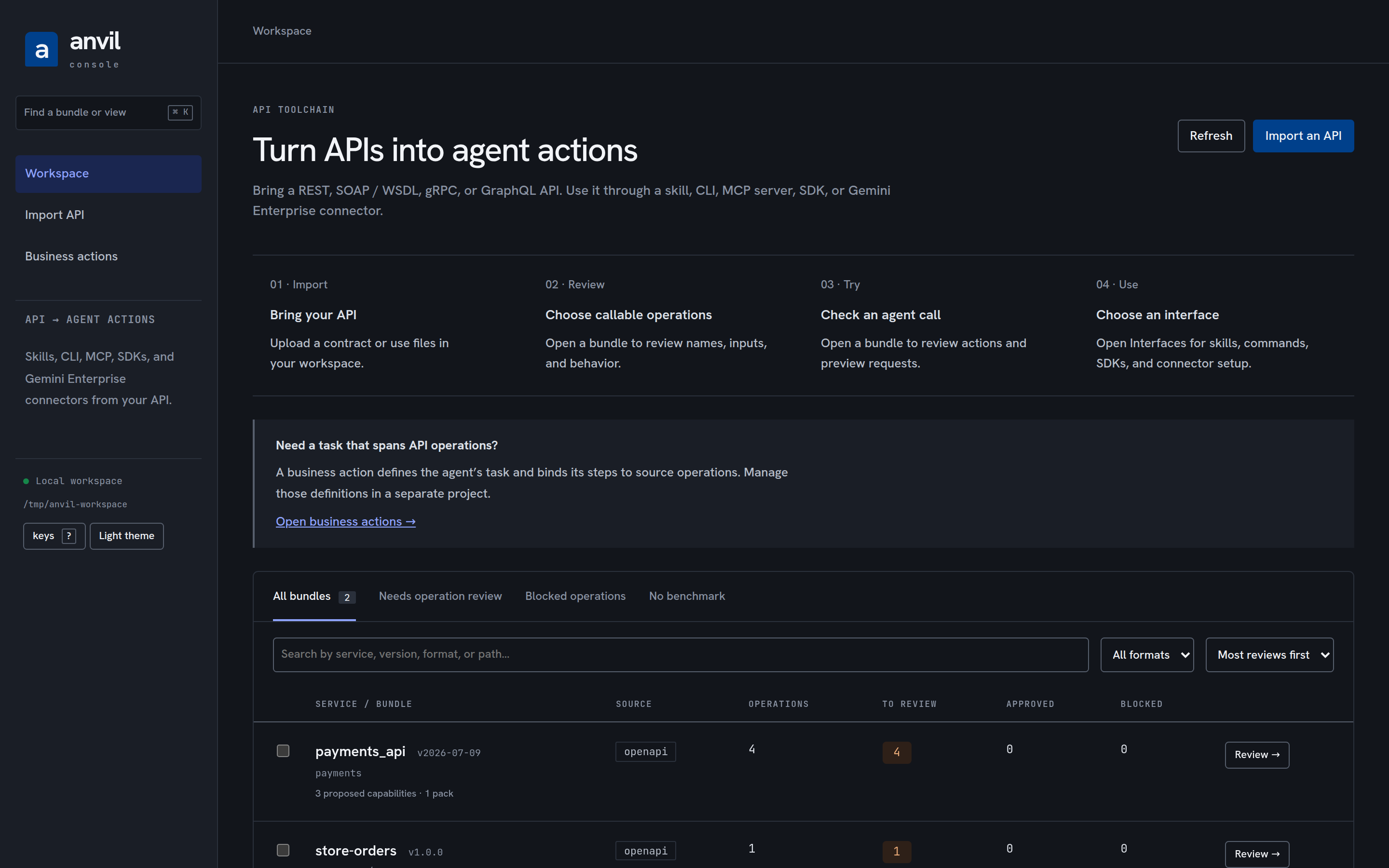
The opening page explains these four steps. Import API accepts REST contracts, SOAP / WSDL, gRPC, and GraphQL alongside the other supported formats. Expand Input formats and execution support for transport limits before importing.
An API operation is one call imported from the specification. A bundle contains an API’s contracts, generated files, and review state. An interface is how an agent or application uses those operations.
Business actions opens a separate, optional project workflow. A business action defines a task using one or more API operations. Today, start by importing a project JSON with action definitions, reviewed source snapshots, and evaluation tasks. Importing an API does not create a business project.
Within a bundle, Interfaces offers five interfaces: skill, CLI, MCP server, SDK, and Gemini Enterprise. Selecting a core interface filters the actual artifact inventory and shows setup guidance. Missing core files are stated explicitly. The Gemini Enterprise option links to the target setup guide; connector files are managed from the terminal and are not included in this browser’s artifact inventory. Gemini Enterprise requires a separate target generation step, deployment, and registration; an imported API is not automatically a deployed connector.
The workspace lists services with searchable, filterable, paginated operation
counts. Select two bundles to compare their contracts. A broken bundle appears
as a diagnostic while healthy bundles remain available. Ctrl+K or Cmd+K
opens navigation across bundles and views.
Each bundle has Overview, Review, API operations, Request builder, and Interfaces. Contract details, Routing quality, Checks & evidence, and Compare bundles provide deeper inspection. Refresh bundle reloads changes made from the CLI.
Review the affected operation or capability before approving it. A successful UI action does not establish that the deployed upstream integration works.
A projection, not a second truth
Section titled “A projection, not a second truth”The console owns no state and no rules. It reads what is already on disk —
air.yaml, the generated projections, the benchmark report, refinement packs
and their receipts/ — and it writes only by calling the library functions the
CLI commands themselves call:
| Console action | CLI command it equals |
|---|---|
| approve operations | anvil approve |
| approve or reject a capability | anvil capability approve / reject |
| record a pack decision | anvil refine approve / reject |
| apply a reviewed pack | anvil refine apply-pack |
| export a cluster task | anvil refine export-task … group:<id> |
| import a submission | anvil refine import-proposal |
An approval made in the console is staged, byte-verified, surface-checked, and
swapped into place exactly as anvil approve does it. A receipt written in the
console is the receipt anvil refine apply-pack verifies — the end-to-end
proof below hands one to the CLI to show it. A group proposal imported in the
console is benchmark-scored and refused on a negative delta exactly as the CLI
refuses it. The safety gates cannot diverge because there is one implementation
of each. Nothing the console shows is computed by the console: counts,
budgets, planner verdicts, drift, and clusters come from the same library
functions the CLI prints.
Security posture, in plain words
Section titled “Security posture, in plain words”The console runs on your machine with your filesystem authority, and its write routes change approval state. A page open in another browser tab must not be able to drive them, so:
- It binds
127.0.0.1only and refuses to start on any other address. - Every process mints a random token, puts it only in the page it serves, and requires it on every write. Nothing else carries it — not the URL the command prints, not a log line, not a JSON response.
- Every write must come from the console’s own origin. Requests from any other page are refused, and the server never emits CORS headers, so another origin can read nothing either.
- Every request, reads included, must address the console as
127.0.0.1orlocalhoston its own port. A web page whose domain has been re-pointed at your machine (DNS rebinding) sends its own domain in theHostheader, so it is refused too and cannot read the API or the page that carries the token. Reaching the console through a port forward on a different local port is refused for the same reason, so forward to the same local port number. Writes also need the Origin the console prints (http://127.0.0.1:<port>), so open that URL rather thanlocalhost. - No other page may frame the console. Every response says so
(
Content-Security-Policy: frame-ancestors 'none'andX-Frame-Options: DENY), so a page cannot hide the console under a decoy and turn your clicks into approvals. - Bodies are JSON only, capped in size, and validated against the API contract before any library function runs.
- Reads never write. No report is regenerated, no cache file lands in a
bundle, and the console’s scratch directory (
<root>/.anvil/console) is created only by a write that needs it. - Every path a request names must resolve inside the workspace root.
The full contract is the comment block at the top of
packages/console/src/contract.ts. Tests assert every line of it over a real
socket, and the mutation gate deletes the token, origin, and path checks to
prove those tests notice.
Bundle views
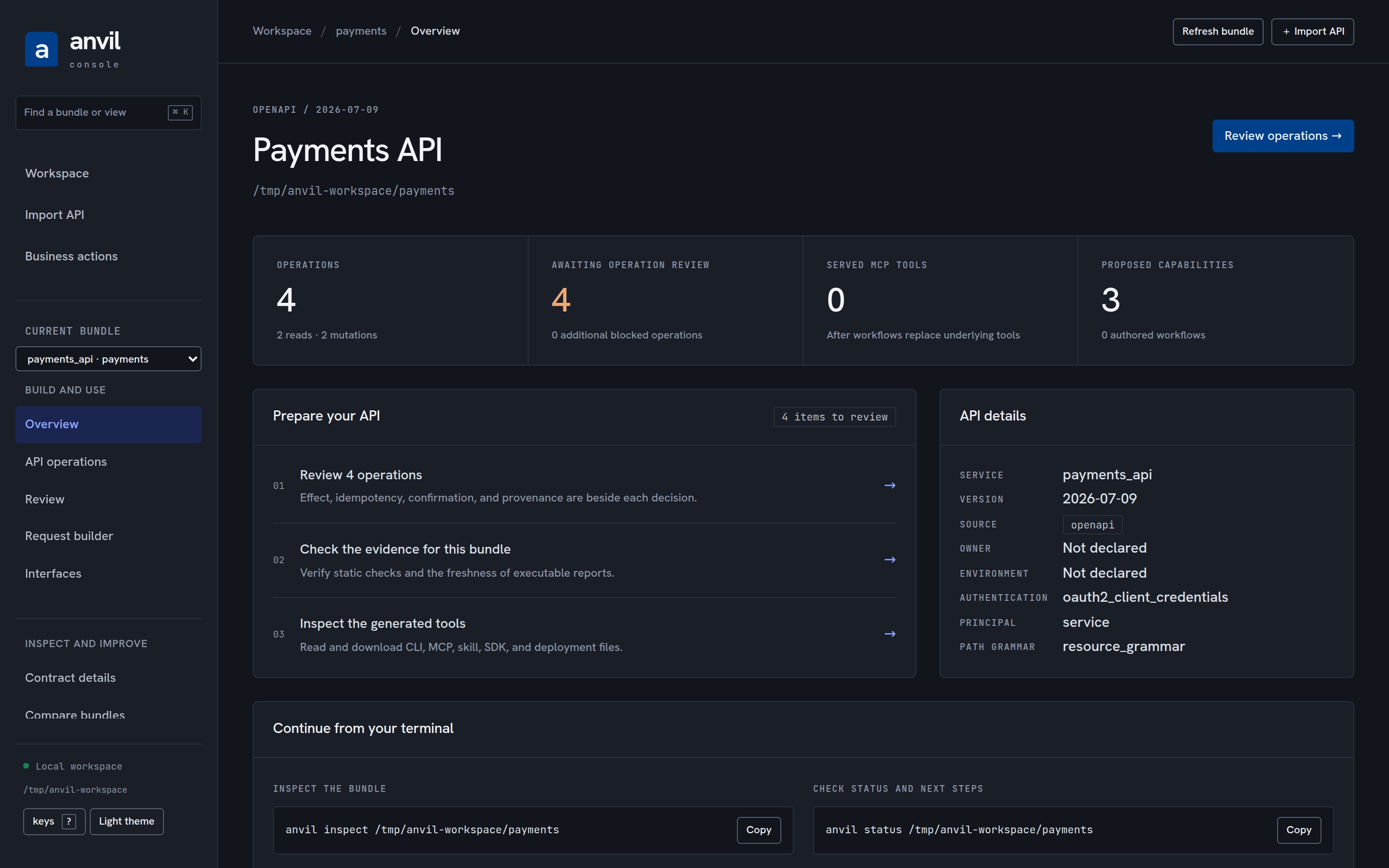
Section titled “Bundle views”Overview — operation counts, served tool counts, contract identity, and links to pending reviews and compiler diagnostics. Individual operation links open the matching queue item. Copyable commands continue the same work in a terminal.
Review — pending decisions in one list, with six kinds: an operation
not yet approved, a capability born proposed, a workflow the planner refuses,
a deficiency the deterministic plan reports, a review-tier refinement in a pack
awaiting a receipt, and a benchmark cluster of confusable tools. Each item
carries its reasons, its AIR claims (source, confidence, note), the suggested
action, and exactly what its decision needs: the operation’s effect,
idempotency, retry, and confirmation posture; the capability’s budget verdict;
the pack hash, refinement id, tier, and measured routing delta; the cluster’s
members and mis-routed intents.
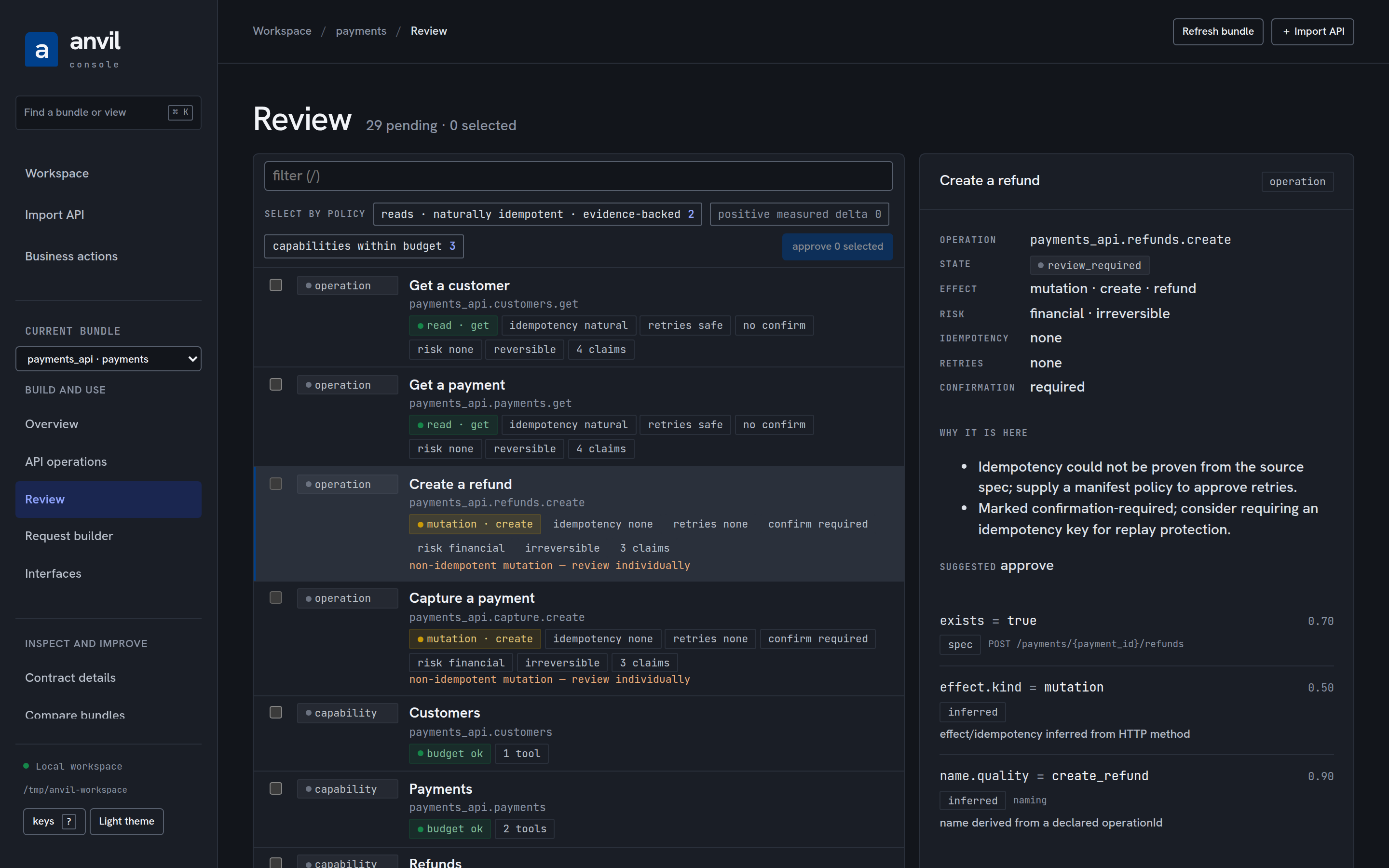
Bulk approval is by policy only — “reads, naturally idempotent,
evidence-backed”, “capabilities within budget”, “positive measured delta” — and
a policy can never reach a row the barrier bars: a non-idempotent mutation, a
destructive or irreversible one, an operation that requires confirmation, a
blocked operation, a capability outside its budget, or a pack refinement with a
non-positive delta. Barred rows say why in the list. The keyboard drives the
whole queue: j/k move, x selects, a approves, r rejects, /
filters, ? shows the map.
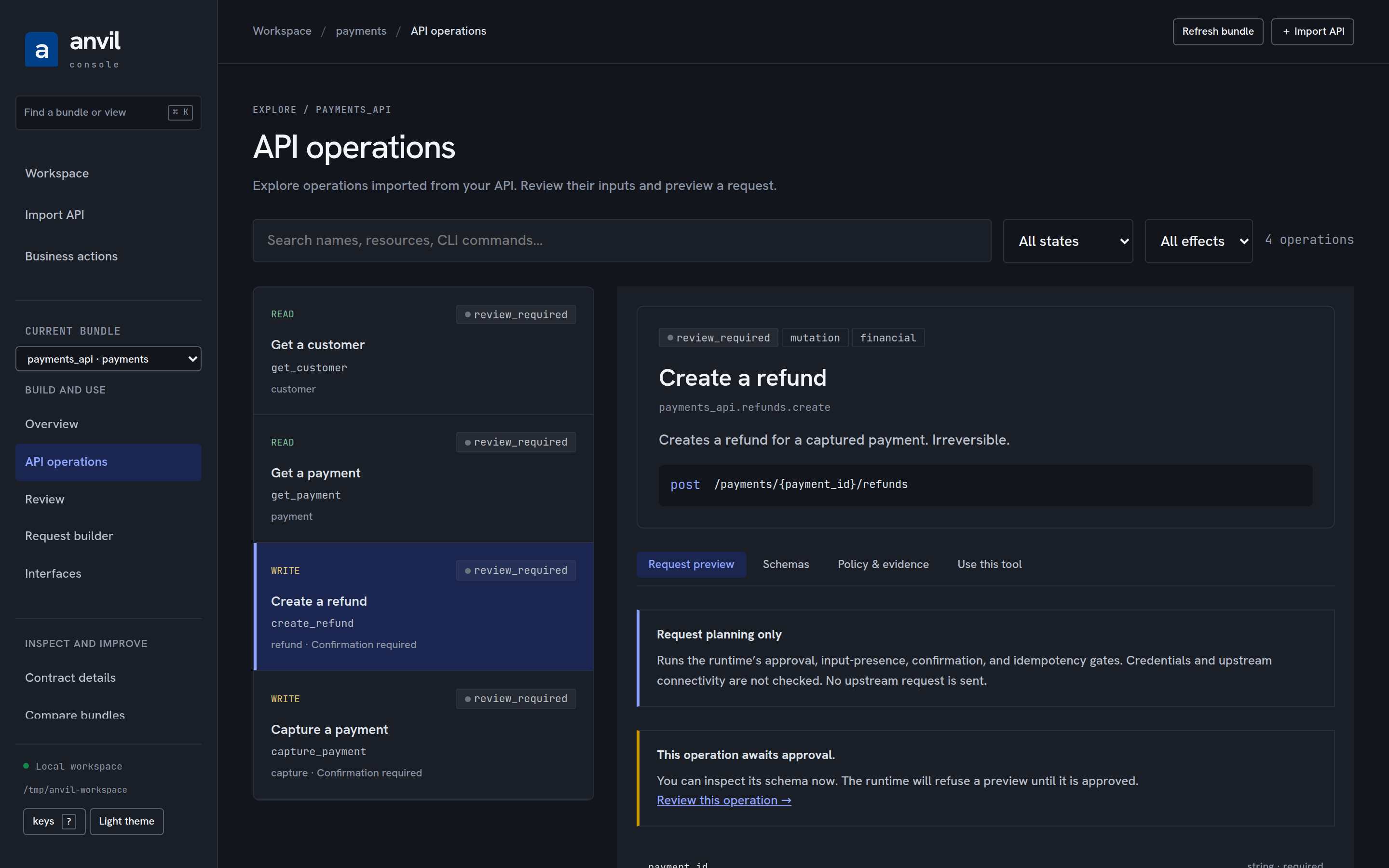
API operations — search and filter imported operations, inspect their input and output schemas, and preview a request through the runtime’s dry-run checks.
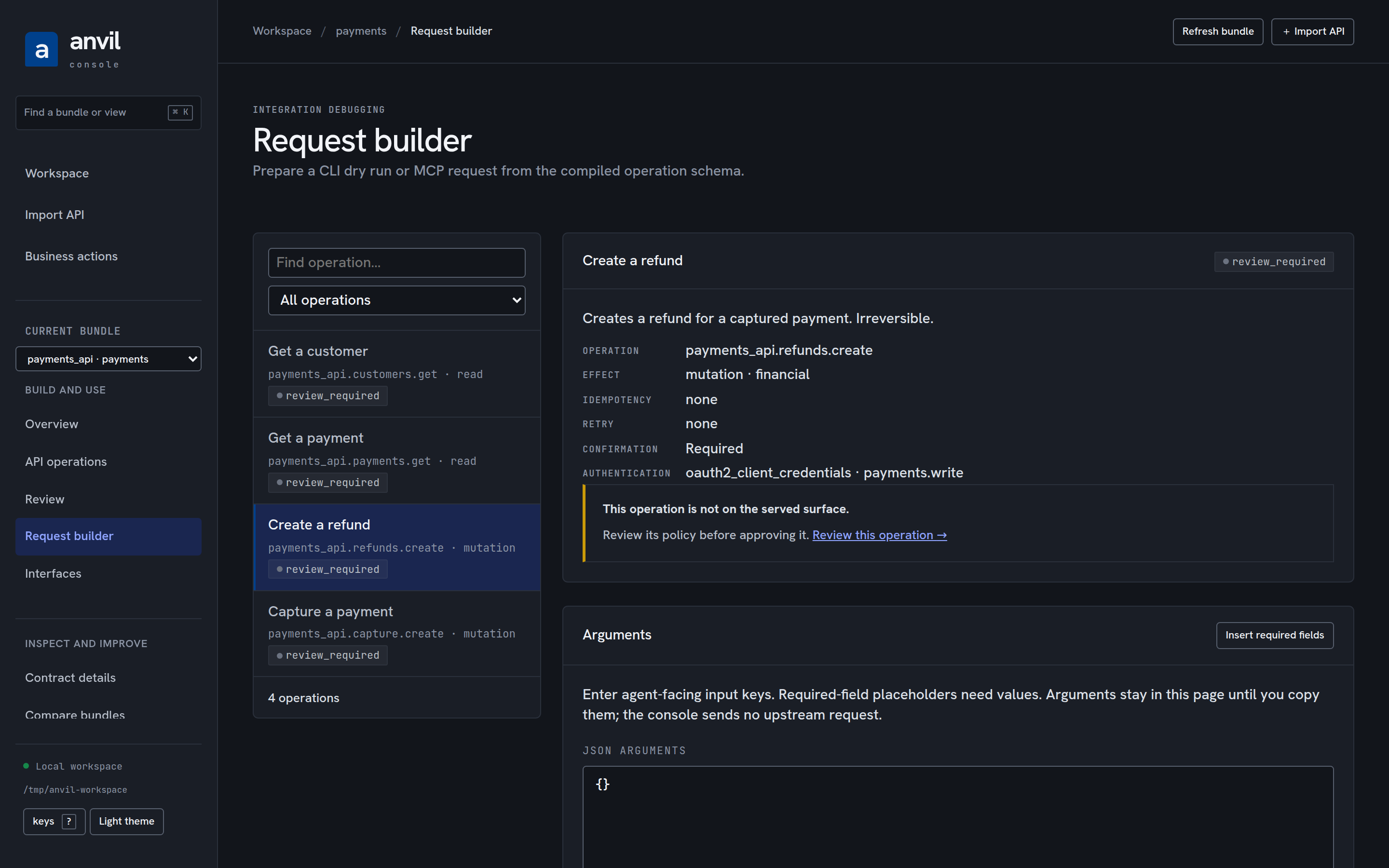
Request builder — prepare CLI dry-run commands and MCP request drafts from the shared input schema. Drafts stay in memory and make no upstream call.
Contract details — the bundle as AIR sees it: service, source and path grammar, diagnostics, every operation with its effect, state, idempotency mode and confirmation requirement, capabilities with their budget verdicts, workflows with the planner’s verdict, the served MCP surface before and after supersession, and drift against another bundle in the workspace.
Routing quality — the benchmark’s confusable-tool clusters and routing hubs with the mis-routed intents verbatim. A cluster exports a harness case file; a submission imports back through the scored admission gate, and a refusal shows the routing numbers, not only prose.
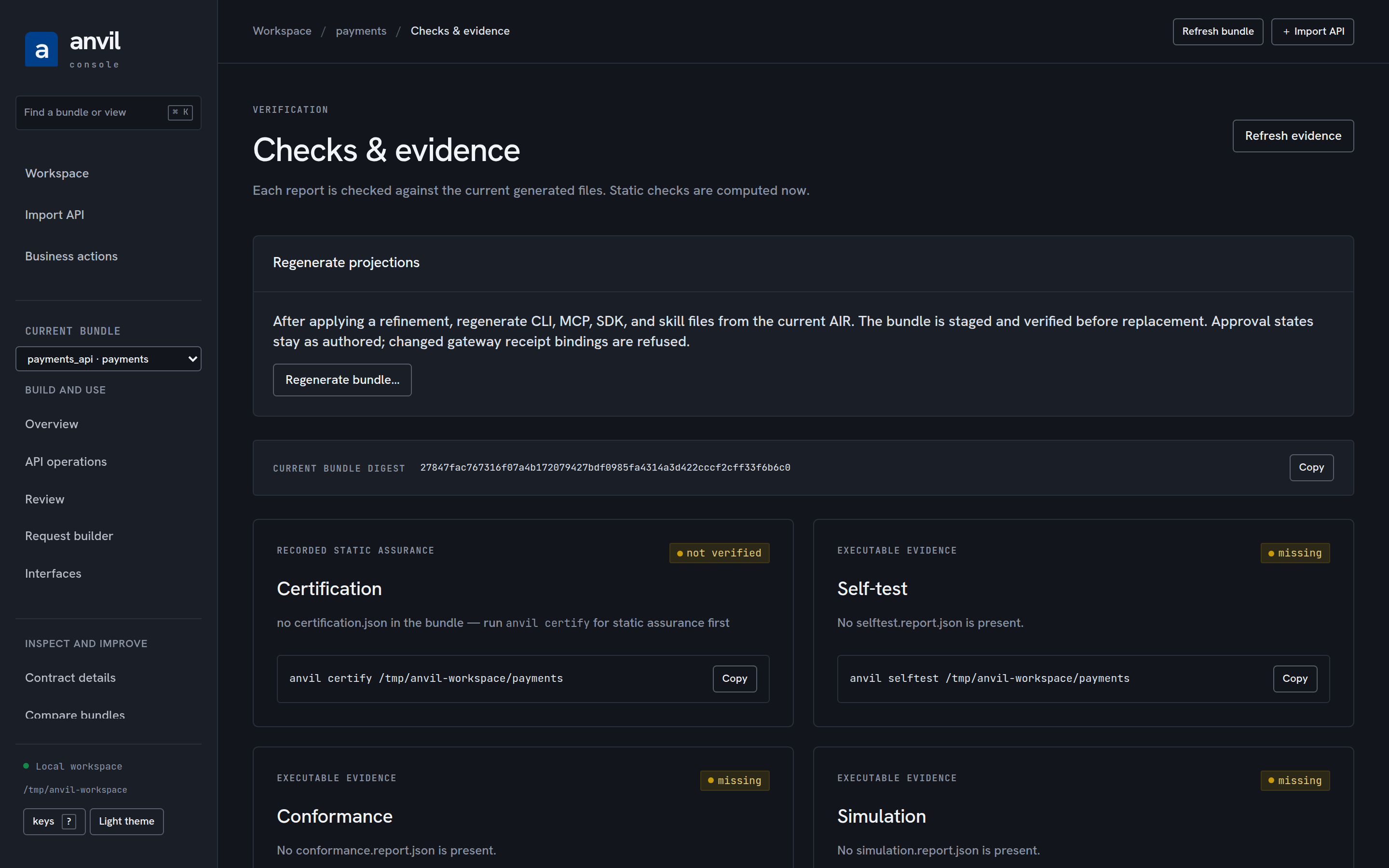
Checks & evidence — current static checks from certifyBundle, recorded
certification validation, and self-test, conformance, and simulation freshness
from executableEvidenceStatuses. Passing results for older generated bytes
appear as stale. Reading this view writes no reports and invokes no upstream
service. Commands beside each lane produce the missing evidence.
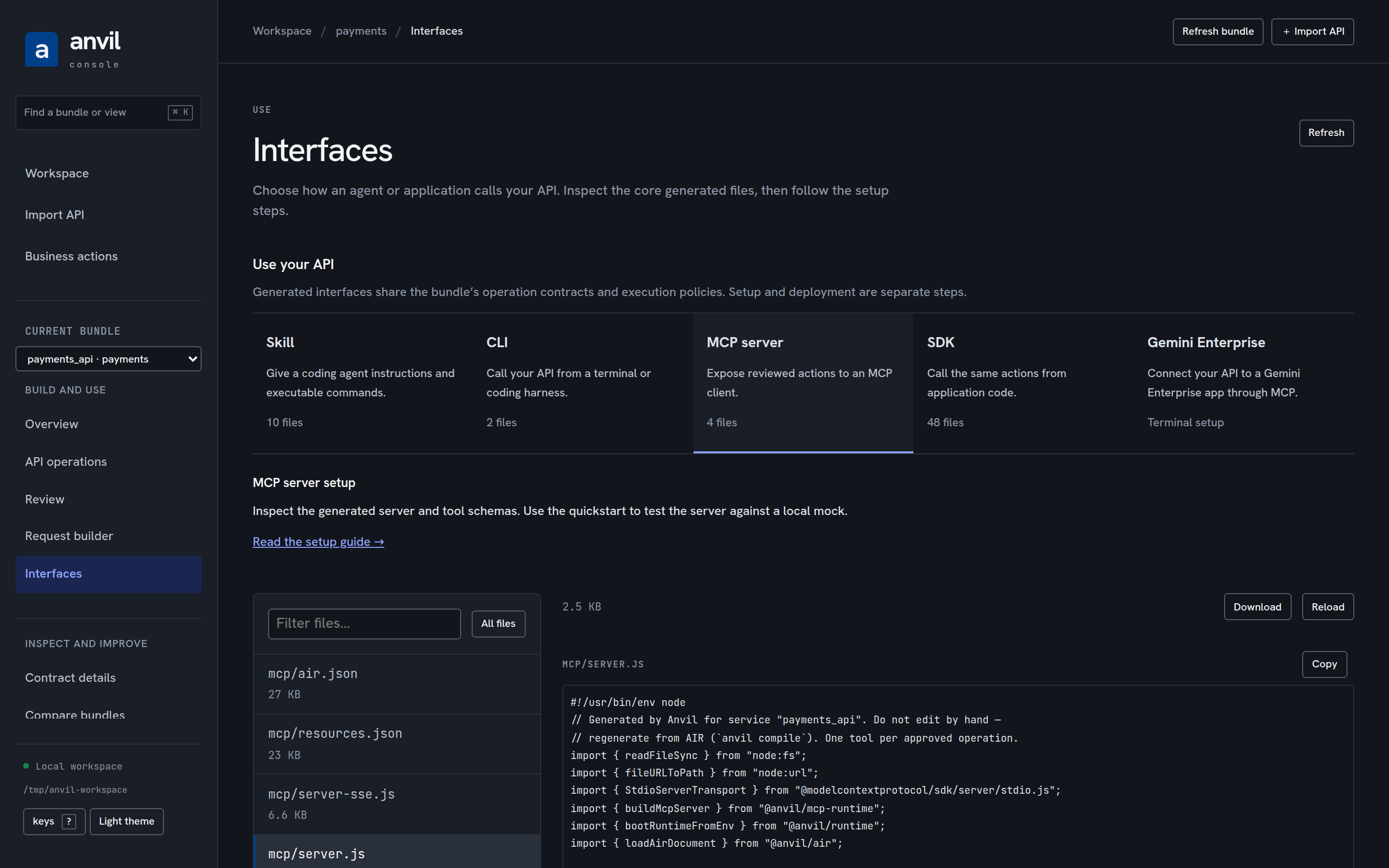
Interfaces — filter the artifact inventory, read source as text, copy it, or download the exact bytes. CLI, MCP, skills, SDKs, schemas, harness plugin files, deployment files, and evidence reports are included. Previews are limited to 256 KiB per file; larger files remain available in the bundle directory. Unrelated local files and hidden credentials are excluded from the inventory.
Create a bundle
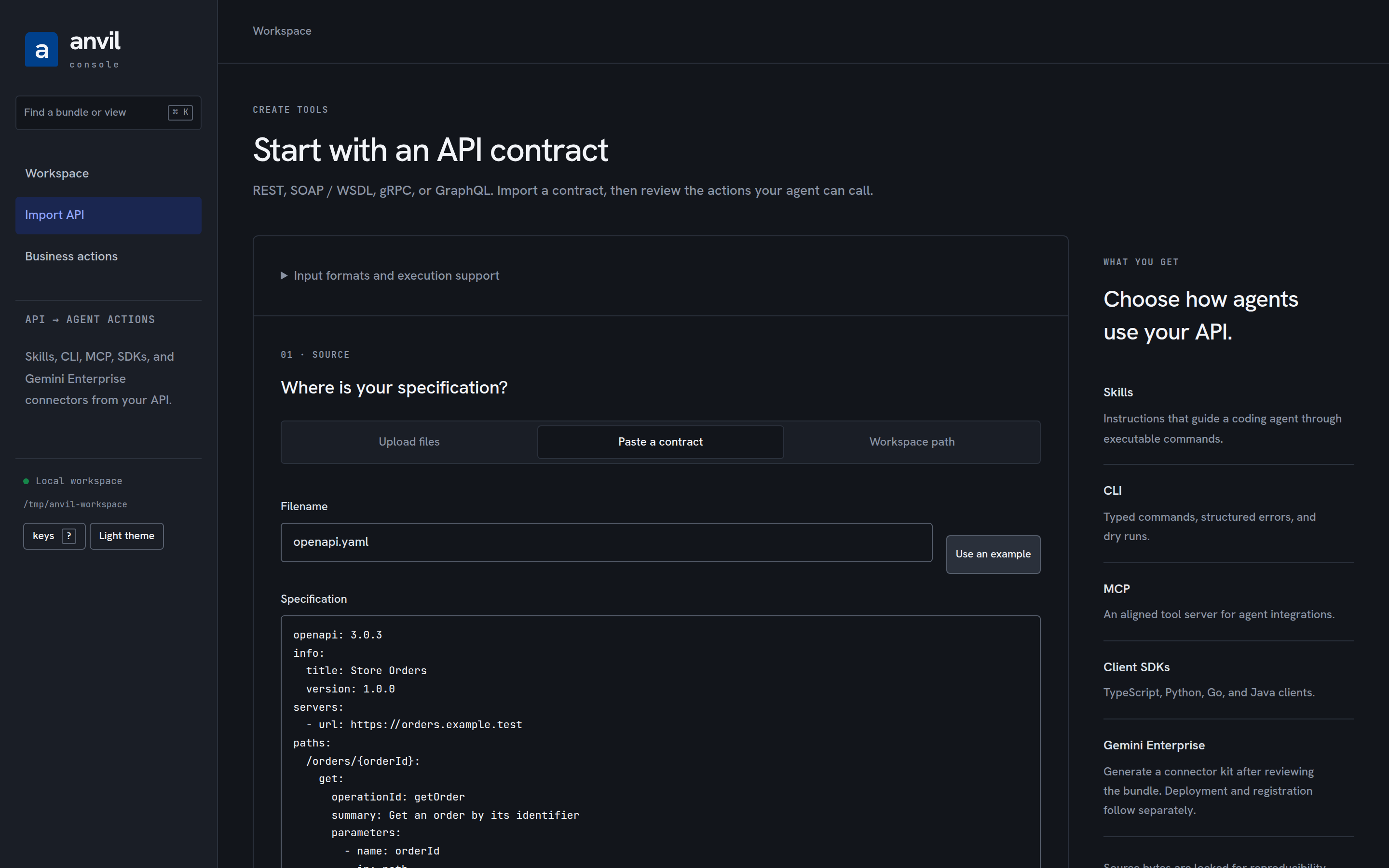
Section titled “Create a bundle”Open Import API and choose one source:
- Upload files for a specification and its supporting files. Choose the
containing folder to preserve nested
$ref, protobuf, and WSDL/XSD paths. - Paste a contract for a single specification. The included orders example can exercise the complete flow without credentials.
- Workspace path for a specification or directory already under the console root. Use this for sources that exceed the upload limit.
Uploads accept up to 100 files and 800 KB of source text. The complete encoded
request, including any optional manifest, must fit the server’s 1 MiB body cap.
The compiler detects the format. Supported directory sources include .har
captures and .edmx metadata as well as OpenAPI, Swagger, GraphQL, protobuf,
WSDL, Google Discovery, and Postman collections.
Choose a bundle name. The console locks the source in .anvil/sources, compiles
from those captured bytes, and installs generated/<name> transactionally.
Existing destinations are refused, including concurrent attempts at the same
name. Use a new name for a second version, then compare it in Compare bundles.
Compilation preserves the compiler’s approval gates; it does not approve
operations on the reviewer’s behalf. A reviewed manifest can provide semantic
overrides and exact operation approvals using the existing compiler contract.
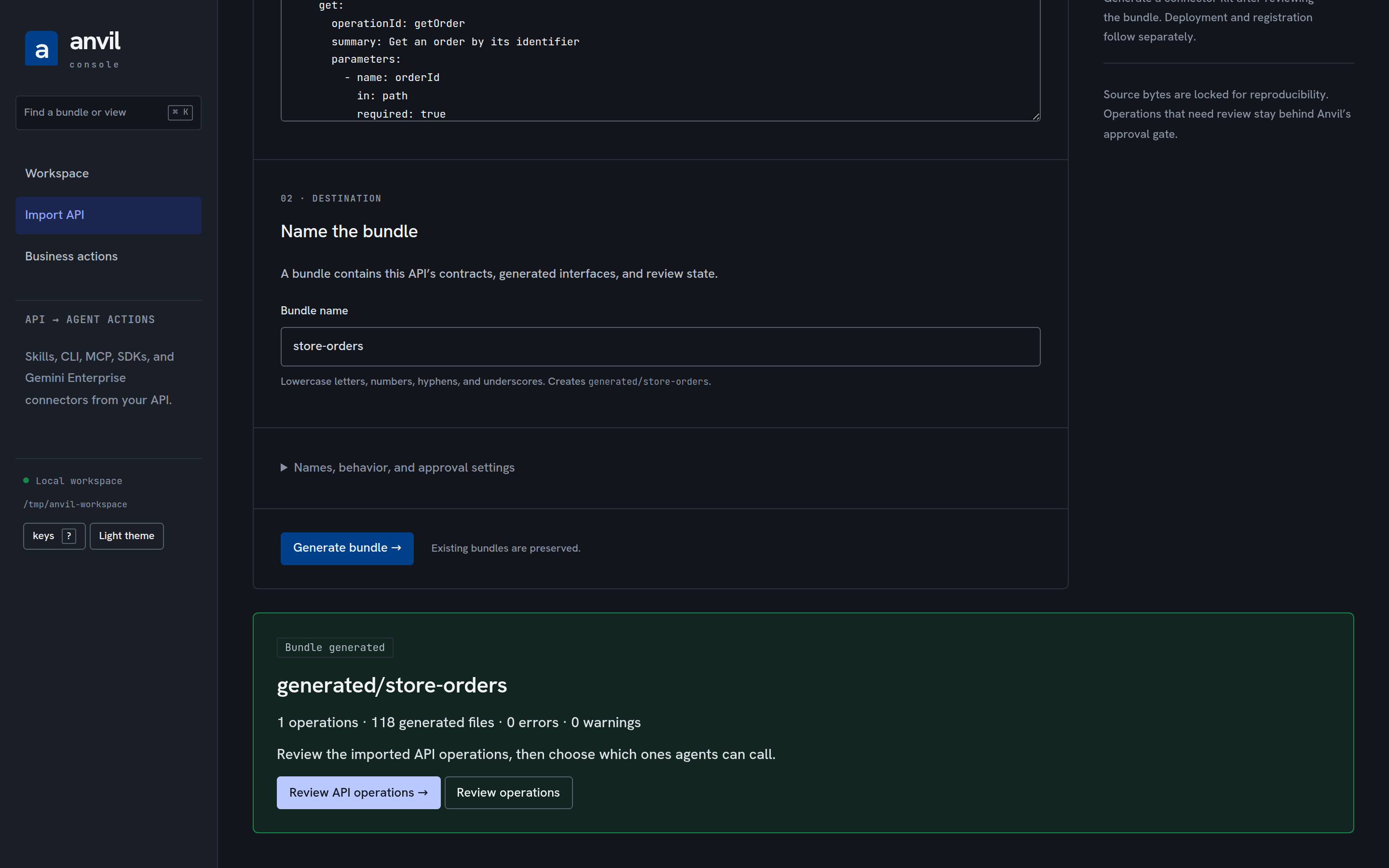
Creation requires a workspace root rather than an individual bundle root. If the console was launched on one bundle, reopen it on that bundle’s parent. Local references stay within the import root. Remote references are never fetched. Temporary upload files are removed after capture; locked source snapshots remain available to the CLI, including diagnostic snapshots of invalid input.
Running it
Section titled “Running it”The screenshots on this page are captured from the real console over the
compiled payments example. Regenerate them after a build with
pnpm --filter @anvil/console screenshots; they land in docs/assets/console/.
anvil console # the current directory as the workspace rootanvil console ./generated # every bundle beneath a directoryanvil console ./generated/payments --open # one bundle, opening a browseranvil console . --port 4177 --json # print { url, port, root }, keep servingA workspace root is walked for every directory holding an air.yaml (or
air.json); each is a bundle addressed by its workspace-relative path. Any
pack.json beneath the root whose service matches a bundle is one of that
bundle’s packs. Both are re-read on every request, so what you see is what is
on disk now — including changes the CLI made a moment ago.
Deciding a refinement pack
Section titled “Deciding a refinement pack”Record decisions in the console or with anvil refine approve|reject; the
receipt is the same file either way, under the pack’s receipts/. Applying
the pack writes AIR only, exactly as anvil refine apply-pack does, and the
console then says what the CLI says: recompile the bundle to regenerate its
projections. A pack is bound to the source contract it was measured against,
and approving an operation or deciding a capability changes that contract —
so decide and apply a pack before approving, or run anvil refine run again
afterwards; a stale pack is refused, never silently applied.
The refinement loop’s packs
Section titled “The refinement loop’s packs”tools/corpus/refine-loop.mjs (see tools/corpus/README.md) runs the same
anvil refine run --out/anvil benchmark/anvil refine export-task sequence
a human would type, once nightly, over every gateway-estate fixture — so its
output is not a special case for the console, it is the ordinary case: a
workspace directory holding air.yaml files with pack.jsons sitting beside
them. Point the console at that workspace and the loop’s packs appear in the
decision queue exactly like a pack a person ran by hand:
node tools/corpus/refine-loop.mjs --work ./refine-loop-workspaceanvil console ./refine-loop-workspace --openNothing routes the loop’s findings anywhere else, and nothing new had to be
built to show them: the “Prefer documenting how the console shows the loop’s
packs over adding a console route” call in the loop’s own design is this
section — the console already walks a workspace for air.yaml + pack.json
pairs (above), and refine-loop.mjs writes exactly that shape. The loop’s own
refine-loop.report.json/refine-loop-summary.md (and the “Refinement
inbox” issue a nightly workflow keeps rolling from it — see
.github/workflows/corpus.yml) are the fast, textual view of the SAME
backlog; the console is where a human actually decides it, cluster exports
included.
The end-to-end proof
Section titled “The end-to-end proof”pnpm test:e2e (a turbo task deliberately outside pnpm test, so the unit
suite and the mutation runner never depend on a browser) runs
packages/console/e2e under Playwright: Chromium drives the real built page
served by a real anvil console process over a workspace the built CLI
compiles from the payments example. Every scenario asserts on disk — the
operation’s state in air.yaml and in the regenerated MCP projection, the
bundle digest before and after, the capability’s lifecycle, the receipt file,
and anvil refine apply-pack accepting that receipt — because the disk is the
truth the console projects. The security scenario runs in the browser: a write
without the token is refused, and a page at another origin can read nothing.
What it deliberately does not do
Section titled “What it deliberately does not do”- No reproject-after-apply route.
anvil refine apply-packwrites AIR and tells you to recompile; so does the console. One implementation, one message. - No reviewer identity on capability decisions. The library records none
for
anvil capability approve|reject, so the console does not invent a field it would have no home for. Pack decisions carry a reviewer because their receipts do. - No workflow approval. A workflow the planner refuses is fixed at its source and recompiled; the queue explains which step is refused and why.
- No report regeneration. The benchmark and certification records are the CLI’s to produce; the console shows them and says when they are stale.
Request drafts and comparison
Section titled “Request drafts and comparison”Request builder projects the operation’s shared input schema into CLI dry-run and MCP request drafts. Drafts stay in memory and do not call an upstream API. Compare bundles shows contract and policy changes against another workspace bundle. Interfaces exposes only generator-owned artifacts and named evidence reports, with a 256 KiB text preview limit; incomplete previews cannot be downloaded. The Assurance route also remains available for static-check filtering and JSON report downloads.
Runtime-backed workbench
Section titled “Runtime-backed workbench”API operations adds paginated search, state/effect filters, deep links, shared input schemas, and runtime-backed request previews. Preview is always a dry run: it has no credentials or live transport and preserves approval, validation, confirmation, and stale-bundle checks. Request builder prepares CLI and MCP handoffs. Checks & evidence provides an explicit, digest-bound regeneration action after refinements; generation uses the shared atomic reprojection path and does not approve operations or produce execution evidence.