Voice & Live Sessions
Build a Live session, send input, handle output and interruptions, and close
the connection. Complete authentication first. Local
microphone and speaker I/O additionally requires the voice-io feature.
What is a Live Session?
Section titled “What is a Live Session?”A Live Session is a full-duplex WebSocket connection to the Gemini API that
supports simultaneous audio/video input and audio/text output. Unlike the
standard generateContent REST API, a Live Session:
- Streams audio bidirectionally (you talk while the model talks)
- Uses server-side VAD (Voice Activity Detection) for turn management
- Supports barge-in (interrupt the model mid-sentence)
- Handles function calling inline with speech
- Maintains conversation context server-side
- Runs for up to ~10 minutes per session (with resumption support)
Audio formats:
- Input: PCM16, 16 kHz, mono
- Output: PCM16, 24 kHz, mono
Quick Start
Section titled “Quick Start”Zero-ceremony with connect_from_env()
Section titled “Zero-ceremony with connect_from_env()”The recommended starting point reads platform selection and credentials from standard environment variables — no token-fetching boilerplate required:
use gemini_adk_fluent_rs::prelude::*;
#[tokio::main]async fn main() -> Result<(), Box<dyn std::error::Error>> {    let handle = Live::builder()        .instruction("You are a helpful voice assistant.")        .on_text(|t| print!("{t}"))        .on_turn_complete(|| async { println!() })        .connect_from_env()        .await?;
    handle.send_text("What is the capital of France?").await?;    handle.done().await?;    Ok(())}
connect_from_env() checks GOOGLE_GENAI_USE_VERTEXAI to select the platform,
then resolves credentials from standard variables (GEMINI_API_KEY for Google
AI; GOOGLE_CLOUD_PROJECT + GOOGLE_ACCESS_TOKEN for Vertex AI, with an
automatic gcloud auth print-access-token fallback). See
Authentication and Connecting for the full
resolution rules and troubleshooting guide.
Explicit API key
Section titled “Explicit API key”let handle = Live::builder() .instruction("You are a helpful voice assistant.") .on_text(|t| print!("{t}")) .on_turn_complete(|| async { println!() }) .connect_google_ai(std::env::var("GEMINI_API_KEY")?) .await?;
handle.send_text("What is the capital of France?").await?;handle.done().await?;This connects to Gemini, sends a text message, prints the streamed response,
and waits for the session to end. For audio, replace send_text() with
send_audio() and add an on_audio callback.
The Live Builder
Section titled “The Live Builder”Live::builder() returns a chainable builder that configures the entire
session. Here is the full chain with all major options:
let handle = Live::builder()    // Model (optional — omit it and connect picks the platform default) and voice    .model(ModelId::LIVE_2_5_FLASH_NATIVE_AUDIO)    .voice(Voice::Kore)    .temperature(0.7)    .instruction("You are a restaurant order assistant.")
    // Tools (auto-dispatched when model calls them)    .dispatcher(dispatcher)
    // Audio/transcription config    .transcription()         // both directions (.input_transcription() / .output_transcription() for one)    .affective_dialog()      // emotionally expressive responses
    // Server-side VAD    .vad(AutomaticActivityDetection::default())
    // Session lifecycle    .session_resume()    .context_compression(4000, 2000)  // trigger_tokens, target_tokens (on by default at 100k/50k;                                      // `.no_context_compression()` turns it off)
    // Greeting (model speaks first)    .greeting("Greet the customer and ask what they'd like to order.")
    // Fast-lane callbacks (sync, <1ms)    .on_audio(|data| { /* forward to speaker */ })    .on_text(|t| print!("{t}"))    .on_input_transcript(|text, _is_final| { /* display what user said */ })    .on_output_transcript(|text, _is_final| { /* display what model said */ })    .on_vad_start(|| { /* user started speaking */ })    .on_vad_end(|| { /* user stopped speaking */ })
    // Telemetry callback (sync, telemetry lane)    .on_usage(|usage| {        if let Some(total) = usage.total_token_count {            println!("Tokens: {total}");        }    })
    // Control-lane callbacks (async)    .on_tool_call(|calls, state| async move { None })  // None = auto-dispatch    .on_interrupted(|| async { /* flush playback buffer */ })    .on_turn_complete(|| async { /* turn finished */ })    .on_connected(|writer| async move { /* session ready */ })    .on_disconnected(|reason| async move { /* session ended */ })    .on_error(|msg| async move { eprintln!("Error: {msg}") })
    // Connect    .connect_vertex("my-project", "us-central1", access_token)    .await?;
The builder validates configuration at connect time, not at each method call. All methods are optional except the connect method.
Callbacks
Section titled “Callbacks”Callbacks are split into two categories based on latency requirements. For the
full callback catalog, argument shapes, is_final transcript semantics,
on_generation_complete vs on_turn_complete, _concurrent variants, and
outbound interceptors, see Live Callbacks.
Fast Lane (Sync, <1 ms)
Section titled “Fast Lane (Sync, <1 ms)”These fire on the fast lane and must complete in under 1 ms. They receive
references (not owned values) and cannot be async. No allocations, no mutex
locks, no blocking I/O.
// Audio: receives zero-copy Bytes.on_audio(|data: &Bytes| {    playback_tx.try_send(data.clone()).ok();})
// Text: incremental deltas as the model generates.on_text(|text: &str| { print!("{text}"); })
// Transcription fragments: the current dispatcher emits is_final=false.// This callback is not a completed-transcript persistence hook..on_input_transcript(|_text: &str, _is_final: bool| {    // Feed an application-owned bounded collector if needed.})
// VAD: voice activity detection events from the server.on_vad_start(|| { /* user started talking */ }).on_vad_end(|| { /* user stopped talking */ })
Control Lane (Async)
Section titled “Control Lane (Async)”These fire on the control lane and can perform I/O, state access, or any
async work. They block the control lane while running (other control events
queue behind them). Append _concurrent to any setter to spawn the body as a
detached task instead.
// Interrupted: flush playback on barge-in (forced blocking).on_interrupted(|| async {    playback_buffer.flush().await;})
// Turn complete: after an interruption, the turn holds what was heard.on_turn_complete(|| async {    println!("--- turn complete ---");})
// GenerationComplete: the model finished generating (not sent for an// interrupted turn). Use with .extract_on_generation::<T>().on_generation_complete(|| async {    println!("--- generation complete ---");})
// Tool calls: return None for auto-dispatch, Some to override.on_tool_call(|calls: Vec<FunctionCall>, state: State| async move { None })
// Error: non-fatal error (session continues).on_error(|msg: String| async move { eprintln!("Error: {msg}") })
// Disconnected (concurrent — fire-and-forget).on_disconnected_concurrent(|reason| async move {    tracing::info!(?reason, "session disconnected");})
See Live Callbacks for the complete reference including
on_tool_cancelled, on_resumed, on_go_away, before_tool_response,
on_turn_boundary, on_extracted, on_extraction_error, and the full list of
_concurrent variants.
Tool Dispatch
Section titled “Tool Dispatch”When the model calls a tool, the dispatch logic follows this priority:
- If
on_tool_callis registered and returnsSome(responses)– use those responses. - If
on_tool_callreturnsNone(or is not registered) and aToolDispatcheris set – auto-dispatch to the registered tool, send the result back to the model automatically. - If neither – log a warning and skip.
Register tools with the dispatcher:
use gemini_adk_rs::{SimpleTool, ToolDispatcher};
let mut dispatcher = ToolDispatcher::new();dispatcher.register(SimpleTool::new(    "get_weather",    "Get current weather for a city",    None, // JSON Schema for parameters (None = no declared schema)    |args| async move {        let city = args["city"].as_str().unwrap_or("unknown");        Ok(serde_json::json!({ "city": city, "temp_c": 22, "condition": "sunny" }))    },));
let handle = Live::builder()    .instruction("You are a weather assistant. Use get_weather to answer questions.")    .dispatcher(dispatcher)    .on_text(|t| print!("{t}"))    .connect_google_ai(api_key)    .await?;
Audio Pipeline
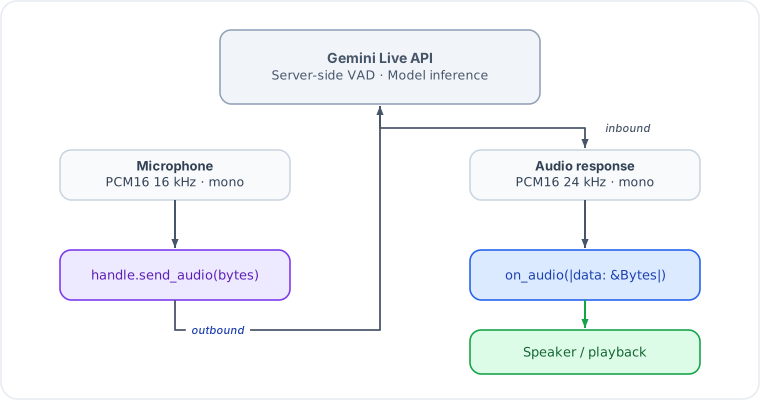
Section titled “Audio Pipeline”The audio pipeline for a typical voice agent:
Key points:
- Input format: PCM16, 16 kHz, mono. Send raw bytes, not base64. The SDK handles base64 encoding on the wire.
- Output format: PCM16, 24 kHz, mono. The
on_audiocallback receives decoded bytes ready for playback. - Buffer sizes: Audio arrives in variable-size chunks. Use an
AudioJitterBuffer(from L0) if you need smooth playback. - Barge-in: When the user speaks while the model is responding, the
server sends an
Interruptedevent. The fast lane sets the interrupted flag and stops forwarding audio; the control lane fireson_interrupted.
Greeting
Section titled “Greeting”Use .greeting() to make the model speak first without waiting for user
input. The greeting prompt is sent immediately after the WebSocket setup
completes.
let handle = Live::builder() .voice(Voice::Kore) .instruction("You are a receptionist at a dental clinic.") .greeting("Greet the caller and ask how you can help them today.") .on_audio(|data| { playback_tx.send(data.clone()).ok(); }) .connect_vertex(project, location, token) .await?;// Model will immediately start speaking a greetingThe greeting text is sent as a user-role client_content message with
turn_complete: true, which triggers the model to generate a response.
Transcription
Section titled “Transcription”Enable text transcription of audio streams to get text versions of what the user said and what the model said:
let handle = Live::builder() .transcription() // both directions .on_input_transcript(|text, is_final| { if is_final { println!("User: {text}"); // final, suitable for storage } }) .on_output_transcript(|text, is_final| { if is_final { println!("Model: {text}"); } }) .connect_from_env() .await?;Both transcript callbacks deliver intermediate partial results (is_final = false) while speech is in progress, followed by a single finalized result
(is_final = true) at the turn boundary. Only the is_final = true delivery
should be persisted or processed downstream. See
Live Callbacks — partial/final semantics
for details.
Transcription is required for turn extraction (.extract_turns()) to work.
When you add an extractor, transcription is enabled automatically.
If the user interrupts the model mid-response, on_output_transcript will
not receive is_final = true for the truncated portion. Use
on_generation_complete with .extract_on_generation::<T>(...) to capture
the evidence available at that provider event; it cannot recover unsent output.
Session Lifecycle
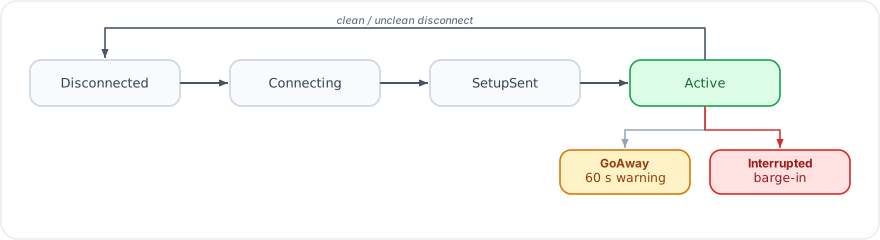
Section titled “Session Lifecycle”A session progresses through these phases:
| Phase | Description |
|---|---|
Disconnected |
Initial state, or after clean/unclean disconnect |
Connecting |
WebSocket handshake in progress |
SetupSent |
Setup message sent, waiting for setupComplete |
Active |
Session is live, audio/text flowing |
The GoAway event signals the server will disconnect soon (the
on_go_away callback receives the server’s time-left hint as a Duration).
Save state and prepare to reconnect. With .session_resume(), the server
keeps issuing resumption handles; handle.resume_handle() returns the latest
one, which can be used to continue the conversation in a new session.
Interacting with a Running Session
Section titled “Interacting with a Running Session”The LiveHandle returned by .connect_*() provides the runtime API:
// Send audio (raw PCM16 16kHz bytes)handle.send_audio(pcm_bytes).await?;
// Send texthandle.send_text("What's the weather?").await?;
// Send video frame (raw JPEG bytes)handle.send_video(jpeg_bytes).await?;
// Update system instruction mid-sessionhandle.update_instruction("Now focus on dessert orders.").await?;
// Read state (populated by extractors)let order: Option<OrderState> = handle.extracted("OrderState");
// Access telemetrylet snapshot = handle.telemetry().snapshot();// Per-turn response latency (end of user speech → first model audio):// last/min/max/mean, p50/p90/p99, histogram. `Display` prints one line.let latency = handle.telemetry().latency();println!("{latency}"); // turns=12 last=420ms p50=380ms p90=610ms …
// Get current session phaselet phase = handle.phase();
// Subscribe to raw events (for custom processing)let mut events = handle.subscribe();
// Latest server-issued resumption handle (see Session Persistence guide)let resume = handle.resume_handle();
// Graceful disconnecthandle.disconnect().await?;
// Wait for session to end naturallyhandle.done().await?;
Consuming Events as a Stream
Section titled “Consuming Events as a Stream”handle.stream() exposes the semantic LiveEvent flow as a
futures::Stream, so it composes with the full futures/tokio-stream
combinator toolbox (callbacks become sugar):
use futures::StreamExt;use gemini_adk_fluent_rs::live::LiveEvent;
let mut stream = handle.stream();while let Some(ev) = stream.next().await {    match ev {        LiveEvent::TextDelta(t) => print!("{t}"),        LiveEvent::TurnComplete => println!(),        LiveEvent::Disconnected { .. } => break,        _ => {}    }}
Each call to stream() creates an independent subscriber starting from the
current point in the event flow. A subscriber that falls behind the broadcast
buffer skips the missed events and keeps going; the stream ends when the
session’s event channel closes.
Vertex AI vs Google AI
Section titled “Vertex AI vs Google AI”The SDK supports both Google AI (API key) and Vertex AI (OAuth2 token) backends. The wire protocol is the same; only the endpoint URL and authentication differ. For the full credential-resolution rules and troubleshooting guide, see Authentication and Connecting.
The easiest way to switch platforms is connect_from_env() with
GOOGLE_GENAI_USE_VERTEXAI=true|false.
Google AI
Section titled “Google AI”let handle = Live::builder() .connect_google_ai("YOUR_API_KEY") .await?;- Endpoint:
wss://generativelanguage.googleapis.com(API versionv1beta) - Auth: API key appended as
?key={api_key}in the WebSocket URL
Vertex AI
Section titled “Vertex AI”// Get token via gcloud: gcloud auth print-access-tokenlet token = std::env::var("GOOGLE_ACCESS_TOKEN")?;
let handle = Live::builder() .connect_vertex("my-gcp-project", "us-central1", token) .await?;- Endpoint:
wss://{location}-aiplatform.googleapis.com(API versionv1beta1) - Auth: Bearer token in WebSocket upgrade headers
- Binary WebSocket frames (decoded automatically by the SDK)
Pre-configured SessionConfig
Section titled “Pre-configured SessionConfig”For advanced scenarios (custom auth, VPC-SC private endpoints, etc.), build
the config yourself and pass it to .connect():
use gemini_genai_rs::prelude::*;
let config = SessionConfig::from_endpoint(    ApiEndpoint::vertex("my-project", "us-central1", token))    .voice(Voice::Kore)    .response_modalities(vec![Modality::Audio])    .system_instruction("You are a helpful assistant.")    .input_transcription(true)    .output_transcription(true);
let handle = Live::builder()    .on_audio(|data| { /* play audio */ })    .connect(config)    .await?;
When using .connect(config), the config’s endpoint and model are merged
into the builder’s settings. Everything else — system instruction, tools,
voice, transcription, callbacks — is taken from the Live builder.
Key Differences
Section titled “Key Differences”| Feature | Google AI | Vertex AI |
|---|---|---|
| Auth | API key (?key=...) |
OAuth2 Bearer token (header) |
| API version | v1beta |
v1beta1 |
| Frame format | Text WebSocket frames | Binary WebSocket frames (auto-decoded) |
| Async tool calling | Supported | Not supported (fields auto-stripped) |
| Thinking config | Supported | Not supported (auto-stripped) |
| Billing | Per-token pricing | GCP billing account |
| Region | Global | Regional (e.g., us-central1) |